What Is Mail Merge? How to Generate Personalized Documents at Scale
RedHub AI Editorialupdated October 7, 20266 min read

Jump to a section8
Mail merge combines one template with one list of data, such as names, amounts, dates and addresses, and produces a finished document for every row on the list. You write the letter, invoice or certificate once. You connect it to a spreadsheet. The software fills in the blanks, so one template becomes hundreds of personalized documents in a single run.
TL;DR: A mail merge is a template with placeholders plus a spreadsheet with one row per recipient. The merge tool swaps each placeholder for that row's value. It works in Word, in email platforms and in most CRMs, and it is only as good as the list behind it. A placeholder with no matching column breaks every document the same way, and a blank cell breaks one. The Template Merge & Mail-Merge Engine ($69) is a check you run before the merge. It does not send anything.
The two parts of every merge
The first part is a template with placeholders, like {{first_name}} or {{invoice_total}}. The second is a data source, usually a spreadsheet, with one column per field and one row per person or record. The merge tool walks down the rows, swaps each placeholder for the value in the matching column, and writes one finished document per row. A 200-row spreadsheet gives you 200 letters. A 40-name list gives you 40 certificates.
Microsoft's own description of Word's mail merge lists four outputs: email, letters, envelopes and labels. It names Excel spreadsheets and Outlook contact lists as the most common data sources. Email platforms and CRMs do the same job under other names, usually merge tags or personalization fields.
Where it shows up in ordinary work
- A property manager sends 200 lease-renewal letters, each with a tenant name, a unit number and a rent amount.
- An events team prints 300 attendance certificates after a conference.
- A bookkeeper turns a sheet of client balances into 80 invoices.
- A clinic runs appointment-reminder letters from a booking export.
- A nonprofit thanks each donor for the amount that donor gave.
The numbers in these examples are made up. The shape is real: the document stays the same and a few fields change.
How a merge runs
- Build the data list. One column per field, one row per recipient. The column headers become your field names.
- Build the template. Write the document once and put a placeholder wherever a personal value goes.
- Connect them. The merge tool maps each placeholder to a column.
- Check before you run. Confirm every placeholder has a column and every row has what the template needs. Then merge a few records and read them.
- Run the full batch. Output individual files, one combined document, or emails.
The step-by-step version is in how to do a mail merge.
Two ways a merge breaks, and they are not equal
A merge fails in two different shapes. The first is a structural fault. The template asks for {{first_name}} and the spreadsheet column is headed FirstName. No row can fill that placeholder, so every document in the batch goes out wrong in the same spot. The second is a row fault: row 140 has an empty company cell, so one letter has a hole in it and the other 199 are fine.
The difference decides what you do next. A row fault means fixing rows. A structural fault means stopping, because a count of clean rows tells you nothing when every row breaks identically. A list that is 199 of 200 clean and a list where the header is misspelled can both look healthy in a spreadsheet.
What a check cannot tell you
A merge check can confirm that the amount field is present and looks like a number. It cannot confirm the amount is the right one. If row 12 says a client owes 1,200 and the client owes 2,100, the invoice merges cleanly and is still wrong. The same goes for AI tools. They can draft the template and tidy the wording. They do not know your ledger.
So the list has two kinds of correctness. One is mechanical and can be checked by a rule. The other is whether the facts are true, and that belongs to the person who knows the business. No tool in this guide closes that second gap, including ours.
The jobs around a merge
People who run merges often are doing four jobs, and one tool rarely does all four well:
- Getting data into a spreadsheet. It often starts in PDFs, scans or old forms.
- Checking the list against the source. Does the list you are about to merge agree with the system it came from?
- Checking the template against the list. Does every placeholder have a column, and does every row have its required values?
- Organizing the output. Three hundred PDFs in one folder need names you can search.
The merge itself, the sending or printing, is done by the tool you already have. The posts in this guide cover the checks around it: templates for letters, invoices and certificates, cleaning the list first, and where AI helps with bulk documents.
Check the merge before it sends
The Template Merge & Mail-Merge Engine reads a template written with {{placeholder}} tokens and a CSV data list. It returns READY, FIX or BLOCK for each row and MERGE READY, FIX ROWS or HOLD for the template. A placeholder with no data column forces HOLD however many rows are clean. It is the check, not the sender: Word, your email platform or your CRM still does the sending. Lifetime access, 12 months of updates, 30-day refunds.
Pairs well with
The AI Document Extraction Kit ($99) turns invoices, receipts and forms into structured data and flags low-confidence fields for review instead of guessing. It makes no accuracy guarantee. The Two-List Reconciliation Kit ($49) joins two lists on an exact key and marks each key RECONCILED, EXCEPTION or ORPHANED, which is how you compare a merge list with the export it came from. It does not do fuzzy name matching. The File Naming & Organization Engine ($49) is a spreadsheet that checks each file name against a four-part convention and marks two files that would end up with the same name as COLLISION. It plans the rename and you apply it.
More in this guide
What is mail merge in simple terms?
Mail merge combines one template with a list of data to produce many personalized documents, such as letters, invoices and certificates, in one run. Each row of the list becomes one finished document.
Do I need special software to do a mail merge?
No. Word has mail merge built in, and most email platforms and CRMs have their own version, usually called merge tags or personalization fields. A separate checking tool is optional. It reads the template and the list before you send and does not replace the sender.
What is the most common mail merge mistake?
Running the full batch without checking it. A placeholder that matches no column breaks every document, and a blank cell breaks one. Both are found by checking the template against the list, then merging a few records and reading them.
Can AI do a mail merge for me?
AI can help write the template and tidy the wording. It cannot confirm that the amounts, names and addresses in your list are correct. That check stays with the person who knows the records.
What documents can I mail merge?
Letters, invoices, certificates, appointment reminders, labels, envelopes and emails are the common ones. Any document with a fixed layout and a few fields that change per recipient is a candidate.
What data format does mail merge need?
A table with one column per field and one row per recipient, usually an Excel sheet or a CSV file. The column headers have to match the placeholders in the template.
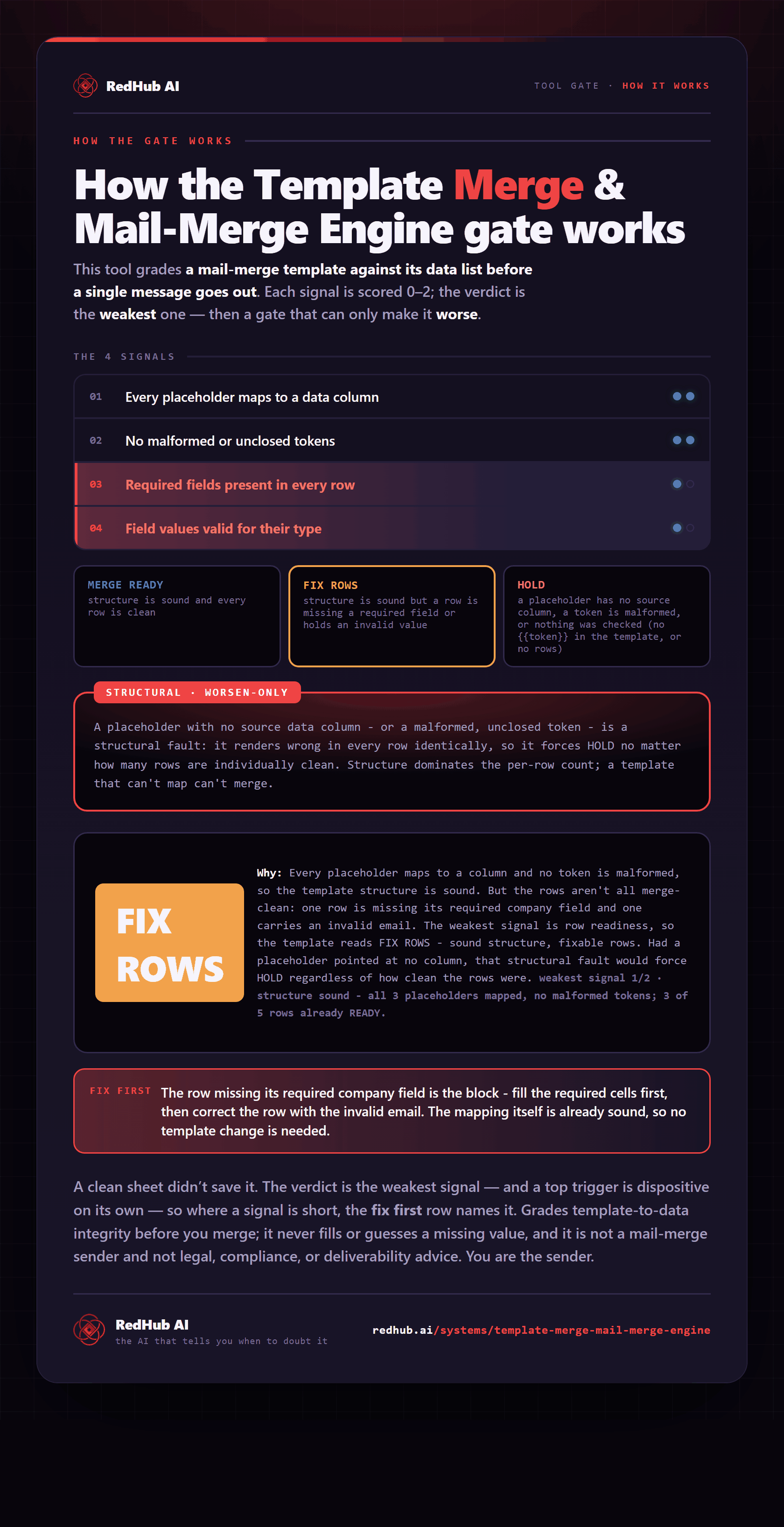
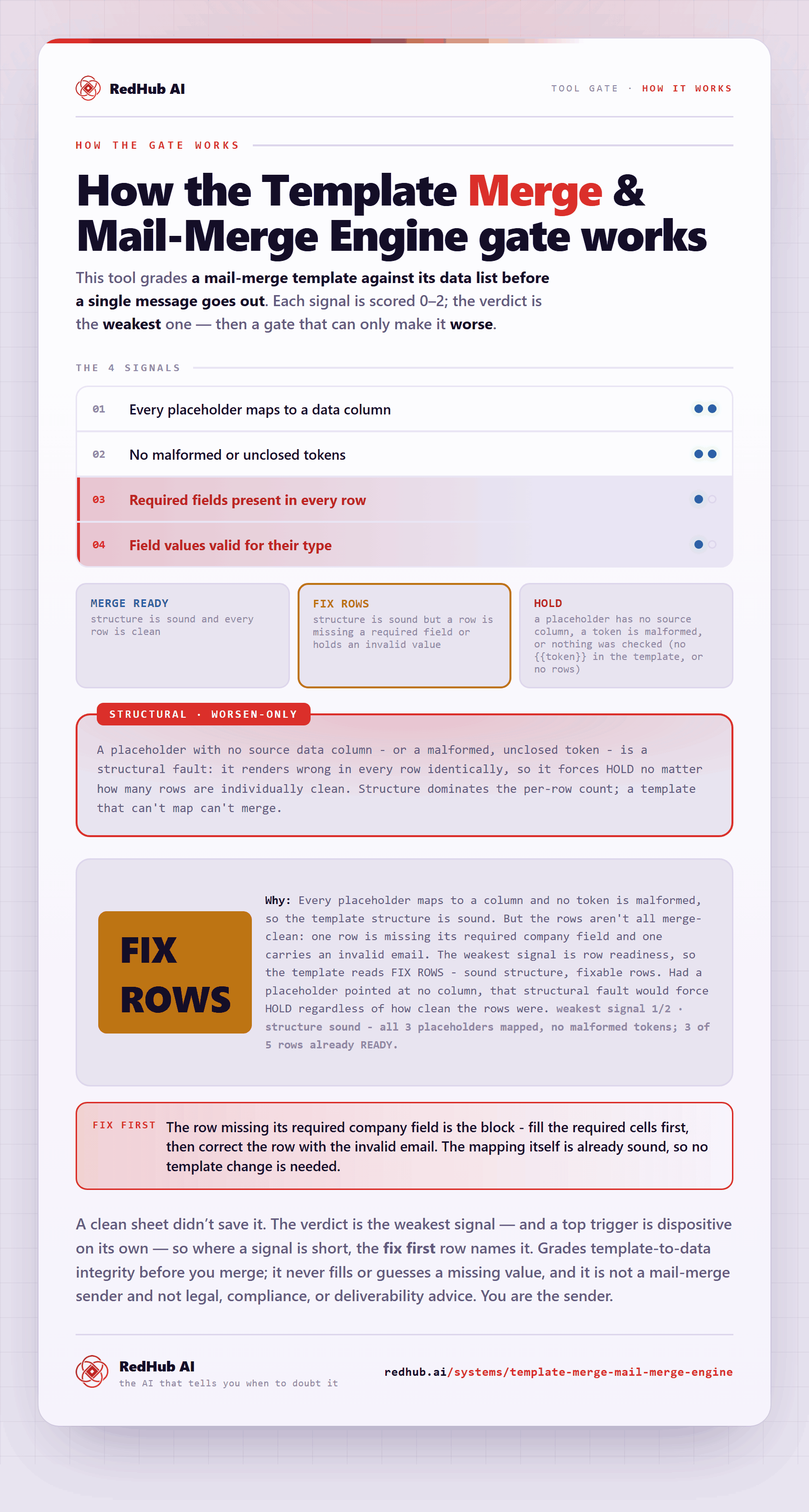
The gate this post refers to, drawn from the tool’s own logic. See the tool.