How to Automatically Sort Incoming Documents
RedHub AI Editorialupdated November 5, 20265 min read

Jump to a section7
To sort incoming documents without a person reading each one, write down where files can go, then write rules that send them there. Start from the queues. There are fewer of them than there are document types, and they change less often. Each rule checks a file for fixed signals such as a filename, a keyword or a sender. What the rules cannot settle goes to a person, in two separate piles.
TL;DR: List the destinations first. Write one rule per destination using signals that hold still. Make tiered rules mutually exclusive, test on last month's real intake, and read the quarantine and unmatched piles every week. The Document Classify & Route Kit ($69) ships the engine and a sample rule pack to edit. The concept is in the pillar: Document Classification & Routing.
Start with the destinations
The instinct is to list every document type you receive. Reverse it. List every queue, folder or person a document can end up with, because that is the decision the sorter has to make. A vendor may send invoices in three layouts over a year. The payables queue does not move.
The sample rule pack in the Document Classify & Route Kit has six rules and six destinations: payables with manager approval, the standard payables queue, a recruiting inbox, Legal's executed contracts, a support queue and an expenses queue. That is a small company's whole front door on one screen. If your list runs past a dozen destinations, some of them are probably the same desk under two names.
Pick signals that hold still
A rule is only as steady as what it matches on. The kit's rules can use five kinds of signal:
- a word or fragment in the filename
- a keyword or phrase in the document's text
- the sender or source
- an amount at or above a threshold, or below one
- whether the document has a date
Sender is usually the steadiest. Mail from a support@ address is a support request no matter how it is worded. A keyword is looser: the word "ticket" also shows up on a parking receipt. Where you can, combine two signals in one rule, so a single stray word is not enough to route a file.
Write the rule list
- List your destinations, and name a person who owns the leftovers.
- Write one rule per destination. Each rule names its signals, a document type and the destination.
- Put specific rules above general ones.
- Where two rules split one kind of document by size or value, make them mutually exclusive. See the next section.
- Set the confidence floor: the fewest signals a match must rest on before it routes without review.
- Run last month's real intake through the list before you trust it on live mail.
The tier trap
Say invoices of $5,000 or more need a manager and the rest go to the standard queue. The obvious pair of rules is "invoice and amount at least 5,000" on top, and plain "invoice" underneath. In the kit, that pair quarantines every large invoice. An $8,400 invoice matches both rules, the two rules name different destinations, and the kit holds any file that two rules send to two places, whatever their order.
The fix is to give the lower tier its own limit: "invoice and amount under 5,000." Now each invoice matches one tier only. The sample rule pack is written this way.
It has a cost. Once both tiers depend on the amount, an invoice with no amount matches neither. We ran one through the sample pack and it came back UNMATCHED. An amount typed as "$8,400" with the dollar sign and comma is read as 8400 and routes. An amount the engine cannot read, such as "8.400,00", matches no amount rule, and the engine prints a note under that document saying so. Neither result is wrong. An invoice with no readable amount probably should be looked at. But you will see these in the unmatched pile, and you should know why they are there.
Read both piles every week
Files the rules cannot settle fall into two piles, and they call for different work. A quarantined file matched rules that disagree, or matched on too little, so someone decides where it goes. An unmatched file matched nothing, so someone writes a rule or files it by hand.
Check both on a set day. A pattern that repeats in the unmatched pile is a missing rule. A pattern that repeats in quarantine is two rules that overlap. The two fixes pull against each other. Broader rules shrink the unmatched pile and create more overlaps. Narrower rules do the reverse. There is no setting that empties both, and a rule list that reports zero leftovers month after month is more likely too broad than perfect.
Sorting also only decides the queue. Naming the file so it can be found later is a separate habit, covered in File Naming Conventions That Don't Fall Apart.
Start from a working rule pack
The Document Classify & Route Kit includes a runnable Python engine, a six-rule sample pack you can edit, a workbook and a guide to designing tiers that do not conflict by accident. Each document comes back ROUTE, QUARANTINE or UNMATCHED. It tells you the destination and you move the file.
Get the Document Classify & Route Kit — $69Pairs well with
Before a packet is sorted, the Document Intake Completeness Checker ($69) checks it against a requirements list you define and returns COMPLETE, CHASE or HOLD INTAKE. After sorting, the AI Document Extraction Kit ($99) pulls structured data from the routed files and flags low-confidence fields for review. The Document Field Validator ($79) then checks those fields against fixed rules and returns PASS, REVIEW or REJECT.
More in this guide
How do I sort incoming documents without machine learning?
Write an ordered list of rules. Each rule checks a file for fixed signals, such as a filename fragment, a keyword, a sender or an amount threshold, and names a destination. Files the rules cannot settle go to a person.
Which signals are most reliable for identifying a document?
The sender is usually the steadiest, followed by a filename pattern. Keywords in the text are looser, because the same word can appear in unrelated documents. Combining two signals in one rule is safer than relying on one.
What should happen to a document no rule matches?
It should be flagged as unmatched and kept separate from files held for a conflict. An unmatched file means the rule list has a gap. A repeating pattern in that pile is the next rule to write.
Why did my large invoices all get quarantined?
Most likely a high-value rule and a general invoice rule both match them and point to different queues. Give the lower tier its own limit, such as an amount under 5,000, so each invoice matches one tier only.
How often should I update my sorting rules?
Read the quarantine and unmatched piles on a set day each week. Add a rule when the same kind of file keeps showing up unmatched, and tighten a rule when the same pair keeps conflicting.
Do I have to build the rule engine myself?
No. The Document Classify & Route Kit ($69) ships a runnable engine, a sample rule pack and a workbook. You supply the destinations, the rules and the documents.
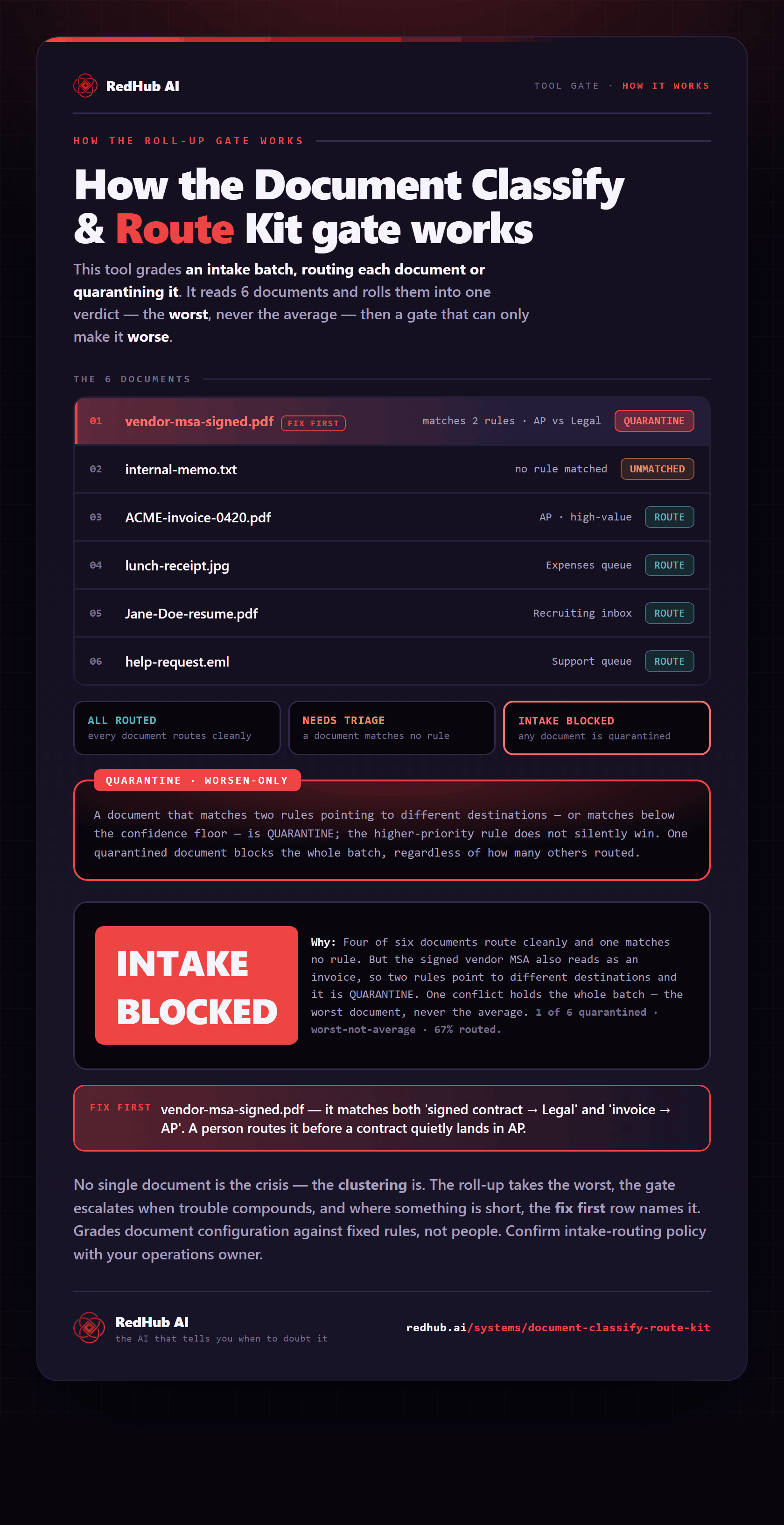
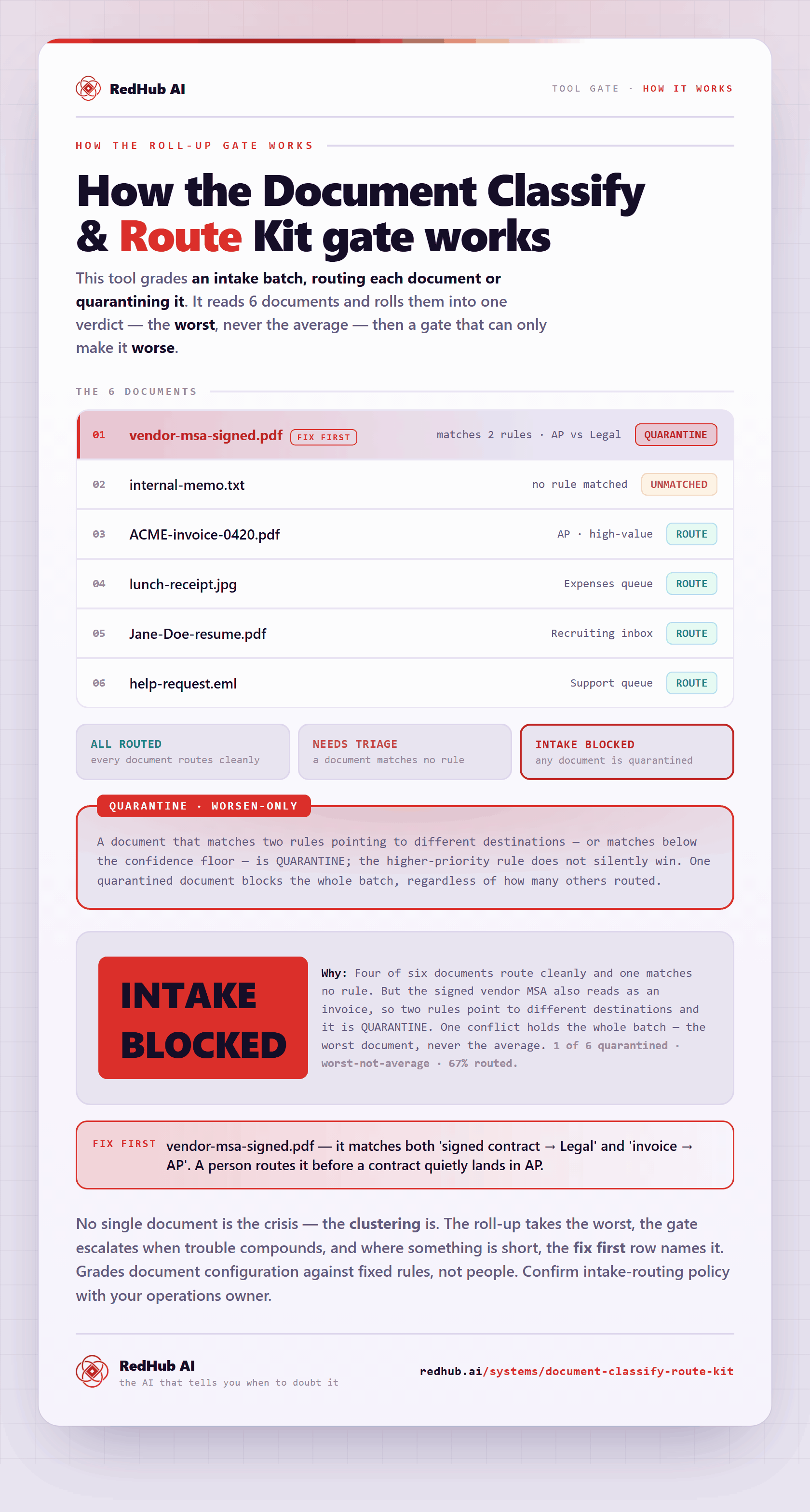
The gate this post refers to, drawn from the tool’s own logic. See the tool.