Document Classification & Routing: Send Every File to the Right Place
RedHub AI Editorialupdated November 5, 20266 min read

Jump to a section8
Document classification and routing is two decisions made at the front door of a document workflow: what is this file, and who handles it next. A rules-based setup makes both the same way every time. Done well, it ends in one of three outcomes. The file is routed, it is held for a person, or it is flagged as something no rule covers. Most hand-built sorters only have the first outcome and a folder called Other.
TL;DR: Classification names the document type. Routing picks the queue. Write rules that match on fixed signals, put them in order, hold any file that two rules send to two different queues, and keep unmatched files in their own pile. The Document Classify & Route Kit ($69) runs a rule pack you write and returns ROUTE, QUARANTINE or UNMATCHED for each document. For the hands-on build, start with How to Automatically Sort Incoming Documents.
Two decisions, and what they leave out
Classification answers "what is this?" An invoice, a receipt, a resume, a signed contract, a support request. Routing answers "where does it go?" The standard payables queue, the recruiting inbox, Legal's executed-contracts folder. Every later step assumes both answers are already right. An approval workflow cannot approve an invoice that is sitting in the support queue.
The job stops there. Classification and routing do not read the fields inside the document, which is extraction. They do not check whether an amount adds up, which is validation. They do not compare one file against another to catch a duplicate. A front door that tries to do all four is hard to debug, because a wrong result could have come from any of them.
Three outcomes, not two
The Document Classify & Route Kit returns one of three verdicts per document, and the split between the second and third is the useful part.
| Verdict | What happened | Who fixes it |
|---|---|---|
| ROUTE | The matching rules imply exactly one destination | Nobody. It goes to its queue |
| QUARANTINE | Two rules point to two different destinations, or the one match rests on too few signals | A person decides where it goes |
| UNMATCHED | No rule matched | Someone adds a rule, or files it by hand |
Quarantine and unmatched are opposite problems. Quarantine means your rules disagree about a file. Unmatched means your rules do not cover it. You clear the first by making a decision and the second by writing a rule. A sorter that drops both into one catch-all folder hides which kind of work is piling up.
Why priority order is not enough
The usual advice is first-match-wins: check the rules top to bottom and take the first one that fits. That is readable and it is repeatable. It also has one bad failure.
The kit's worked sample includes a file called vendor-msa-signed.pdf. It is a master services agreement with a signature line, and it mentions an invoice for a $1,500 setup fee. The sample rule pack sends invoices under $5,000 to the standard payables queue, at priority 2. It sends signed agreements to Legal, at priority 4. Under plain first-match-wins, the invoice rule wins and a signed contract lands in payables. Nothing errors, and nobody in Legal knows the contract exists.
The kit handles this with what it calls an ambiguity gate. If a document matches two or more rules that point to different destinations, it is quarantined regardless of rule priority. Priority still does a job when the matching rules agree on the destination. It just never settles a disagreement between two desks. The mechanics are in Document Routing Rules: First-Match-Wins and Its Limit.
A batch can be 67% routed and still blocked
The same sample batch has six documents. Four route, one is quarantined and one is unmatched. The engine prints "routed 67%" and then the batch verdict: INTAKE BLOCKED. The three batch labels are ALL ROUTED, NEEDS TRIAGE when something is unmatched, and INTAKE BLOCKED when anything is quarantined. A batch with no documents in it reads NO DOCUMENTS. The percentage is shown for context and does not decide the verdict.
That is strict, and it will not suit every inbox. The four routed files still carry their destinations. The label says a decision is waiting on a person. On a busy intake line, one conflicted file a day means the label reads blocked every day. Whether your team treats that as a stop or as a short to-do list is a call the kit leaves to you, and a team that learns to ignore the label has lost what it was for.
What rules cannot do
Rules only catch what you wrote down. A brand-new document type comes back unmatched until someone adds a rule for it. A trained classifier may attempt a guess where rules will not. Rules-Based vs. AI Document Classification covers when that guess is worth having.
Rules also need something to match on. The kit's engine takes each document as a name, its text, a sender, an amount and a date, supplied by you or by a script. It does not open a PDF or read a scan. A keyword rule can only fire if the text is there, so a scanned page with no text layer can be matched on its filename and sender and nothing else. If most of your intake arrives as images, the text has to come from somewhere first. Our guide to AI document extraction covers that step.
The router also decides the queue and stops. It does not move a file, forward an email or run a workflow. A person or a script does the moving, which is what How to Automate a Shared Document-Intake Inbox is about.
Where this sits in the document line
Classify and route comes first, then extraction, then validation. Each stage assumes the one before it was right, which is why a misroute is expensive: the extractor pulls invoice fields from a contract and the validator dutifully rejects them. Our guide to intelligent document processing lays out the full line and how to find the stage that is holding it back.
Sort intake with rules you can read
The Document Classify & Route Kit ships a runnable Python engine with no dependencies, a workbook, two guides and a worked six-document batch. You write the rule pack and set the order. It returns ROUTE, QUARANTINE or UNMATCHED per document and quarantines any file two rules send to two different places. It decides the destination. You move the file.
Get the Document Classify & Route Kit — $69Pairs well with
The AI Document Extraction Kit ($99) takes a routed document and turns it into structured data, flagging low-confidence fields for review instead of guessing. The Document Field Validator ($79) runs those fields against fixed checks and returns PASS, REVIEW or REJECT per record. If you are not sure routing is your weak stage, the Document Processing Pipeline Diagnostic ($79) scores a document workflow across six stages from your own 0 to 5 marks and returns AUTOMATED, MANUAL DRAG or STALLED.
More in this guide
What is the difference between document classification and document routing?
Classification identifies what a document is, such as an invoice, a contract or a receipt. Routing decides which queue, folder or person handles it next. Both happen before extraction or validation.
What happens to a document that matches no rule?
It should be marked as unmatched and kept apart from files that are held for a conflict. In the Document Classify & Route Kit the verdict is UNMATCHED, which means no rule claimed the file and your rule pack has a gap.
Why hold a document instead of letting the higher-priority rule win?
Because two rules pointing to two different queues is a real disagreement about who owns the file. Letting priority settle it is how a signed contract that mentions an invoice ends up in payables. The kit quarantines that file so a person decides.
Does a document router read the fields inside a file?
No. The kit matches on the filename, keywords in the text, the sender, an amount threshold and whether a date is present. Pulling out totals, dates or line items is extraction, a separate step.
Is rules-based routing better than an AI classifier?
It depends on the intake. Rules give you a readable reason for every decision and suit document types you can describe. A trained model can attempt types nobody wrote a rule for, and its confidence score does not explain the decision.
What does the Document Classify & Route Kit include?
A runnable Python routing engine with no dependencies, an Intake Worksheet workbook, two guides and a worked six-document sample batch. It is a one-time $69 purchase with lifetime access and 12 months of updates.
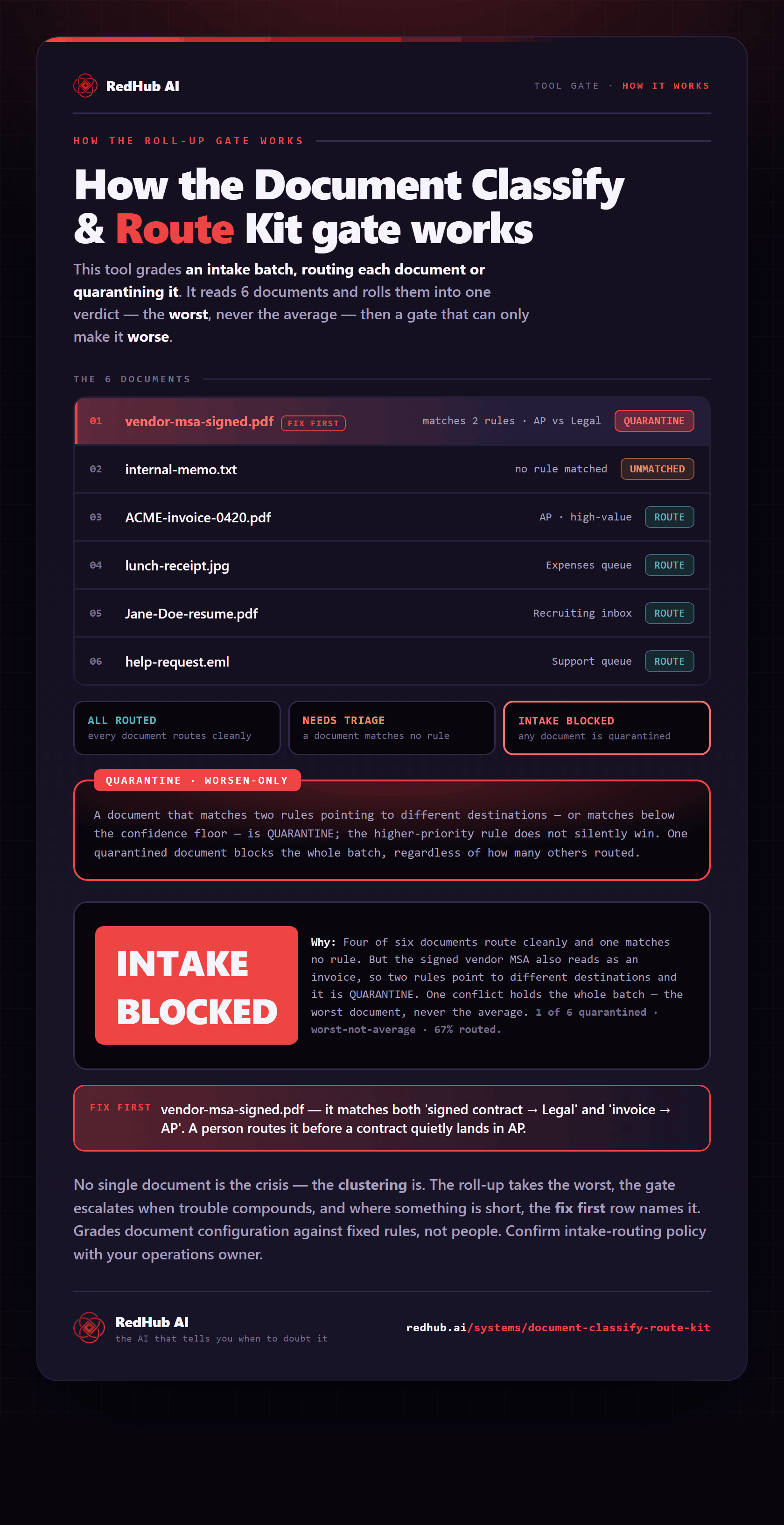
The gate this post refers to, drawn from the tool’s own logic. See the tool.