How to Automate a Shared Document-Intake Inbox
RedHub AI Editorialupdated November 5, 20266 min read
Jump to a section8
A shared intake inbox runs on one person's memory of where things go. To automate document intake, you write that memory down as rules, let a router apply them to every file, and leave people only the files the rules cannot settle. The part that gets automated is the decision, not the delivery. Something still has to hand the router each document and act on its answer, and it is worth knowing that before you start.
TL;DR: Interview whoever triages the inbox, turn their if-then habits into an ordered rule list, name an owner for held and unmatched files, and run the rules beside the manual process before switching. The Document Classify & Route Kit ($69) makes the routing decision from a rule pack you write. It does not connect to a mailbox or move files. See Document Classification & Routing for the concept.
Why a shared inbox clogs
At low volume a shared inbox works. Whoever is free forwards each file to the right person. It stops working when volume grows or the team changes, because the routing logic was never written anywhere. A new hire does not know that one vendor's statements go to the controller and not to payables. The person who knows is out on Thursday, and Thursday's mail sits until Monday.
What gets automated, and what does not
Three things happen to every incoming file. Someone or something gets it out of the inbox. Something decides where it belongs. Someone or something puts it there. A rules-based router does the middle one.
The Document Classify & Route Kit is specific about this. Its engine reads a batch file in which each document is listed with a name, its text, a sender, an amount and a date. It returns ROUTE, QUARANTINE or UNMATCHED for each one, with a destination when it routes. It does not log in to a mailbox, open an attachment or move anything. In the kit's workbook the process is more manual still: you list the documents and mark which rules each one matches, and the sheet works out the verdict.
That makes the kit useful at two levels. For a small team it is a written, checkable triage procedure that any person on intake duty can follow the same way. For a team with a script or an automation tool on either side, the engine is the decision step in the middle. Our guide on how to automate document processing covers choosing which part of the line to automate first.
Build the intake step
- Sit with whoever triages the inbox and write down every "if it's from X, it goes to Y" they apply from memory. Ask about the exceptions. Those are the rules that matter.
- Turn the list into ordered rules, each with its signals, a document type and a destination. How to Automatically Sort Incoming Documents walks through this.
- Name an owner for the files the rules hold and the files the rules do not match, and a backup for that owner.
- Run the rules beside the manual process.
- Switch over, and read the held and unmatched files every day for the first weeks.
The parallel run
Before the rules replace anyone, let them shadow the person. For a week or two, the person triages as usual and the rules run on the same files. Then compare, file by file.
Every disagreement falls into one of three kinds. The rule was wrong, so fix the rule. The person was wrong, which only shows up once there is something to check against. Or the person used knowledge that is not in the document: "that vendor is in a dispute, so everything from them goes to the controller." The third kind is the valuable one. It is either a new rule or a standing exception a person must keep handling, and you want to know which before go-live.
The bottleneck can move
Automating the routing decision does not remove the need for a person. It concentrates it. Before, one person looked at everything. After, one person looks at whatever the rules hold or cannot match.
The kit makes that pile hard to ignore. Its batch verdict reads INTAKE BLOCKED if even one document is quarantined, and NEEDS TRIAGE if any is unmatched. In its six-document sample, four files route and one conflict still blocks the batch. That is the intended behavior.
It also means that if the held pile has one owner and that owner is out on Thursday, you have rebuilt the original problem at a smaller size. A backup owner helps. So does tightening rules until less is held, though rules made broad enough to hold nothing will misroute without telling you. How much should reach a person is a judgment about your documents, and no tool sets it for you.
What intake automation leaves alone
Routing decides where a document goes. It does not read the amount on an invoice, check that a contract is signed in the right place, or notice the same receipt was sent twice. Those are extraction, validation and duplicate checking, and they come after. If you are not sure intake is the slow stage at all, Find Your Document Processing Bottleneck First is the place to start.
Put the triage rules in writing
The Document Classify & Route Kit gives you a rule pack to edit, a Python engine that runs it on a batch of documents, a workbook version for doing it by hand, and two guides. Each document comes back ROUTE, QUARANTINE or UNMATCHED. The kit decides the queue. You or your own script move the file.
Get the Document Classify & Route Kit — $69Pairs well with
If the inbox receives multi-document packets, the Document Intake Completeness Checker ($69) checks each one against a requirements list you define and returns COMPLETE, CHASE or HOLD INTAKE. Once files are routed, the AI Document Extraction Kit ($99) turns them into structured data and flags low-confidence fields for review. If that data ends up in an export, the CSV / Data-Export Schema & Quality Gate ($69) grades whether the file is structurally fit to process and returns READY, FIX or BLOCK.
More in this guide
How do I automate a shared document-intake inbox?
Write down how the current triage person decides where each file goes, turn that into an ordered rule list, and let a router apply it to every incoming file. People handle only the files the rules hold or cannot match.
Why do shared inboxes become bottlenecks as teams grow?
Because the routing knowledge sits in one or two people's heads. More volume or a change in staff exposes the gap. New people do not know the unwritten rules, and files wait for the one person who does.
Does the Document Classify & Route Kit connect to my email?
No. Its engine reads a batch file listing each document's name, text, sender, amount and date, and returns a routing verdict. Getting documents out of the inbox and moving them to their queue is done by you or your own script.
Should I run automated intake beside the manual process first?
Yes. Have the rules run on the same files a person is triaging for a week or two, then compare each decision. The disagreements show which rules are wrong and which decisions depend on knowledge outside the document.
What should happen to documents the router cannot place?
They go to a named person. Files held because two rules conflict need a decision. Files that matched no rule need a new rule or hand filing. Give that pile an owner and a backup.
Does automating intake remove the need for a person?
No. It narrows the person's work to the files the rules cannot settle. If that pile has a single owner with no backup, the delay moves to them.
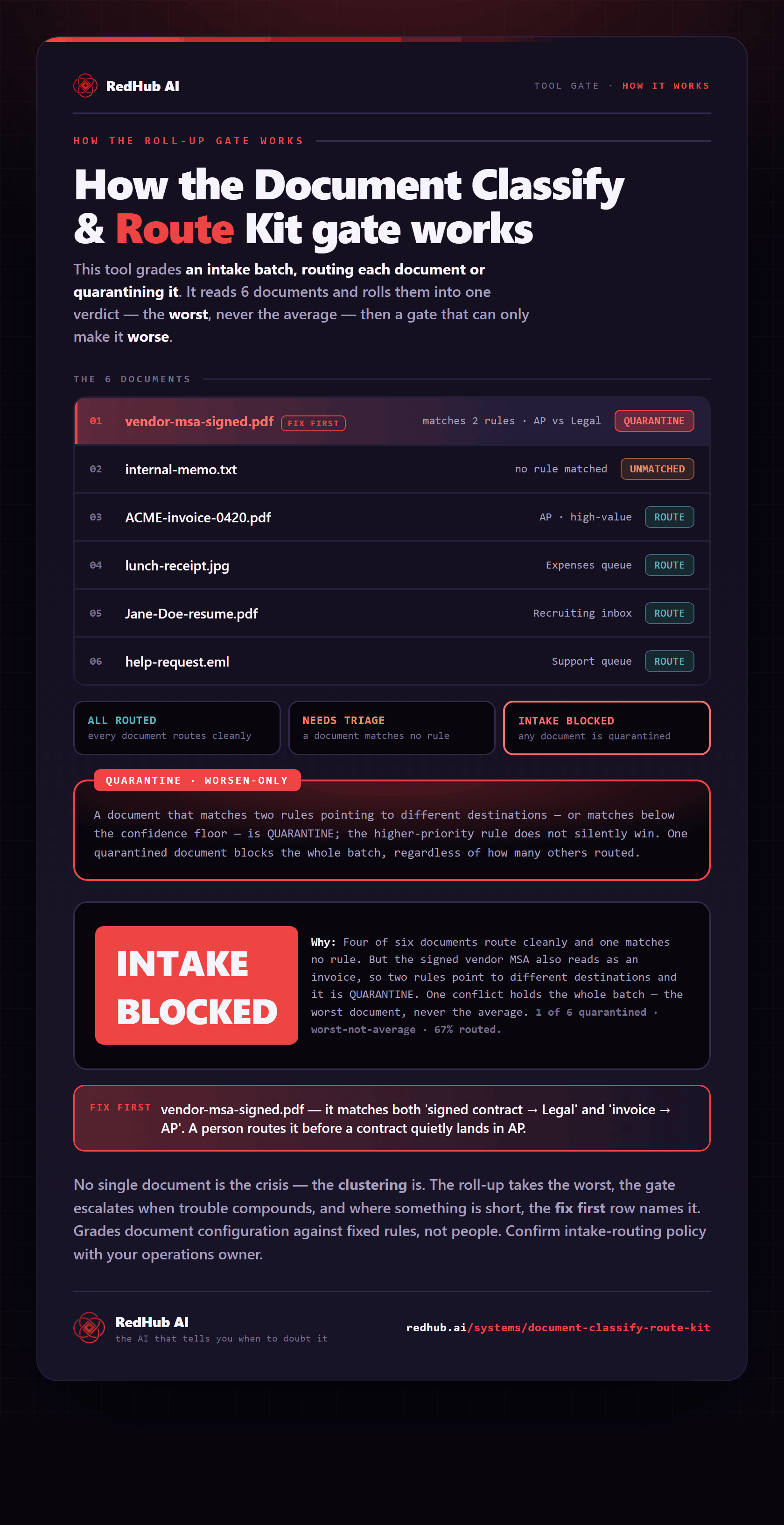
The gate this post refers to, drawn from the tool’s own logic. See the tool.