Live and Still in the Sandbox: The Quieter Failure
RedHub AI Editorialupdated November 5, 20266 min read

Jump to a section6
Production still in test mode means the copy of your app that customers use is wired to a sandbox instead of the real service. A payment that never charges. An upload stored where your live app never looks for it. A text that never reaches a phone. Nothing crashes and nothing complains. Orders come in and look normal. The failure is that nothing real happens on the other end, and it lasts until someone notices.
TL;DR: A sandbox is built to answer like the real thing, so your live app gets success responses and moves on. The first signal is usually a person: a customer asking where their order is, or you noticing an empty folder. This is the recoverable crossing. Point the setting back and the problem stops. What is left is a backlog of missed orders and messages to work through. Check it on purpose, service by service, before the complaint arrives. Fix any development-on-live row first.
Why this one hides so well
The other crossing, development reaching real data, tends to show itself: a real charge, a real deletion, an email someone replies to. This one does not, because a sandbox is designed to behave like the real service from the inside. A test payment can pass every check your app runs and return a success response without moving any money. Your app has no way to tell on its own. It sends a request, gets an answer that looks right, and carries on.
No error. No alert. What breaks the silence is almost always a person. A customer emails to ask why their card was never charged, or why the confirmation never came. Or you look at your payouts and they do not match the orders on your dashboard.
Three ordinary ways it shows up
Payments. The checkout completes, the app thanks the customer, and the order is marked paid. In the sandbox, a test charge succeeded. In your bank account, nothing arrived. If you ship goods against those orders, you have shipped them unpaid.
File and image storage. A customer uploads a document and the app confirms it. The storage service did accept the file, into the sandbox copy. Your live app, or a teammate, goes looking for it later in the real one and it is not there.
Texts and push notifications. The app fires a confirmation the moment an order comes in and logs it as sent. The message went through a test channel that does not deliver to real phones. The customer is left wondering whether the order went through.
None of these throws an error. From inside the app, all three look like success.
Why it ranks below the other crossing
It is tempting to treat both crossings as one rule pointed different ways. They cost different things. Once you find a live app on a sandbox, the fix is one setting: point it back at the real service. From that moment, new orders charge and new messages arrive.
What is left is a backlog. Orders that never charged. Files stored in the wrong place. Messages that never went out. That can take an afternoon of reprocessing and apologizing. It is real work and it can cost real money, but none of it is irreversible the way a deleted production row or a sent email is. That is the whole reason this one waits until the development-on-live rows are fixed.
A complication worth naming: "recoverable" is not the same as "free." If the sandbox ran for a month on a busy store, the backlog is a month of orders. Some of those customers will not answer when you ask them to pay again. The ranking is about which crossing can be undone, not which one costs less in every case.
How to check before a customer tells you
Do not trust the success screen. For each service, find the setting your live app uses and confirm it points at the real one. Start with the services where "it looked like it worked" is the only signal you would ever get: payments, storage, messaging, anything that confirms success with no second system checking.
A quick confirmation, where your provider allows it: make one small real transaction or send one real message to yourself from the live app, then look for it in the live side of that provider's dashboard, not in your app. If it is not there, the live app is not talking to the real service.
And when you cannot find what the live app points at, score it as the sandbox. That is the worst answer for that question. "I could not find it" should never read as "it is probably live."
Find the live app that is talking to a sandbox
The Test Mode vs Live Mode Line-Up asks four questions per service from dropdowns. A row reads PROD ON TEST when your live app points at the sandbox, or when you could not find where it points, as long as the row is not already development on live.The Dashboard counts these as "crossings that cost a day, not the data." If PROD ON TEST rows are the only problem, the verdict is POINTING AT THE SANDBOX. If any row is DEV ON LIVE, the verdict is WIRES CROSSED, and the fix-first line names a development-on-live row ahead of any PROD ON TEST row. One .xlsx, offline, reading back only what you type.
Get The Test Mode vs Live Mode Line-Up — $49The workbook does not watch your services. It is not a monitor, and it will not notice the day something stops arriving. It reads what you tell it on the day you fill it in. For whether your order flow itself fires each step exactly once, see The Money Path Teardown ($69). For the wider pre-launch pass, the Vibe-Coded App Hardening Kit ($79) covers auth, rate limits, error handling, secrets and cost ceilings.
More in this guide
Frequently asked questions
What does "still in the sandbox" mean for a live app?
It means the copy of your app that customers use is wired to a service's test copy instead of the real one: a payment sandbox that never charges, a test storage area your live app never reads, a messaging channel that never reaches a real phone. The app looks normal on the surface while nothing real happens underneath.
Why doesn't a live app on a sandbox throw an error?
Because a sandbox is built to answer like the real service. Your app sends a request, gets a success response, and moves on. It has no way of knowing on its own that the answer came from a test copy.
How long can production stay in test mode before anyone notices?
There is no fixed answer. It lasts until a person checks the other end: a customer asking about an order, or you comparing payouts with orders. Nothing on the app's side flags it, which is why checking each service on purpose is faster than waiting.
Is a live app on a sandbox worse than development reaching live data?
No. It is quieter, but it can be undone. Pointing the setting back stops the problem from that moment on, and what remains is a backlog of missed orders and messages. Development reaching live data can delete or send something real that no setting change brings back, so fix that first.
How do I check for this before a customer tells me?
For each service, find the setting your live app uses and confirm it points at the real one, starting with payments, storage, and messaging. Where your provider allows it, make one small real transaction from the live app and look for it on the live side of the provider's dashboard, not in your app.
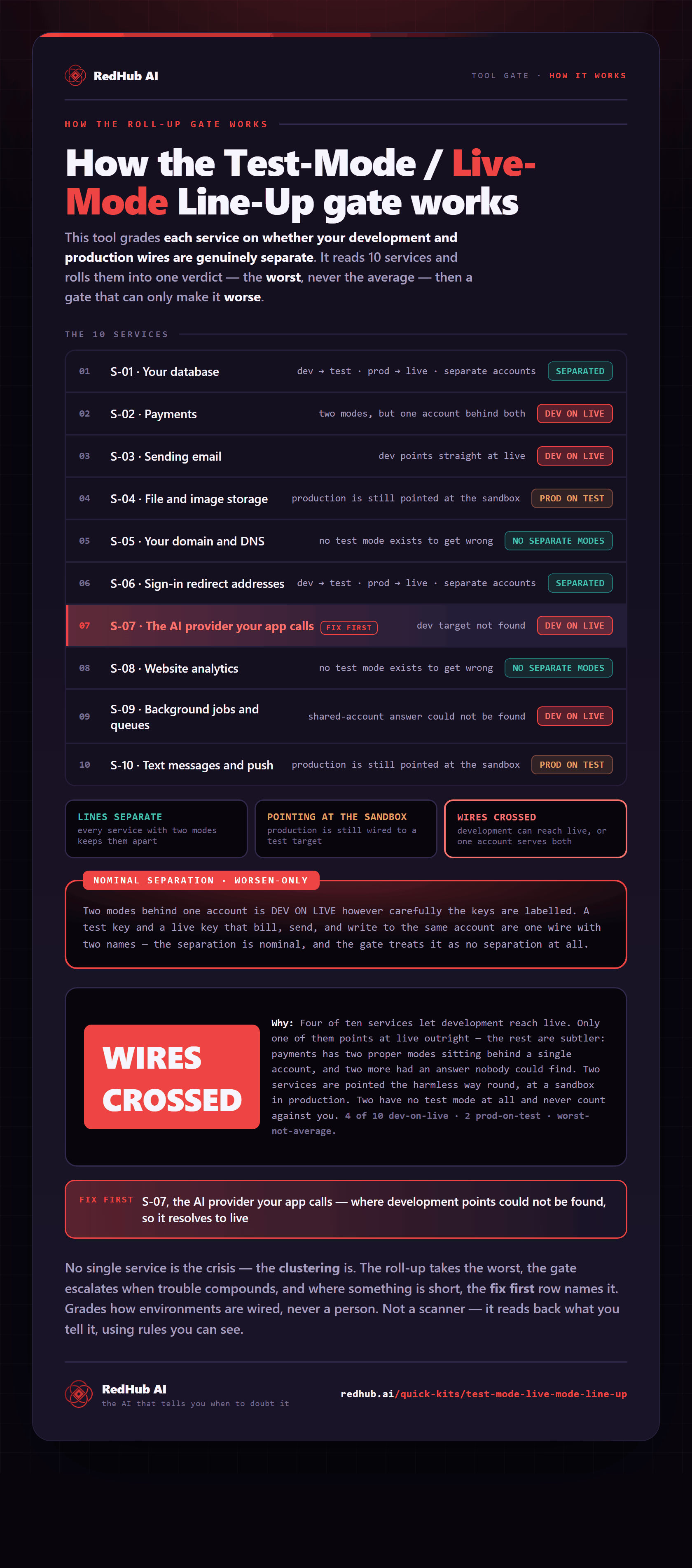
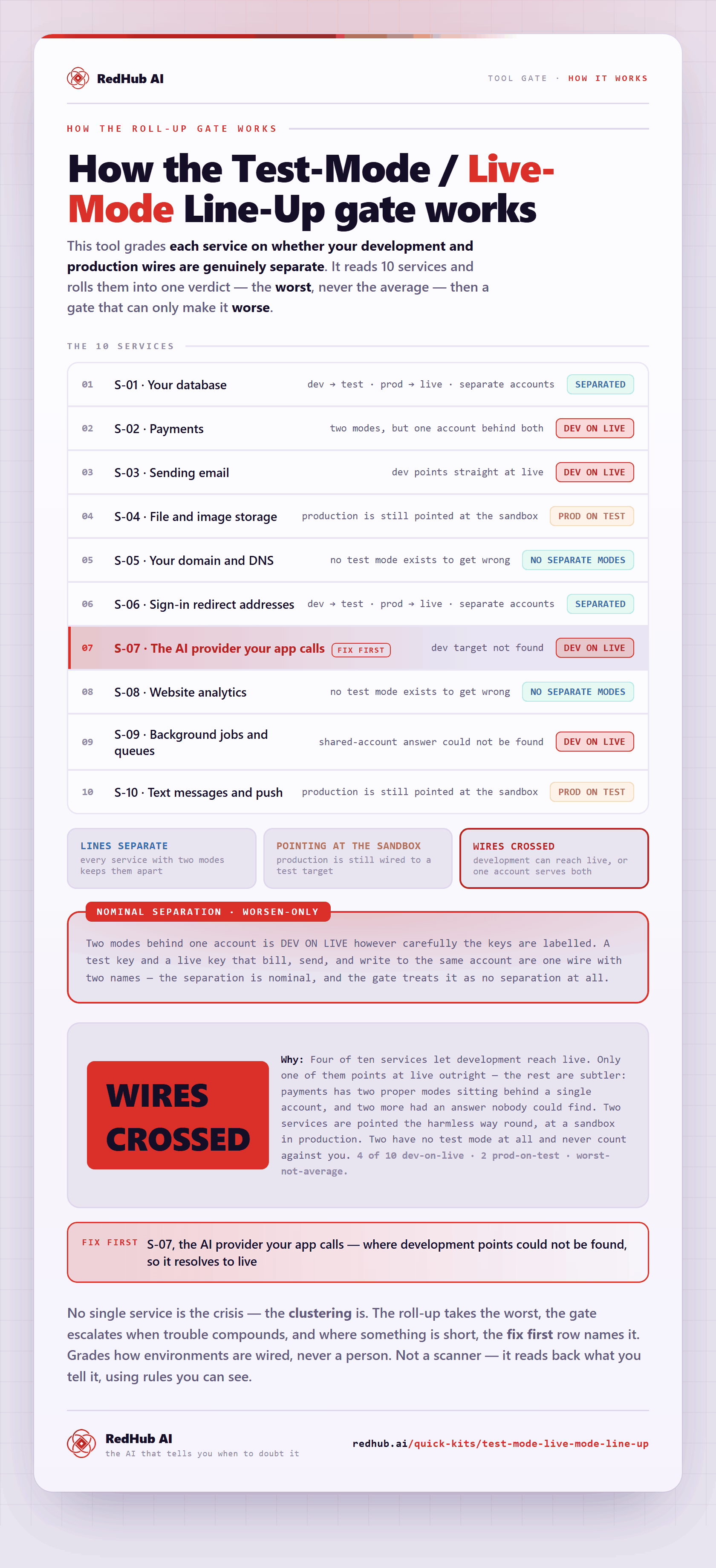
The gate this post refers to, drawn from the tool’s own logic. See the tool.