Mail Merge for Letters, Invoices, and Certificates: Templates That Work
RedHub AI Editorialupdated October 7, 20266 min read
Jump to a section7
Mail merge templates break in a different place for each kind of document. On a letter it is the greeting line. On an invoice it is the total. On a certificate it is the name, which is usually the largest text on the page and has to fit whether it is five letters or thirty-two. Build each template around its own weak field.
TL;DR: Letters need a greeting that survives a missing title. Invoices need a total with visible math and an explicit currency format. Certificates need a name field tested against the longest real name on the list. Test each template with your longest and shortest real values. A fallback makes a document look right when the record behind it is incomplete, so decide per field whether to fall back or stop. The Template Merge & Mail-Merge Engine ($69) checks a template against its list before you send. Process: how to do a mail merge.
Letter templates
A personalized letter, such as a lease renewal or a donor thank-you, has three sensitive spots: the greeting, one specific reference (an amount, a date, a decision) and the sign-off. The greeting fails most often. "Dear Mr. ," happens when a title field is filled on some rows and empty on others.
- Greeting: if the list does not have a title on every row, do not merge a title. "Dear Sarah" is safe. "Dear Mr. Sarah" is not.
- Body reference: "your gift of 250" reads as a typo. Decide the currency format in the template or in the list, and check which one your tool obeys.
- Length: test the paragraph that carries an organization name against the longest real name you have.
Take a lease-renewal letter that merges tenant name, unit, current rent and new rent. The wording is written once. All the risk sits in whether the new-rent column is filled and formatted the same way on every row.
Invoice templates
An invoice is the merge document where a wrong field costs money. Four guardrails:
- Show the math. If you can, merge the line amounts as well as the total, so a reader can see how the total was reached. A lone total with nothing behind it is hard for anyone to question.
- Format currency explicitly. Microsoft's guidance for Excel data sources says currency, percentage and postal-code entries should be formatted correctly in the spreadsheet so Word can read their values. Do not assume the format carries over. Look at the test merge.
- Require invoice number and due date. These two matter most once the invoice has left, and a blank in either should stop that row.
- Test the edges. Merge a zero-balance record and your largest one. A layout that holds 1,500.00 can wrap at 150,000.00.
One failure to watch for: an amount typed with a stray character, so the spreadsheet stores it as text. It prints exactly as typed, with no currency symbol and no alignment with the rows around it.
Certificate templates
A certificate is a layout first and a document second. The name carries the page.
- Let the name scale. "Jo Li" and "Alexandria Montgomery-Fitzgerald" are 5 and 32 characters. Both need to look deliberate.
- Pick one capitalization. If some names arrive in all caps and others in title case, fix the list. Do not merge whatever is there.
- Test the longest real value in every field, not a placeholder name.
The second-longest field is usually a session or course title. "Advanced Data Modeling and Predictive Analytics for Nonprofits" is eight words, and it will overflow a line that was sized for "Excel Basics".
The trouble with fallbacks
A fallback is a default that prints when a field is empty: "Dear Friend" when there is no first name, a dash when there is no unit number. Many merge tools offer them, and for a newsletter greeting they are sensible.
They also hide the problem they solve. A letter that says "Dear Friend" looks finished. Nobody opens it and sees a hole, so nobody learns that 14 records have no first name, and the same 14 go out the same way next month. On an invoice, a fallback in the amount field is worse than a blank, because a blank looks broken and a default looks like a number.
There is no rule that settles this for every field. A workable split: allow a fallback where the document still means the same thing without the value, and stop the row where it does not. A greeting can fall back. An amount, a due date or a name on a certificate should not.
Keep the templates you have tested
If you send the same three documents every month, keep the tested versions and change only the list. Each time a column is added or renamed in the export, the saved template can fall out of step with it, and a renamed column is the kind of fault that breaks every row at once. That is the case for checking the template against the list on every run, including the runs where "nothing changed."
Stop the row, do not fill it
The Template Merge & Mail-Merge Engine reads a template written with {{placeholder}} tokens and a CSV list. Each row comes back READY, FIX or BLOCK: a missing required value is BLOCK, and a malformed email, date or number is FIX. The template comes back MERGE READY, FIX ROWS or HOLD. It never fills or guesses a value. You mark which fields are required in its config file. It checks structure and presence, not layout, so it will not tell you a name is too long for the line. It does not send. Lifetime access, 12 months of updates, 30-day refunds.
Pairs well with
When invoice or certificate data has to come out of PDFs first, the AI Document Extraction Kit ($99) turns invoices, receipts and forms into structured data and flags low-confidence fields for review instead of guessing. To confirm the invoice list agrees with your ledger export, the Two-List Reconciliation Kit ($49) joins the two on an exact key, with an amount tolerance you set, and marks each key RECONCILED, EXCEPTION or ORPHANED. For the 300 PDFs a certificate run leaves behind, the File Naming & Organization Engine ($49) proposes a conforming name for each file and marks two that would share a name as COLLISION. You apply the renames yourself.
More in this guide
What is the biggest risk in an invoice mail merge?
A wrong or badly formatted amount. An invoice error goes to a customer under your name and can affect what they pay, so the amount, invoice number and due date deserve stricter checks than a greeting line.
How do I stop a broken greeting in a letter merge?
Do not merge a title unless every row has one. Greet by first name, and check that the first-name column has a value on every row before the run.
Why does a name look squeezed on my certificate?
The name field has a fixed size and the name is longer than the one the template was designed around. Set the field to scale if your tool allows it, and test with the longest real name on the list.
Should I use a fallback value for empty fields?
Only where the document means the same thing without the value, such as a greeting. For an amount, a due date or a certificate name, stop the row and fix the record. A fallback there hides a missing fact.
Can one template work for both letters and emails?
Often, with changes. A letter needs an address block and a formal sign-off that an email does not. Test both outputs separately even when the body text is shared.
What should I test before running a certificate batch?
The longest name and the longest session or course title in your real data, plus the shortest name. Placeholder text rarely shows where the layout overflows.
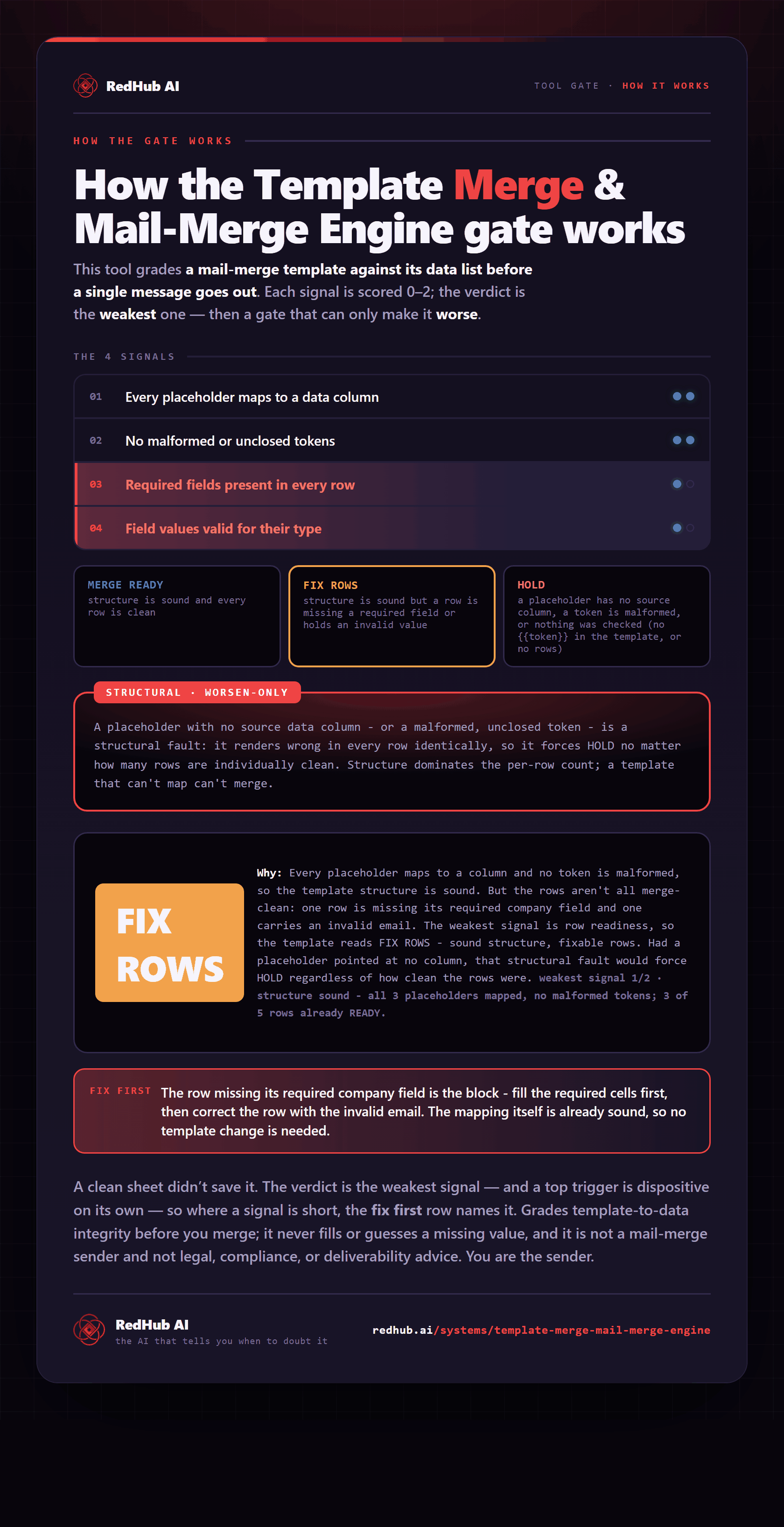
The gate this post refers to, drawn from the tool’s own logic. See the tool.