How to Clean Your Data Before a Mail Merge (So You Don't Send "Dear FIRST_NAME")
RedHub AI Editorialupdated October 7, 20266 min read

Jump to a section9
"Dear FIRST_NAME" reaches a real inbox when a placeholder in the template has no matching column in the list. Clean data for mail merge is how you stop it, and it comes down to four checks on the spreadsheet: headers that match the template, no blanks in required columns, one format per column, and no duplicate rows. Three of the four are mechanical. The fourth is harder than it looks.
TL;DR: Before a merge, match every column header to its placeholder, count the blanks in each column the template uses, put dates and amounts in one format, and remove duplicate rows by a stable key such as email or customer ID. Near-duplicate names like J. Smith and John Smith cannot be settled by a formula, so someone has to decide. Then merge a few records and read them. The Template Merge & Mail-Merge Engine ($69) runs the first three checks on every row and does not deduplicate.
Why "Dear FIRST_NAME" happens
Two different faults get blamed for it. When the template asks for a field the list does not have, many tools print the placeholder itself, so the reader sees the raw tag. When the column exists and one cell is empty, the reader usually sees a gap: "Dear ," with nothing after it. The first fault hits every document in the batch. The second hits one row. Neither is a software bug, and both sit in the spreadsheet where you can find them before the run.
Check 1: Headers that match the template
Put the list of placeholders next to the list of column headers and compare them character by character. first_name, First_Name and FirstName are three different names to a strict tool. So is a header with a space after it, which you cannot see in the cell. This check comes first because a header fault makes the other three pointless. If the column cannot be found, it does not matter how clean its values are.
Check 2: Blanks in required columns
Pick the columns the template cannot do without. For each one, count the filled cells and compare the count with the number of rows. In Excel or Google Sheets, COUNTA counts filled cells and COUNTBLANK counts empty ones. If the numbers disagree, filter the column for blanks and you have the rows.
One trap: a cell holding only a space counts as filled. It looks empty and merges as empty. Trim the column before you count.
Check 3: One format per column
A date column with three date styles in it will merge as three date styles. An amount column where some cells are numbers and some are text will print some with a currency symbol and some without. Pick one format for each column and convert everything to it. For dates, the year-month-day form, such as 2026-11-10, is the least ambiguous, since 03/04 means March in one office and April in another.
Our guides to common CSV errors and validating a CSV file cover what goes wrong when the list is exported from another system.
Check 4: Duplicates, and why this one resists a rule
Exact duplicates are easy. If two rows share the same email address or the same customer ID, a count on that column finds them. Remove one and move on.
The hard case is the near-duplicate. "John Smith," "J. Smith" and "Jon Smith" might be one customer typed three ways. They might be a father, a son and a stranger. Nothing in the three names says which. Fuzzy-matching tools exist and will score how alike two names are, but a score is a guess, and merging two real people into one row is a worse error than sending one person two letters. We cover the trade-offs in matching records across two lists.
What works in practice is narrower than people hope. Deduplicate on a key, not on a name: an email address, an account number, an invoice number. Where the list has no such key, sort by last name and address and have a person read the clusters. On a list of 40 that takes minutes. On a list of 3,000 it is a real job, and no honest tool makes it disappear.
What a rule can check and what it cannot
Presence, format and header matching are rule-checkable. A script can say, with certainty, that row 140 has no company name. It cannot say that the 1,200 in row 12 is what that client owes, or that the address on file is current. AI tools sit on the same side of that line: useful for spotting a column with mixed formats, no help with truth. Whoever owns the records owns that check.
Then read a few
With the list clean, merge three to five records and open them. This catches what a spreadsheet check cannot: a field mapped to the wrong column, a long value that breaks the layout, a format that looked fine in a cell and reads oddly in a sentence. The order matters. Check the list, then the test merge, then the batch.
Run the first three checks on every row
The Template Merge & Mail-Merge Engine reads a template written with {{placeholder}} tokens and a CSV list. A placeholder with no matching column forces HOLD on the whole template. A row missing a required value is BLOCK. A row with a malformed email, a date that is not year-month-day, or an amount that is not a plain number (a currency symbol counts) is FIX. You mark which fields are required, and their types, in its config file. It matches headers exactly, including capitalization. It does not find duplicates, and it does not send. Lifetime access, 12 months of updates, 30-day refunds.
Pairs well with
The CSV / Data-Export Schema & Quality Gate ($69) grades whether an exported file is structurally fit before anything else reads it, with one file verdict of READY, FIX or BLOCK. A single row of the wrong width forces BLOCK. The Two-List Reconciliation Kit ($49) joins two lists on an exact key, after trimming and lowercasing, and marks each key RECONCILED, EXCEPTION or ORPHANED. Use it to compare the merge list with the export it came from. It does not do fuzzy name matching, so it will not settle J. Smith against John Smith. If the data still lives in PDFs or forms, the AI Document Extraction Kit ($99) pulls it into structured data and flags low-confidence fields for review.
More in this guide
Why did my mail merge show the placeholder instead of real data?
The template asked for a field the list does not have, usually because the column header and the placeholder differ in spelling, spacing or capitalization. That fault affects every document in the batch, so fix the header before anything else.
How do I find blank cells in a large spreadsheet before merging?
Count the filled cells in each required column with COUNTA and compare the result with the number of rows. If they differ, filter that column for blanks. Trim the column first, because a cell holding only a space counts as filled.
Can AI clean my mail merge list for me?
AI can point out mixed date formats or amounts stored as text. It cannot confirm that a name, amount or address is correct, and it cannot know whether two similar names are one person. Those checks need someone who knows the records.
What is the difference between cleaning data and deduplicating it?
Cleaning fixes blanks and formats inside the rows you have. Deduplicating decides whether two rows are the same person or record. Exact duplicates on a key such as email are simple to find. Near-duplicate names need a human decision.
What date format is safest for a merge list?
Year-month-day, such as 2026-11-10, stored as text. It sorts correctly and cannot be read as a different day in another country's date order. Convert it to a friendlier style in the template if your tool allows.
Whose job is it to check the data before a merge?
Whoever built or approved the list. Merge software prints what the data says and cannot tell whether it is true. A checking tool can confirm fields are present and well formed, and the facts stay with the list's owner.
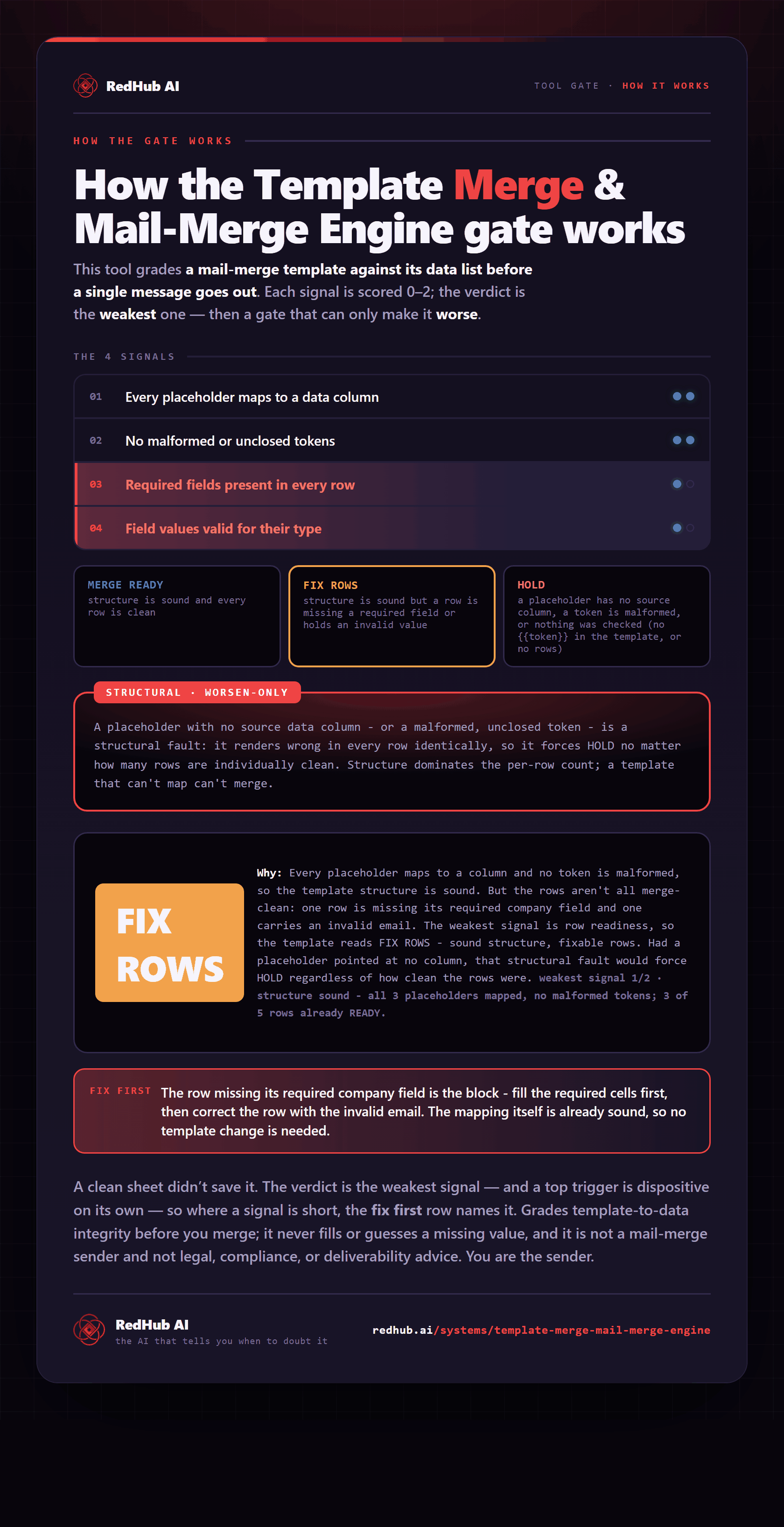
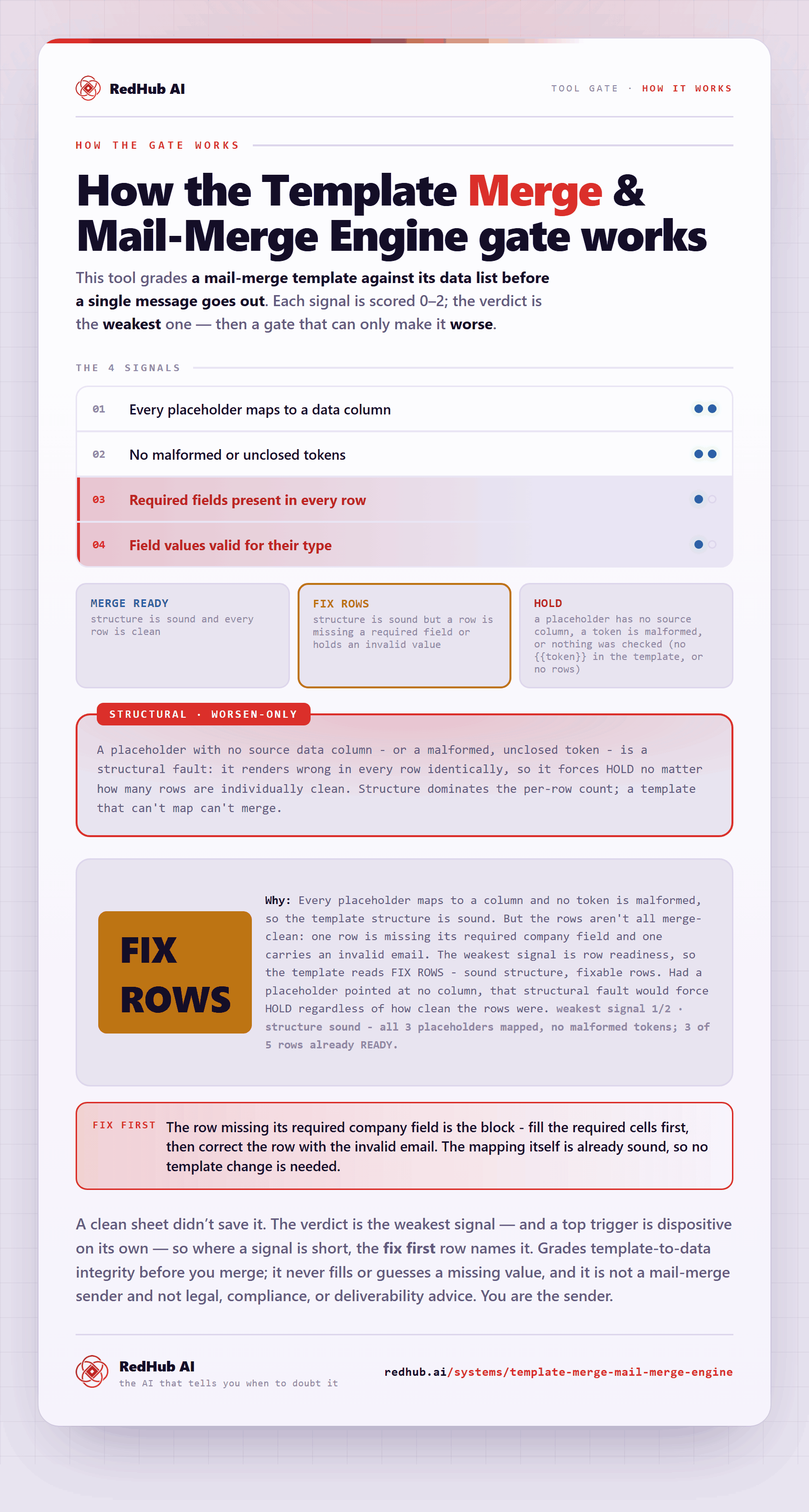
The gate this post refers to, drawn from the tool’s own logic. See the tool.