Publishable vs Secret Keys: They Look Identical and They Aren't
RedHub AI Editorialupdated October 7, 20267 min read

Jump to a section8
Publishable vs secret key is a difference in job, and the string rarely shows it. A publishable key is issued to travel to every visitor's browser, where anyone can read it; that is its purpose, and finding it there is no leak. A secret key is issued for your server alone. Both arrive as random-looking strings in the same setup step and often land in the same config file, so the dependable way to tell them apart is the documentation of the service that issued them.
TL;DR: A key found in your browser's code is not automatically a problem. Publishable and secret keys are built for two different jobs, and mixing them up fails in both directions: hiding a publishable key breaks features that need it to be public, and shipping a secret key to the browser exposes something that was never meant to leave your server. Find out which kind each key is before deciding how worried to be.
Two keys sit in the same file. They were pasted in during the same setup step and they ship to the browser together. One is fine there and the other is a real problem, and laying the two strings side by side won't tell you which is which. The difference is in the design: what each string was issued to do.
What "publishable" means
Some services issue a key so it can travel to your visitors. It identifies your project to that service, saying which account is asking and which project the request belongs to, without granting the power to do anything sensitive. A key like this showing up in your site's downloaded code, in a browser's network activity, or in your page's source is the key doing its job.
Stripe's documentation draws the line in one sentence: "Only publishable keys are safe to expose outside your application's backend." Other services use other names for the same idea, such as a public key or an anon key.
Rotating a publishable key in a panic every time you spot one costs attention and risks breaking something that worked. It also trains you to treat every alert about a key as equally urgent, and the alert about a secret key is the one that can't afford to be waved off.
What "secret" means
A secret key identifies your project too, and it also carries the power to do something consequential: move money, send messages on your behalf, read or change data that should be out of reach from outside. It is issued on the assumption that only your own server will ever hold it. When a secret key shows up where a visitor's browser can read it, that assumption is broken, and everything the key can do is available to anyone who looks.
Same location, opposite verdicts
The worked example in the Keys & Secrets Sorting Drill has this pair in adjacent rows. K-04 is a database's public API key, sitting in the browser bundle. K-05 is a write token for an analytics service, sitting in the same bundle. The sheet reads K-04 as MEANT TO BE PUBLIC and K-05 as ROTATE NOW. Same location, different job, and the job decides.
| Question | Publishable key | Secret key |
|---|---|---|
| Who's meant to read it | Anyone, in every visitor's browser, by design | Only your own server |
| Found in the browser bundle | Expected. Not a finding. | A real problem. It was never supposed to leave the server. |
| Found in a public repository | Still fine on its own, since it was already public | Now reachable. Treat as exposed. |
| What it can do | Identifies your project; what it reaches is set by rules on the service's side | Performs the consequential action it was issued for |
| What fixes it once it's in the wrong place | Usually nothing. It is where it belongs. | Issuing a new value and retiring the old one |
The public-repository row is where people slip. A publishable key there is no new problem, because it was already meant to be seen by anyone. A secret key in the same repository has landed in the one kind of place it was never supposed to touch.
A public key is only as safe as the rules behind it
"Meant to be public" describes the key. It says nothing about what the service lets that key reach. A public database key is safe to publish because the database's own access rules decide which rows a request carrying it can read or change. If those rules admit everyone, the key is still working as designed, and your data is open anyway. Rotating the key would fix nothing, because the hole is in the rules.
So a publishable key sorted correctly is one question answered. Whether the rules behind it hold is a second question, and no key worksheet can answer it for you.
How to tell them apart
Look it up. The service that issued a key documents which category it falls into, and that page is the lookup you need. Some services stamp the kind into a key's label or its first few characters. Plenty don't, and the conventions differ between providers and change over time, so a guess from the string's length or from where you first saw it used is still a guess.
When the documentation leaves you unsure, treat the key as secret. Wrongly guarding a publishable key costs you some extra caution. Wrongly publishing a secret one puts everything it can do in the open.
Once you know the kind, the rest gets easier. A publishable key in an odd place is rarely urgent. A secret key in the wrong place needs the treatment in Moving a Key Isn't Fixing It: When You Actually Have to Rotate, and if it has ever been reachable, moving it back does not undo that. Plan that swap before you start: retiring a live key stops whatever still uses the old value.
Which kind is it? That is the Drill's first question
The Keys & Secrets Sorting Drill asks which kind each key is before it asks anything else, and you answer from your provider's documentation. A publishable key reads MEANT TO BE PUBLIC and is never counted against you. An answer of cant_find is scored as a secret. The sheet never asks you to paste a key in, and sorting keys by kind is not a security review.
Pairs well with
The Supabase RLS Read-Off ($69) answers the second question above for one database: it reads each table and operation, and a policy that admits everyone still reads OPEN TABLE. The Browser Line Read-Off ($59) sorts the checks your app makes into ENFORCED, TRUSTS THE BROWSER and FINE IN THE BROWSER. The Test Mode vs Live Mode Line-Up ($49) covers a different mix-up with the same keys: whether each service is pointed at its sandbox or the live one.
More in this guide
Frequently asked questions
How do I find out which kind of key I have?
Check the documentation of the service that issued that specific key. Providers label and structure their keys their own way, and their documentation is the dependable place to confirm which category a key falls into. Its length, its appearance, and where you first saw it used are not.
I found a key in my browser's network activity. Is that automatically a problem?
Not automatically. If it's a publishable key, that's expected behavior. If it's a secret key, it's a real problem, because a secret key was never meant to leave your server. The location alone doesn't tell you which situation you're in. You need to know which kind of key it is first.
Can a secret key ever safely be sent to a browser?
No. It is issued on the assumption that only your own server will hold it, and everything it can do becomes available to anyone who can read it once it leaves that server. If a secret key is in your client-side code, it needs to come out, and if it has ever been reachable there, it needs a new value too.
What if I can't tell from my provider's documentation which kind a key is?
Treat it as secret until you're certain otherwise. The cost of wrongly treating a publishable key as secret is some extra caution. The cost of wrongly treating a secret key as publishable is the key doing damage in the open.
Is a publishable key always harmless?
The key is safe to publish. What it can reach depends on the access rules set on the service's side. If a database's rules let every request read every row, a public key will read every row, and rotating the key won't change that. Fix the rules.
Does the Keys & Secrets Sorting Drill tell me which kind each of my keys is?
No. That lookup is yours, against the documentation of the service that issued the key. The Drill is a worksheet: you answer which kind it is, based on what you found, and it applies the scoring rules from there. It never asks for the key's value.
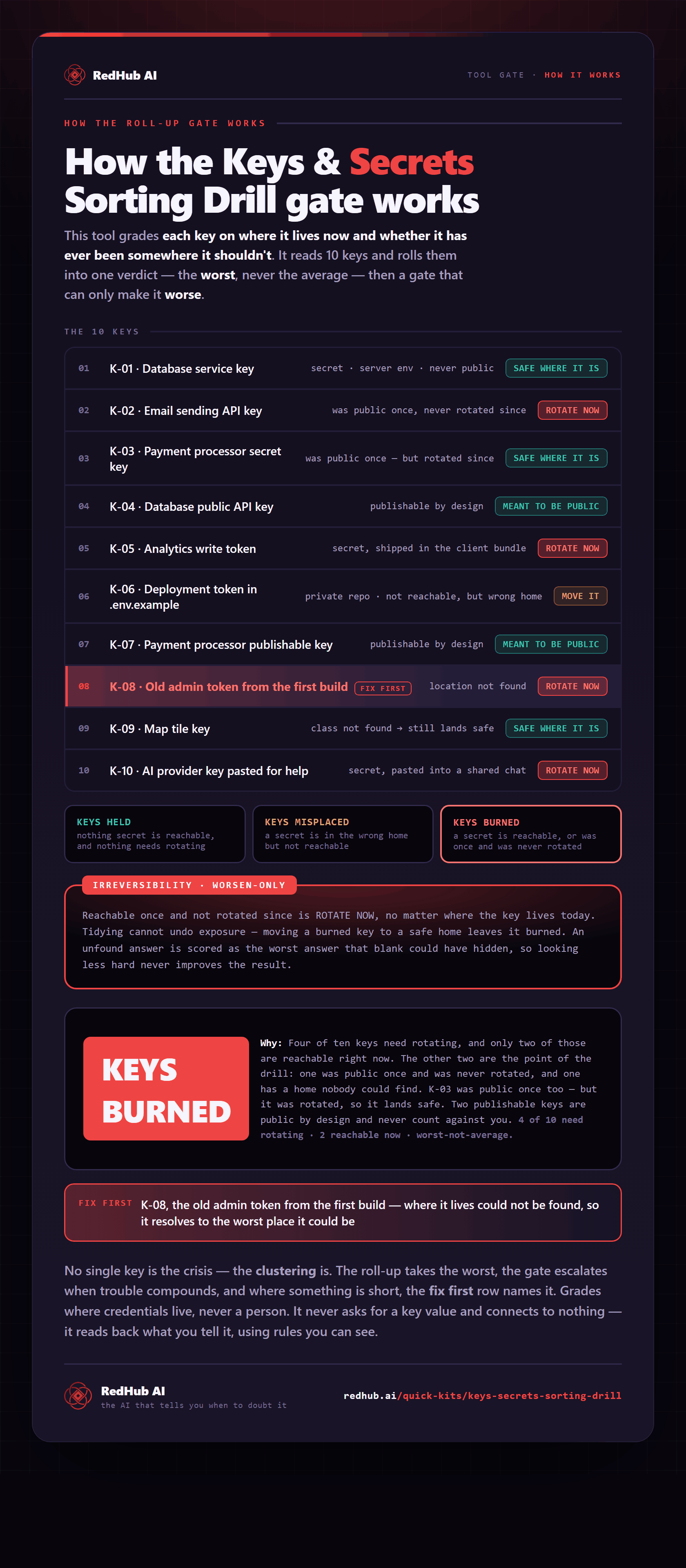
The gate this post refers to, drawn from the tool’s own logic. See the tool.