Moving a Key Isn't Fixing It: When You Actually Have to Rotate
RedHub AI Editorialupdated October 7, 20269 min read

Jump to a section10
- Where a key lives is the wrong question
- Four questions, asked about every key you have
- The gate is history, and tidying can't release it
- When you don't remember
- Don't spend your alarm on the wrong half
- Rotation has a cost, so plan it
- What the Drill doesn't do
- Pairs well with
- More in this guide
- Frequently asked questions
How to rotate an API key comes down to two actions at the service that issued it: create a new value, then turn the old one off. Moving the key, renaming it, or deleting the line that referenced it does neither, so the old value stays as valid as it was the day it leaked. A secret key needs rotating whenever it has ever sat somewhere a stranger could have read it, wherever it lives today and however long ago that was.
TL;DR: A key is only fixed once you've issued a new value and turned off the old one. If a secret key has ever been reachable (committed, pasted, screen-shared, shipped to a browser) and you haven't rotated it since, it is still live, wherever it sits now. If you can't remember whether that happened, treat it as if it did.
Nobody tells you this the first time you find a key somewhere it shouldn't be. Your stomach drops, you move it into the right settings panel, you delete the old copy, and the problem feels finished. A key is a string of characters that a server accepts as proof of who's asking. Once that string has been somewhere a stranger could copy it, even for an hour, even years ago, the string itself is compromised and its new address changes nothing.
Think about a house key that got copied while it sat on a counter at a party. You can move that key to a locked drawer tonight and put it on a different keyring. The copy is still out there. The only fix is a new lock, and with an API key the lock is something you can change yourself. That change is rotation.
Where a key lives is the wrong question
Most advice about keys is about location: put it in an environment variable, keep it out of the client code, don't commit it to a repository. Good practice, all of it, and none of it decides whether one specific key needs a new value today. That takes a narrower question. Has this exact string ever been somewhere reachable, and if it has, have you replaced it since? Location tells you a key is tidy. History and rotation tell you whether it is safe.
Getting keys out of your code and your client bundle in the first place is its own job, and the Vibe-Coded App Hardening Kit covers that pass. This guide takes the half that gets written about less: the keys that already got out, and how to tell which ones those are.
Four questions, asked about every key you have
You don't need a security background for this. You need to answer the same four questions for every key your project touches, one key at a time. They are the four columns of the Keys & Secrets Sorting Drill, and they work the same on paper.
- Which kind of key is this. Some keys are built to be shipped to a browser and read by anyone visiting your site. Others are meant for your own server and nobody else. Test: look up how the service that issued the key documents the difference. Your project files won't tell you.
- Where does it live right now. Server settings, a private repository, a public repository, the code your browser downloads, a chat thread, a screenshot. Test: name the location it is in today, which may differ from the one you meant to put it in.
- Has it ever been somewhere reachable. The question covers the key's whole life. A key that spent one day in a public repository before you caught it has been reachable, even though it isn't anymore. Test: think back through every place this value has sat since it was created.
- Has it been rotated since. Have you issued a new value and disabled the old one since the moment it was reachable? Since you rotated it, that is, and moving it doesn't count. Test: this is the only answer that clears a key that has already been out. If the answer is no, the key is still live.
Question four is the one people skip, because moving a key feels like doing something and rotating it feels like extra work on top of the thing you already fixed. It isn't extra work on top of the fix. For a secret that has ever been reachable, it is the fix, and everything before it is bookkeeping.
The gate is history, and tidying can't release it
A secret key that has ever been reachable and hasn't been rotated since is still live, however clean everything looks today. The rule doesn't soften when the key now sits in the right place, and it doesn't soften after six quiet months. Nothing about a key's present can undo a moment in its past when a stranger could have read it.
The worked example that ships inside the Drill has ten keys in it. K-02 is an email-sending key that lives in server settings today, was reachable at some point before that, and never got a new value. It reads ROTATE NOW. K-03 is a payment processor's secret key with the same answers except one: a new value was issued afterward. It reads SAFE WHERE IT IS. With K-02 on the sheet, the dashboard's verdict for the whole project is KEYS BURNED.
When you don't remember
The honest answer to "has this key ever been reachable" is sometimes "I don't know." Maybe you pasted a whole config file into a chat with an AI tool eight months ago and can't recall whether that key was in it. Maybe you inherited the project. This is common, and it is no failure of memory to feel bad about.
What matters is what you do with "I don't know." Score it as the worst thing it could be hiding: an unremembered history counts as exposed, and you don't get to call the coin flip in your own favor. An answer you can't produce is no evidence of safety. Scored this way, there is also no reward for looking less carefully, because guessing "probably fine" can never land a better result than the truth would have.
The Drill gives this answer its own option, cant_find, and applies that rule to it. One exception is built in. Where an unfound answer could not have changed the row either way, the sheet doesn't count it against you and the row says so.
Don't spend your alarm on the wrong half
Some keys are built from the start to be public. They ship to every visitor's browser and show up in your site's own source, doing their job in the open. Finding one of those in your client code is no discovery, and rotating it in a panic teaches you to distrust every alert this kind of check gives you. The next time something is wrong, you'll be primed to wave it off. The full comparison between the two kinds is in Publishable vs Secret Keys: They Look Identical and They Aren't. For now: know which kind a key is before you decide how worried to be about it.
Rotation has a cost, so plan it
None of this means rotating every key you own the moment you finish reading. A key wired into a running integration can break that integration the instant the old value stops working, if the new value isn't in place everywhere the old one was used. A payment key that lives in three settings panels needs all three updated together. So the order matters: generate the new value, put it everywhere the old one lived, confirm the integration still works, and only then disable the old one.
That order assumes your provider lets both values work side by side for a while, and not every provider does. Some retire the old value the moment you create the new one, which leaves no overlap at all. Read your provider's rotation page before you click anything. If there is no overlap, have every settings panel open and the new value ready to paste, and pick an hour when a few minutes of failed requests will cost you least. The burned key still has to go. What you control is how long the gap lasts.
If you're facing a whole project's worth of keys and aren't sure which to work through first, Which Keys to Rotate First When You're Not Sure What Got Out gives the order.
What the Drill doesn't do
The Keys & Secrets Sorting Drill is a worksheet you fill in with your own answers to the four questions above. It never asks for a key's value, has nowhere to paste one, and connects to nothing. It doesn't scan your code or your repository; it reads back what you type, using rules you can check in the formulas. It is not a security audit and it certifies nothing as safe. It won't rotate anything for you either. It tells you which rows need it.
Four questions per key, never the key itself
The Keys & Secrets Sorting Drill asks four questions about each key and never the key itself, then routes it SAFE WHERE IT IS, MEANT TO BE PUBLIC, MOVE IT or ROTATE NOW. The dashboard rolls the sheet up to KEYS HELD, KEYS MISPLACED or KEYS BURNED and, where a key needs rotating or moving, names the one to fix first. One .xlsx with 60 rows, offline.
Get the Keys & Secrets Sorting Drill — $49Pairs well with
The Vibe-Coded App Hardening Kit ($79) is the pass that comes before this one: a production-readiness audit, a 10-antipattern catalog and a 6-layer checklist that includes secret management. The Money Path Teardown ($69) looks at what surrounds a payment key, grading each step of an order flow CONFIRMED, DISPLAY ONLY, TAKEN ON TRUST or NOT HANDLED. The Agentic AI Security Bundle ($269) is for keys held by an AI agent or an automated process; one of its four systems is the Non-Human Identity & Credential Sprawl Gate.
More in this guide
Frequently asked questions
What does it mean to rotate a key?
It means going to the service that issued the key, generating a new value, updating every place your project uses that key, and disabling the old one. The old string stops working once it's disabled, and that is the step that undoes an exposure. Moving, renaming, or deleting a reference to the old key does none of that; the old string keeps working until it's retired at the source.
Why isn't moving a key to the right place enough on its own?
Because the danger was never about location. Once a secret key's value has been somewhere a stranger could read it, that value is compromised wherever you keep it afterward. Moving it into a proper environment variable stops it leaking again the same way. It does nothing about the copy that got out while the key sat exposed.
What if I don't remember whether a key was ever exposed?
Treat it as if it was. An answer you can't produce is no proof of safety, and giving yourself the benefit of the doubt on something you can't verify is how a real exposure gets missed. Score the uncertain case as the worst it could be, then rotate.
Are all keys equally risky once they're exposed?
No. Some keys are built to be public from the start, so a visitor's browser reading one is the key doing its job, and rotating it in a panic wastes attention a secret key needs. A secret key that has ever been reachable is the one that needs rotating, wherever it lives today.
Will rotating a key break anything?
It can, if the key is wired into something that is running. Generate the new value first, update every place the old value was used, confirm the integration works with the new one, and only then disable the old value. Some providers retire the old value as soon as the new one exists, so check how yours handles rotation before you start.
Does the Keys & Secrets Sorting Drill see my key values?
No. It asks four questions about each key: what kind it is, where it lives, whether it has ever been reachable, and whether it has been rotated since. There is nowhere in the worksheet to enter a value. It connects to nothing and scans nothing; it is a read-off worksheet, not a security audit.
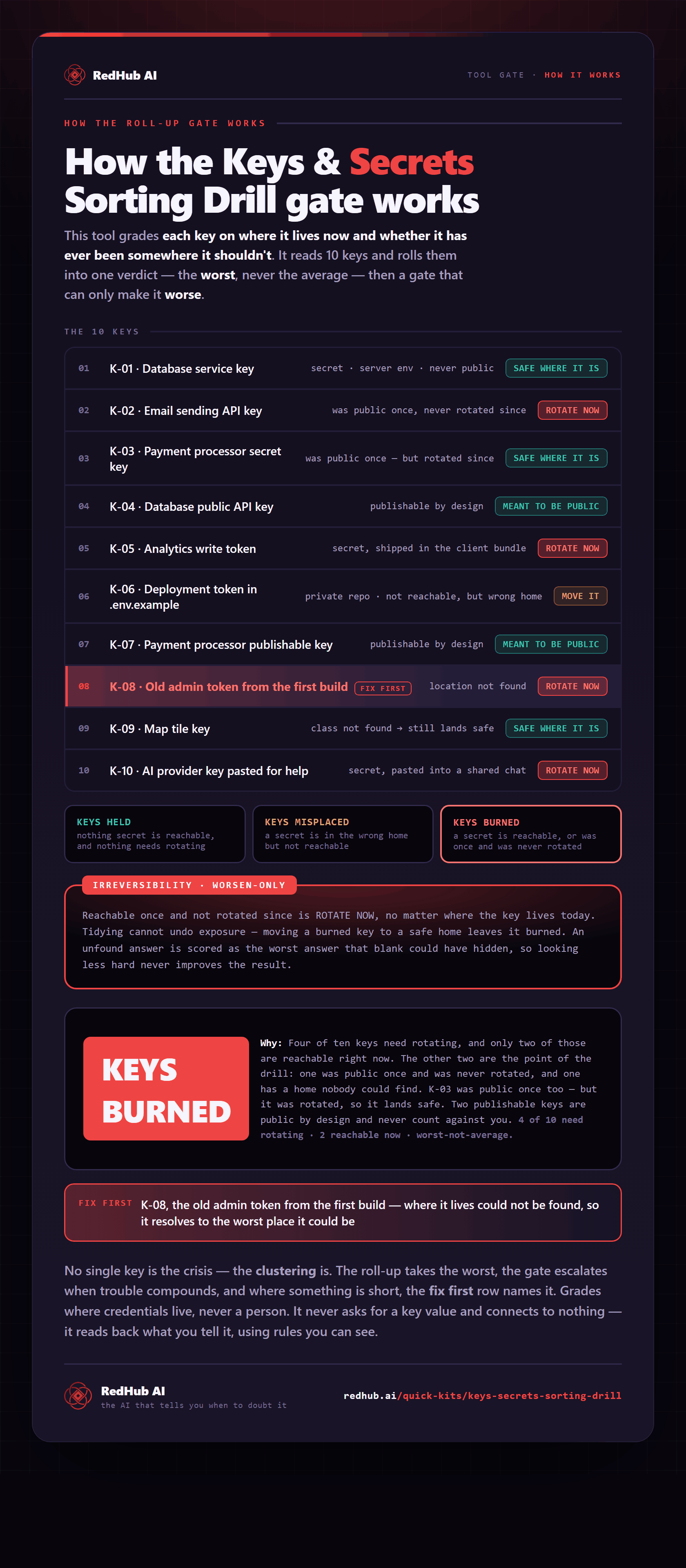
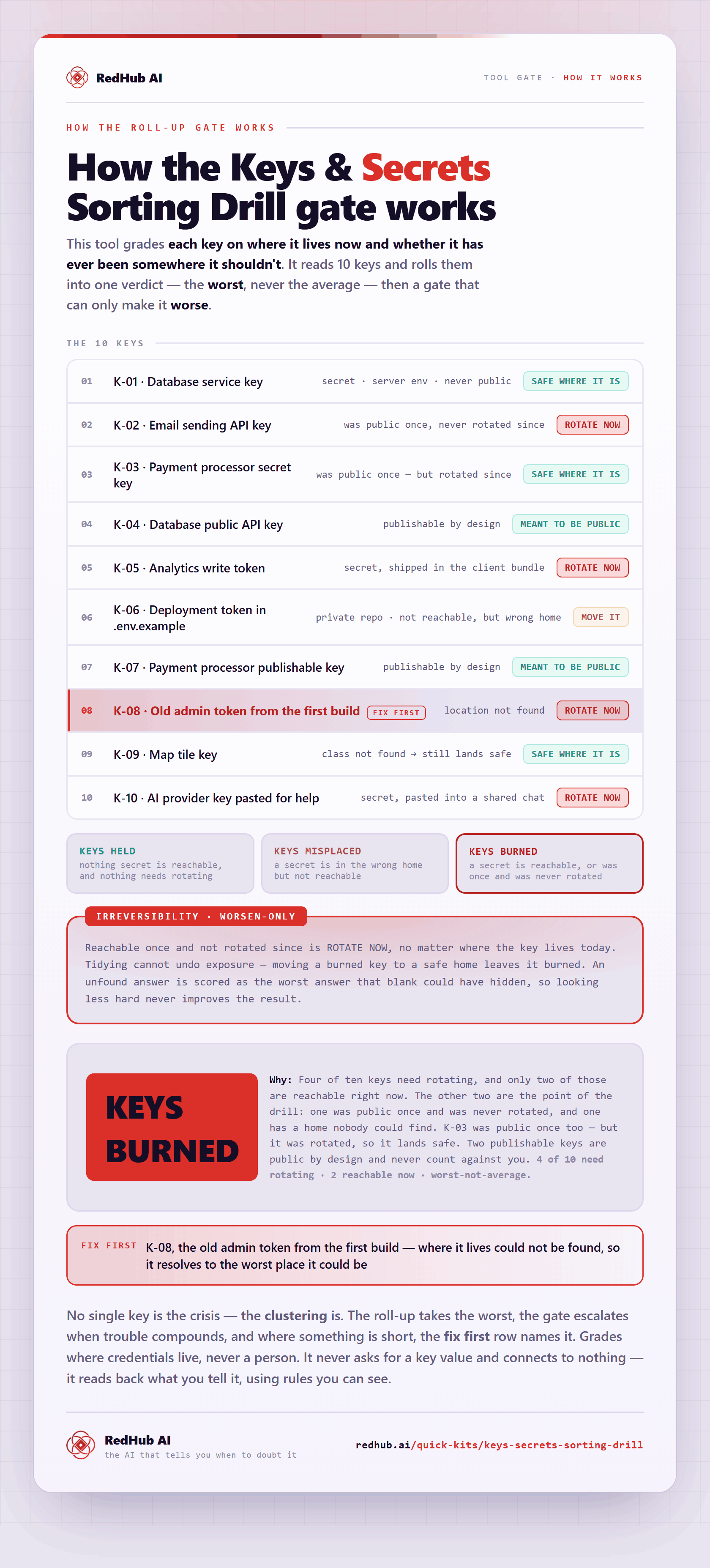
The gate this post refers to, drawn from the tool’s own logic. See the tool.