Which Keys to Rotate First When You're Not Sure What Got Out
RedHub AI Editorialupdated October 7, 20267 min read

Jump to a section8
Start with the keys you can't account for. That is the short answer to which keys to rotate first, and it puts a key whose location or history you can't verify ahead of one you know is exposed. The unverifiable key has to be scored as the worst thing it could be hiding, while the known problem has a clear, bounded fix. After those, work through the secret keys that are reachable right now, then the ones that were reachable once and were never rotated afterward.
TL;DR: With a whole project's worth of keys and limited time, order matters. Unknown-location keys first, because "I can't find it" has to be treated as the worst case. Secret keys that are reachable now second. Keys that were reachable in the past and never rotated third. Keys in the right place, or built to be public, were never the emergency.
Knowing that some of your keys need attention is the easy part of a first pass. The hard part is having ten or twenty of them in front of you, one afternoon, and no obvious place to start. Go in file order, or alphabetically, and you can spend the first hour on something that was never urgent while the one that mattered sits untouched.
The order to work in
- Keys you can't account for. If you don't know where a key lives, or can't remember whether it has ever been somewhere reachable, score that answer as the worst thing it could be hiding. An unfound answer is no evidence of safety. Test: any key where you answered "I don't know" to where it lives or whether it has been exposed goes first.
- Keys you know are reachable right now. A secret key sitting where a stranger could read it today, in the browser bundle or in a repository someone outside your team can see, is an ongoing exposure. Being known makes it more direct to fix than an unknown, and it stays live every hour it isn't rotated. Test: list every secret key that is reachable as of today, however it got there.
- Keys reachable once, never rotated since. These feel less urgent because the exposure is in the past and nothing looks wrong today. The key is still the original value, and it has been valid the whole time. Test: any key where "has it ever been reachable" is yes and "rotated since" is no.
- Everything else. Secret keys that have never been anywhere reachable and sit in the right place need nothing done to them. Keys meant to be public, sitting in public-facing code, need nothing either. Spend no rotation effort here.
Why the unknown outranks the known
This part of the order feels backwards. Surely a key you can see is exposed is worse than one you're unsure about? A known-reachable key has a ceiling on how bad it is. You know what it can do, you know it's exposed, and you can act on that. An unaccounted-for key could be sitting somewhere reachable right now, could have been reachable months ago, or could be fine, and until you track it down or rotate it you carry all three possibilities.
Scoring the unknown as the worst case is also the one version of the rule that can't be gamed. If a vague "I think it's probably fine" could ever score better than an honest "I don't know," there would be a reason to look less carefully.
A worked pass, in order
The ten-key example that ships in the Keys & Secrets Sorting Drill has four rows that read ROTATE NOW. K-08 is an old admin token from the first build, and nobody can say where it ended up. K-05 is an analytics write token shipped in the browser bundle. K-10 is an AI provider key that was pasted into a chat for help. K-02 is an email-sending key that was reachable once, sits in server settings now, and never got a new value.
The sheet's dashboard names K-08 as the one to fix first, ahead of the two you can see are exposed. Not knowing where the admin token is means you can't rule anything out about it. K-05 and K-10 come next. Neither outranks the other on the order above, so take whichever is faster to fix cleanly, usually the one with fewer places the new value has to go. K-02 comes last of the four. A key that has sat this way for a while will sit that way one more day while you clear the active exposures.
That last step is where the order is weakest, and it is worth saying so. "Past exposure, never rotated" ranks third because of an assumption: that nobody found the key while it was out. You can't check that assumption. If K-02 guards something that moves money and K-05 guards an analytics feed, a reasonable person rotates K-02 first, and the list above won't argue. What a key can do is the tiebreaker this order leaves to you.
Don't let the order become a rush
A key wired into something that is running, such as a payment integration or a service your app depends on, can break the moment its old value stops working if the new value isn't in place everywhere the old one was used. Even at the top of the list, take the extra few minutes: generate the new value, update every place the old one lived, confirm the thing still works, and only then disable the old value. The order says what to work on first. It doesn't excuse skipping the confirmation step, which is where a rotation turns into an outage.
What the Drill ranks, and what it leaves to you
Tracking every key, four answers each, and the order in a notes app works, though it gets easy to lose track of which key you already checked. The Drill holds a row per key and applies the same four questions to each. Where a key needs rotating or moving, its dashboard names one to fix first: ROTATE NOW rows come ahead of MOVE IT rows, and within each group a row scored on the unsafe side because of an unfound answer comes ahead of the rest.
After that it goes by sheet order. It does not rank a key that is reachable today above one that was reachable last year, so tiers two and three are yours to apply. It also never asks for a key's value and there is nowhere to type one. Putting your rotations in order is one job; it is not a security review and it certifies nothing.
One key named to fix first, where any need fixing
The Keys & Secrets Sorting Drill rolls 60 rows up to KEYS HELD, KEYS MISPLACED or KEYS BURNED. Its dashboard counts the keys in each destination, shows how many were scored on the unsafe side because you could not find an answer, and names one key to fix first where a key needs rotating or moving. Where none does, it says nothing needs work.
Get the Keys & Secrets Sorting Drill — $49Pairs well with
The Money Path Teardown ($69) is for the key tied to how your app takes money. A rotated key doesn't confirm the path around it is wired correctly, and the Teardown reads that path one step at a time, rolling up to MONEY PATH HOLDS, PATH CAN BE FORGED or PATH BREAKS. The Agentic AI Security Bundle ($269) covers keys that belong to an AI agent or an automated process, a wider surface than rotation alone. The Logged-In Is Not Allowed read-off ($59) asks a question no key answers: whether a signed-in user can reach a record that isn't theirs.
More in this guide
Frequently asked questions
I have a dozen keys and no idea where to start. What comes first?
Start with any key whose location or exposure history you can't pin down. It has to be scored as the worst it could be, which puts it ahead of keys you can already see are exposed. After that, work through the ones you know are reachable right now, then the ones that were reachable once and were never rotated.
Why would an unknown location score worse than a key I know is exposed right now?
Because a known exposure has a ceiling: you know what's wrong and you know how to fix it. An unaccounted-for key could be exposed now, exposed in the past, or fine, and you don't know which. Scoring the uncertain case as the worst removes any benefit to guessing optimistically about something you can't verify.
Won't rotating several keys in a row risk breaking my app?
It can, if you rotate faster than you update every place a key is used. For each key on the list: generate the new value, put it everywhere the old one was used, confirm things still work, and only then disable the old value. Speed through the list is fine. Skipping the confirmation step per key is where outages come from.
Should I just rotate everything at once to be safe?
You can, but it isn't necessary and it multiplies the number of integrations you could break at the same time. Secret keys that have never been reachable and sit in the right place don't need rotating, and keys meant to be public never do. Save the effort for the tiers that need it.
What if I can't remember whether any of my keys were ever exposed?
Treat every one you're unsure about as if it was, and put those at the top of your list. The default is uncomfortable on purpose. An answer you can't produce is no proof of safety, and assuming the best about something you can't check is how a real exposure gets missed.
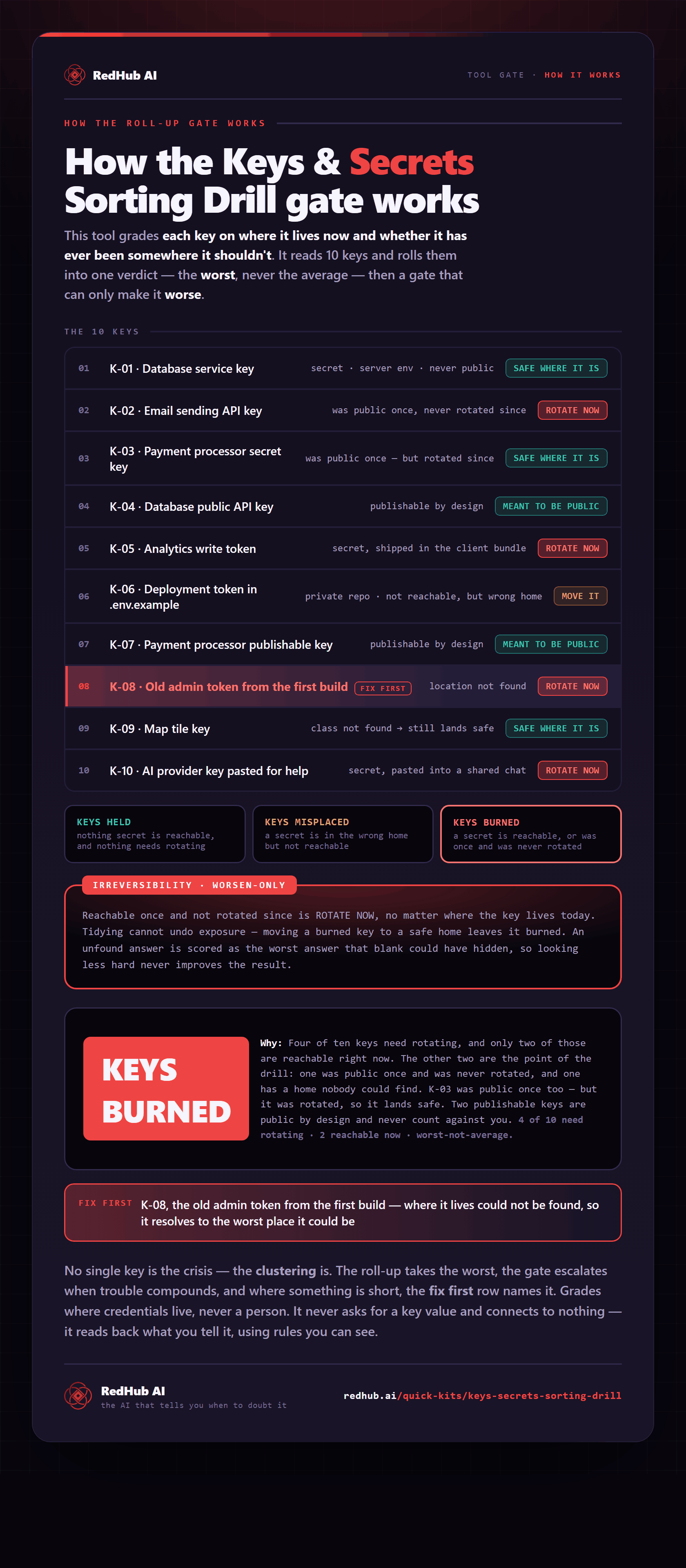
The gate this post refers to, drawn from the tool’s own logic. See the tool.