How to Test Your Lead Forms End to End
RedHub AI Editorialupdated October 4, 20266 min read

Jump to a section7
Clicking submit and watching for the thank-you page checks one step out of seven. To test lead forms end to end, submit as a real visitor and follow that one submission until a person acts on it. The form posts, the data is delivered, someone is alerted, the alert lands in the inbox and not in spam, it reaches the right person, the visitor gets a confirmation, and the conversion event fires. A form can pass the first step and fail every other one. The test proves the chain, not the button.
TL;DR: End-to-end testing follows one real submission from click to a person acting on it: submit, deliver, alert, spam check, routing, confirmation and tracking. Test as a stranger (phone, private window, off your network), use a marker you can search for, time how long the lead takes to reach someone, and re-test after any change. The Website Lead-Leak & Form-Failure Gate ($49) scores six plumbing signals with a no-delivery gate. Part of the guide on website lead leak.
Set up the test so it's honest
A test only counts if it recreates a real visitor's conditions. Use a device and network you don't normally test from; your phone on cellular data is ideal. Open a private window and make sure you are logged out of your site and every tool. Then put a searchable marker in the submission: a name like "TEST-Tue-0915" and an email address you control. You can then find the test lead wherever it lands, and the time in the name tells you how long it took to surface.
Follow the submission through every link
- Submit and watch. Confirm a genuine success state: no hung spinner, no hidden validation error. Note whether the form behaves the same on a phone as on a desktop.
- Find the delivery. Go to where the lead should land, whether inbox, CRM or form dashboard, and confirm the marked submission arrived.
- Check spam and promotions. If it is not in the primary inbox, look in spam and the promotions tab before you conclude it never sent.
- Confirm a person is alerted. A lead nobody is told about is lost, even if it is stored. Write down the minute the alert arrived.
- Verify routing. Confirm it reached the right person or queue, not a catch-all address or a former employee's inbox.
- Check the visitor's side. Confirm the email you submitted with received the confirmation, so a real lead would know you got it.
- Check the conversion event. Confirm it fired on the actual submit, not on page load, in your analytics, ad platform or CRM.
Every test lead leaves a trace
A real test fires the real conversion event, if your tracking works. That is the point of step seven: you can only see the event fire by submitting. It also means each test can be counted as a real conversion in analytics, reported to an ad platform as a result, and filed in your CRM next to real prospects. The "TEST-" marker makes the CRM record easy to find and delete. Deleting the record does not un-report the conversion.
Testing on a staging copy of the site keeps the numbers clean, but then you are testing a different form, often with different mail settings. No setup is both fully real and fully invisible. The workable middle is a small, regular number of live tests and a few labeled conversions you can explain.
Test the failure paths too
The happy path is half the job. Submit once with a required field empty and confirm the error is visible on a phone screen, not hidden above the keyboard. Try the oldest phone and browser you still support. If you have several forms, such as a contact page, a footer form, a landing page and a chat handoff, test each one separately, because they often use different tools and different routing. A leak in one does not show in another.
Put a date on the next test
A form that passed in March can fail in May without anyone on your team touching it. Re-test on a schedule, and again on the day anything changes: a form plugin update, a CRM switch, a host move, a new person owning the inbox. The Website Lead-Leak & Form-Failure Gate ($49) gives the re-test a fixed shape. The kit tells you what to check for each signal, the Form Scorecard holds your marks, and the Dashboard rolls the site up to its worst form. Where a signal is short, the fix-first call names the weakest one, and if the gap turns out to be who receives the alert, see lead notification setup.
Give every form test the same shape
Six plumbing signals per form, marked 0, 1 or 2 from your own testing. The verdict follows the weakest mark: CAPTURING, LEAKING or BLACK HOLE, with a no-delivery gate that overrides the rest. One .xlsx with a worked 5-form example.
Get the Website Lead-Leak & Form-Failure Gate — $49Pairs well with
If the slow-phone test drags, the Core Web Vitals Revenue-Impact Gate ($49) grades a page's LCP, INP and CLS field values and estimates the revenue a slow LCP costs, from your own inputs. Once the plumbing holds, the Lead-Capture Page Kit ($79) grades the page around the form, and the Lead-to-Meeting Engine ($149) drafts replies to the leads that arrive.
More in this guide
What does end-to-end form testing mean?
Following one real submission from the click to a person acting on it: submit, deliver, alert, spam check, routing, confirmation and tracking. Checking only that the thank-you screen appears tests the first step and nothing after it.
How do I test a form realistically?
Recreate a stranger's conditions: phone on cellular, private window, logged out. Use a marker you can search for, such as a name with the day and time in it and an email you control, so you can find the test lead wherever it lands and see how long it took.
Should I test every form on my site?
Yes. A contact form, footer form, landing page and chat handoff often use different tools and routing, so a leak in one won't show in another. Test each separately.
Why time how long the lead takes to surface?
Because response speed shapes what happens next. A 2011 Harvard Business Review audit of 2,241 U.S. companies found firms that tried to reach a web lead within an hour were nearly seven times as likely to qualify it as firms that tried an hour later. The data is old, so treat it as a direction.
Will test submissions mess up my analytics?
They can. A test that fires the conversion event may be counted as a real conversion and reported to ad platforms. Label every test lead so you can find and delete the CRM record, keep live tests few and regular, and expect a small number of explainable test conversions.
How does the Gate help me test?
The kit tells you what to check for each of six plumbing signals, the Form Scorecard holds your 0, 1 or 2 marks, and the Dashboard rolls the site up to its worst form. Where a signal is short, it names the weakest one to fix first. It is deterministic and offline.
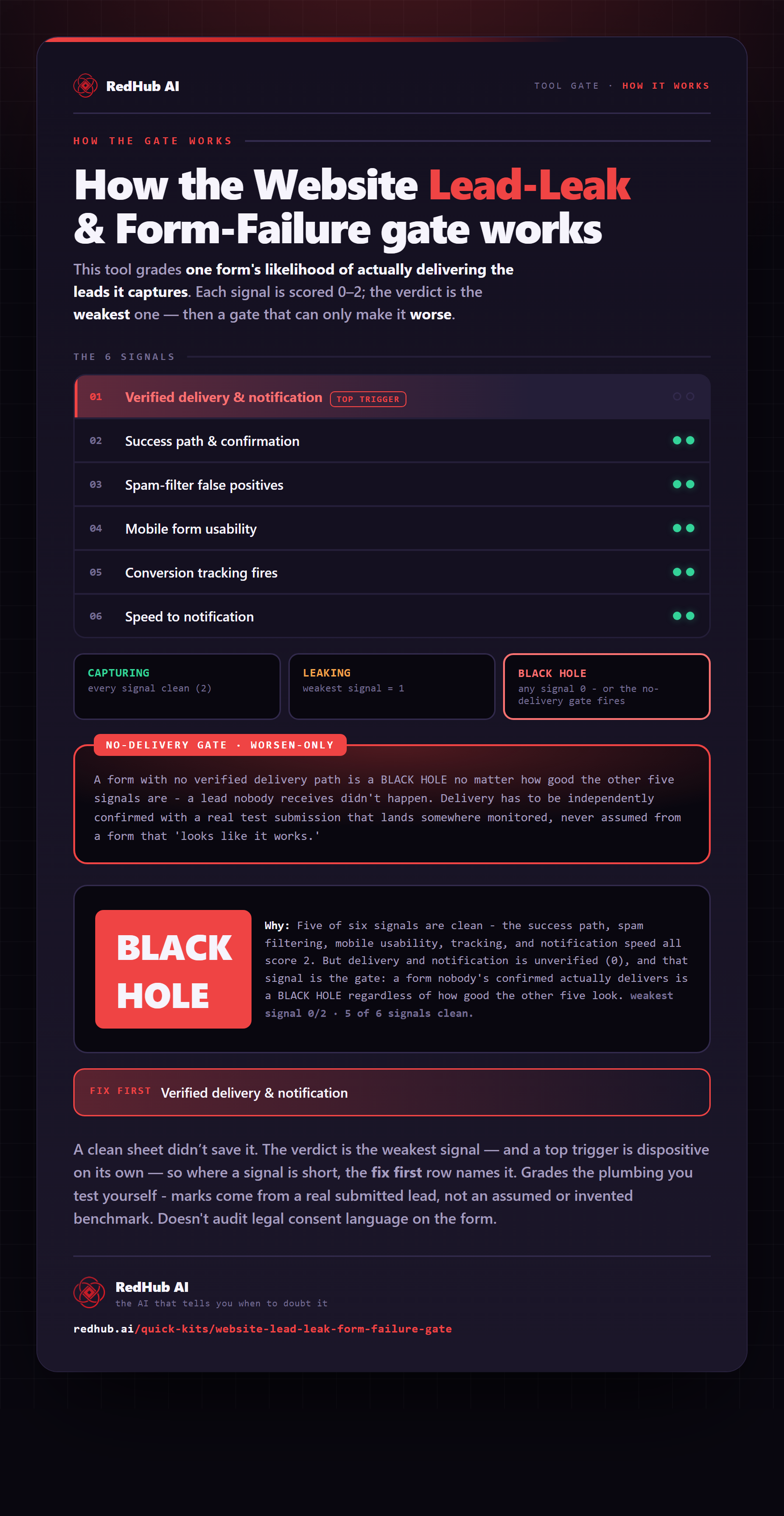
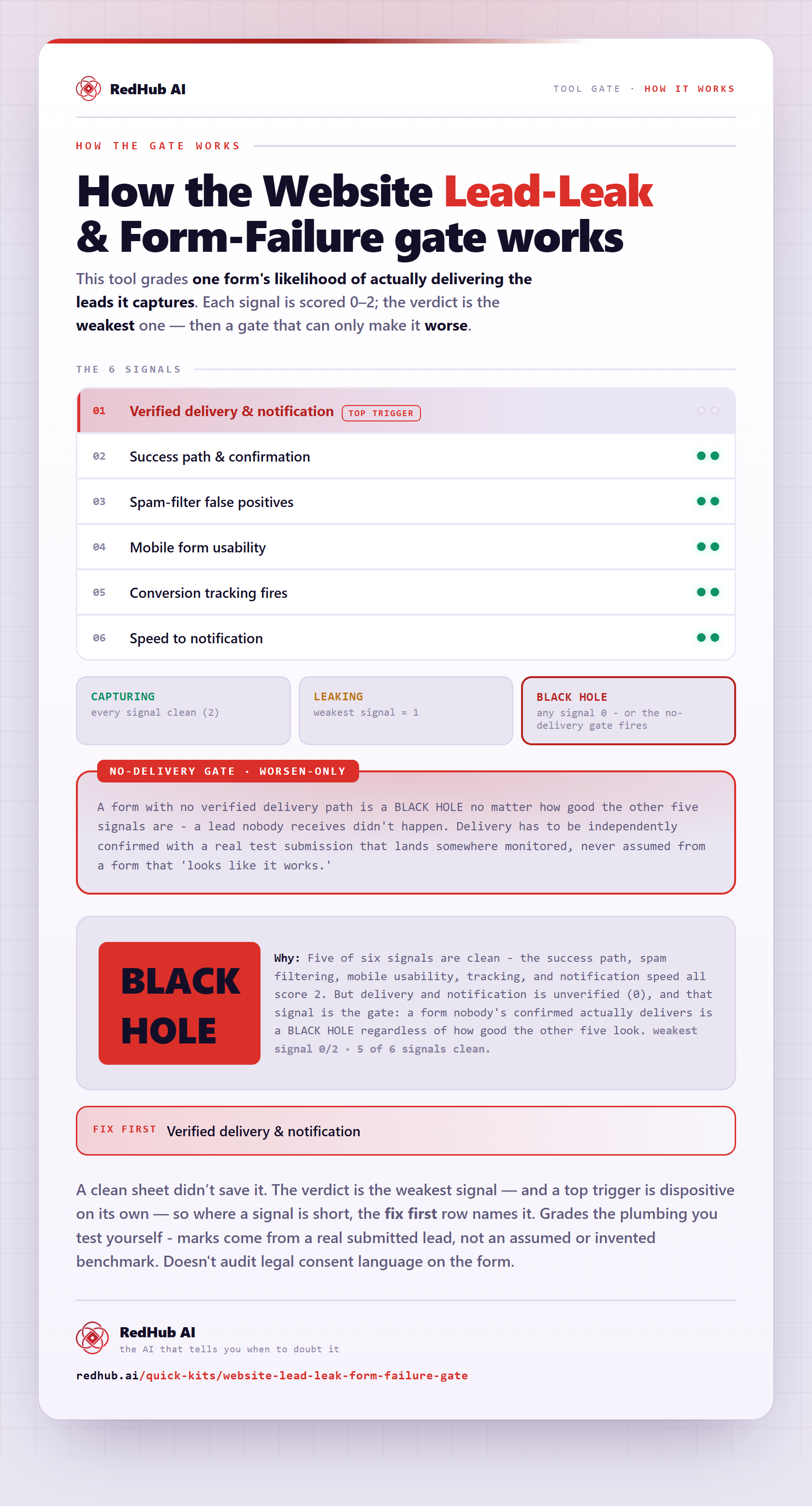
The gate this post refers to, drawn from the tool’s own logic. See the tool.