Where Leads Get Lost Between Click and Inbox
RedHub AI Editorialupdated October 4, 20265 min read

Jump to a section5
There are six places where leads get lost between the click and your inbox, and the visitor sees none of them. The form fails to submit. The submission is not delivered. No person is alerted. The alert lands in spam. It routes to the wrong person. Or the visitor gives up before finishing. Each one is silent to both sides, which is how a "working" form can leak for months. Naming the six turns "we're not getting enough leads" into a list of things to test, and testing all six comes before rewriting anything.
TL;DR: Leads leak at six points: submit, delivery, alert, spam filter, routing, and the visitor abandoning mid-form. All are silent. Five are plumbing you find by testing. Abandonment is design, and your own test can't see it. The Website Lead-Leak & Form-Failure Gate ($49) grades the plumbing on six signals and, where a signal is short, names the one to fix first. Part of the guide on website lead leak.
The six leak points
Walk the path a lead takes, and each handoff is a place it can vanish:
- The submit. A broken script, a validation error the visitor can't resolve, or spam protection that rejects a real person means the submission never happens.
- The delivery. The form posts, but the data never reaches its destination: a misconfigured email step, a broken CRM integration, an expired API token. It succeeded on screen and went nowhere.
- The alert. The lead is stored, but no person is told, so it waits in a dashboard nobody opens.
- The spam filter. The notification is sent but filed in spam or promotions, often because the sender is not authenticated. SPF and DKIM are the records that fix that.
- The routing. It reaches a person, but the wrong one: a catch-all address, a shared inbox with no owner, a former employee's account. Everyone assumes someone else has it.
- The abandonment. The visitor starts and doesn't finish: too many fields, a confusing step, a slow load on a phone.
The leak your own test can't see
Five of the six points are plumbing: machinery that runs after a visitor hits submit. You find those by testing, and you fix them in configuration. Abandonment is different. It is a design problem, and an end-to-end test can't catch it, because you always finish your own form. You know what every field wants, and you are not deciding whether a stranger has earned your phone number.
The only direct view is a count of how many people start the form against how many submit it, if your form tool or analytics reports starts at all. Without that number, you are guessing from the form itself: count the fields, cut any you don't use in the first call, and read the landing page mistakes that push people away before the form. Even with the number, it tells you that people left, not why.
Which signal grades which leak
The Website Lead-Leak & Form-Failure Gate ($49) grades the plumbing on six signals you mark 0, 1 or 2 from your own testing. They map onto the six leak points unevenly:
| Leak point | Gate signal that grades it |
|---|---|
| The submit | Success path & confirmation; Mobile form usability; Spam-filter false positives |
| The delivery | Verified delivery & notification (the no-delivery gate) |
| The alert | Verified delivery & notification; Speed to notification |
| The spam filter | Spam-filter false positives |
| The routing | Not one of the six signals |
| The abandonment | Mobile form usability, in part |
The sixth signal, conversion tracking, does not lose the lead. It loses the record of where the lead came from, and without it a campaign that works can look like one that doesn't. The verdict follows the weakest mark: CAPTURING, LEAKING or BLACK HOLE, and unverified delivery forces BLACK HOLE. Where a signal is short, the fix-first call names the weakest one, with delivery winning ties. To run the test behind the marks, see how to test your lead forms end to end; if the submit itself is failing, start with contact form not sending.
Grade the plumbing, form by form
Six signals per form, a no-delivery gate, and a fix-first call where a signal is short. The Dashboard rolls the site up to its worst form plus an exposure rate, the share of forms reading BLACK HOLE. Deterministic and offline.
Get the Website Lead-Leak & Form-Failure Gate — $49Pairs well with
For the abandonment point, the Lead-Capture Page Kit ($79) grades a capture page on six weighted levers, including form friction and message match. For the routing point, the Speed-to-Lead Routing Kit ($69) audits assignment, escalation and after-hours coverage. For the leads that make it through, the Inbound Lead Qualification Engine ($99) returns PURSUE NOW, NURTURE or DISQUALIFY per lead from your own marks.
More in this guide
Where do website leads get lost?
At six points between click and inbox: the form fails to submit, the submission isn't delivered, no person is alerted, the alert is spam-filtered, it routes to the wrong person, or the visitor abandons the form. Each is silent: no error for the visitor, no lead for you.
If one test fails, is that the only problem?
Not necessarily. A break early in the chain hides the breaks after it. If delivery fails, you can't see whether the confirmation email works. Fix the weakest link, then run the test again before you decide the chain is sound.
What's the difference between a plumbing and a design leak?
Plumbing leaks happen after the visitor hits submit and are fixed in configuration. A design leak is abandonment: the form is too much work to finish, fixed by simplifying it. Your own test finds plumbing leaks. It can't see abandonment, because you always finish your own form.
Why do notifications end up in spam?
Often because the alert comes from a sender the receiving server can't verify, such as your domain with no SPF or DKIM behind it. The email is delivered somewhere, but nobody sees it, which is why checking spam comes before blaming the form.
Does the Gate grade all six leak points?
Not all of them. Its six signals cover the submit, delivery, alert and spam filter, plus mobile usability and conversion tracking. Routing to the right owner is not one of its signals, and it grades abandonment only through mobile usability.
What does the Gate's fix-first call do?
After you mark the six signals, it names the weakest one to repair first, with delivery winning ties, so you fix the actual leak instead of rebuilding everything. Where every signal is at full marks, it names nothing.
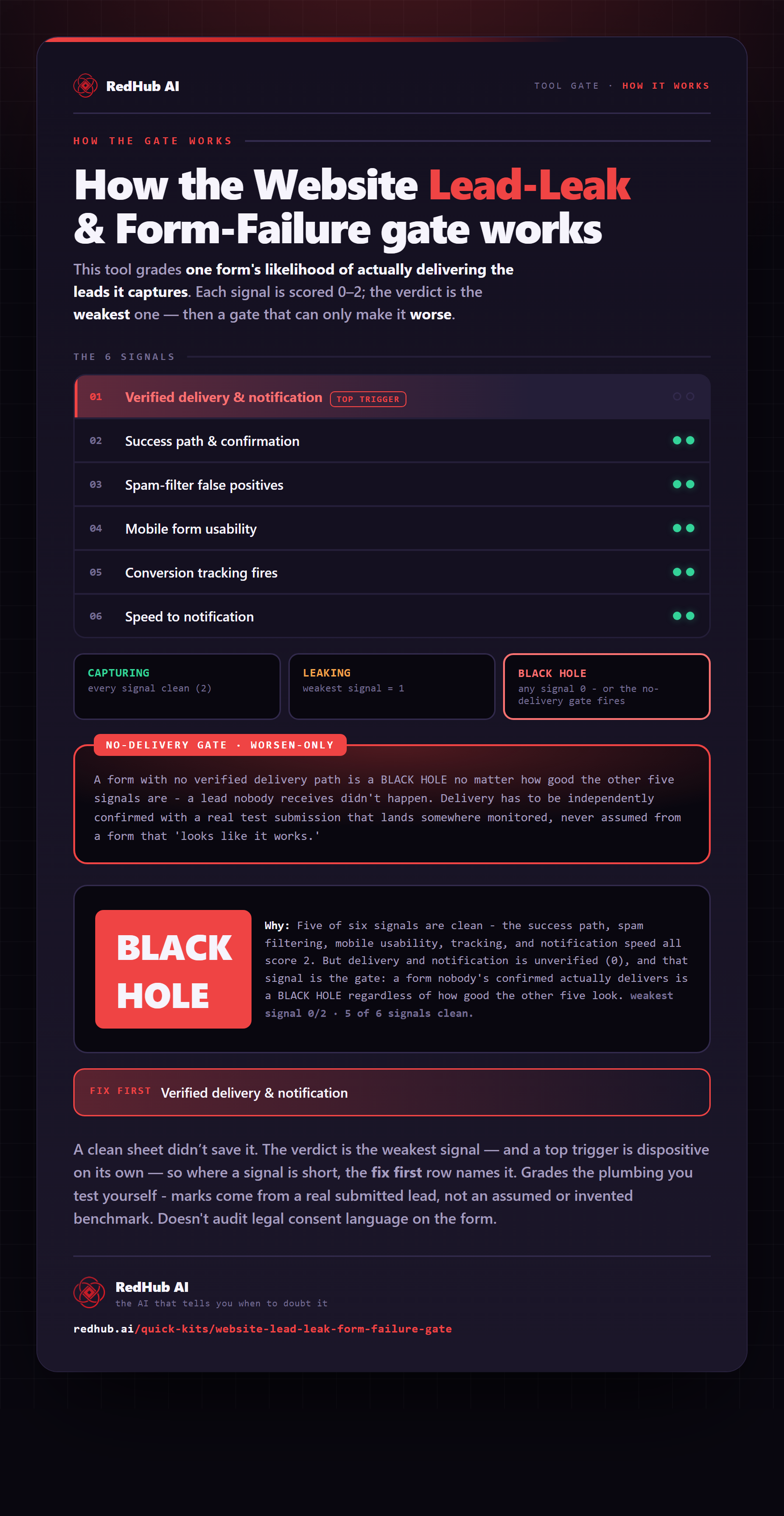
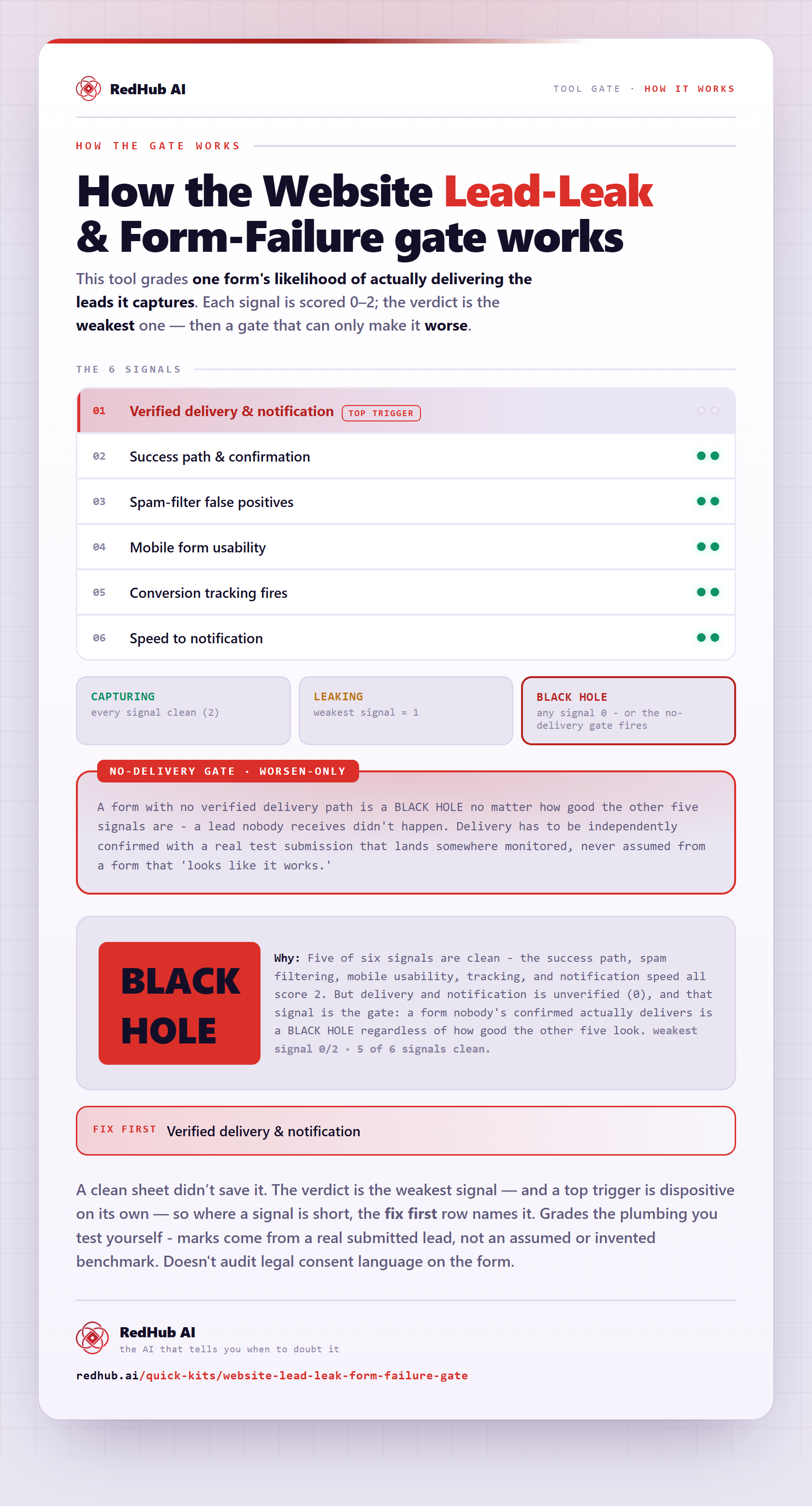
The gate this post refers to, drawn from the tool’s own logic. See the tool.