Website Lead Leak: Why Your Contact Form Is Losing Jobs
RedHub AI Editorialupdated October 4, 20266 min read

Jump to a section6
A website lead leak is a contact form that shows the visitor a thank-you message while the lead never reaches anyone who can call back. On their screen, the submission worked. Behind it, the notification email landed in spam, the CRM handoff stopped, or the alert went to an inbox nobody opens. Nothing throws an error, so the lost lead never shows up in any count, and the gap reads as a slow week. The only reliable way to find a website lead leak is to test the chain on purpose, from the click to a person who can act on it.
TL;DR: A lead leak is a form that submits but never delivers. It throws no error, so you blame a slow week instead of broken plumbing. Find it by submitting your own form as a stranger would and following that one lead to a human. The Website Lead-Leak & Form-Failure Gate ($49) has you mark six plumbing signals per form from your own testing and returns CAPTURING, LEAKING or BLACK HOLE. Deep dives: contact form not sending, testing forms end to end, where leads get lost, and lead notifications.
Why a lead leak throws no error
Most website failures announce themselves. A broken page returns a 404. A failed payment produces an angry email. A lead leak does neither. The visitor sees "Thanks, we'll be in touch" and closes the tab. The failure happens after the form's own success, in a step the visitor never sees and you never check.
That is why the missing leads never enter your count. Your CRM shows eight leads this month, not eight leads plus three that vanished. A leak can run for months. Sometimes it surfaces only when a customer mentions they filled out your form back in June and nobody called.
The chain from click to inbox
A submission has to survive several handoffs before it becomes a lead someone can work. Any one of them can break without a sound:
- The form posts. No hung spinner, no validation error hidden below the fold on a phone, no spam filter on the form itself rejecting a real person.
- The data arrives. The submission reaches the inbox, CRM or form-tool dashboard it was meant for.
- A person is alerted. Someone gets a notification they will see, instead of the lead waiting in a dashboard nobody opens.
- The alert reaches the inbox. The notification email is not filed in spam or promotions. Our post on why emails go to spam covers the sender side.
- The right person gets it. Not a shared info@ address, and not a former employee's mailbox.
- The visitor gets confirmation. A working thank-you page or confirmation email, so they don't assume you ignored them.
When someone says "the form works," they usually mean the first link. The full teardown of each break is in where leads get lost between click and inbox.
Your own test is not every visitor's test
A clean test proves the form worked for one person, once. Some failures only reach other people. Google's reCAPTCHA v3 documentation (opens in a new tab) says the service scores each interaction from 0.0 to 1.0, where 1.0 is very likely a good interaction, and that a site can use a threshold of 0.5 by default. The site owner decides what happens below that line. A real visitor on an unfamiliar network or device may score lower than you do on your own phone. If your form drops low scores without a message, your test passes while theirs fails.
There is no clean fix. You can check whether your spam protection logs or holds the submissions it rejects, rather than discarding them, and read that log every week. You still cannot test as every visitor. A passing mark is a claim about the tests you ran, and it is worth writing down which tests those were.
Test on purpose, then gate on delivery
Fixing a leak is a testing habit, not a monitoring product. The Website Lead-Leak & Form-Failure Gate ($49) is one spreadsheet with three tabs: Start Here, Form Scorecard and Dashboard. For each form, you mark six signals 0, 1 or 2 from your own testing:
- Verified delivery & notification
- Success path & confirmation
- Spam-filter false positives
- Mobile form usability
- Conversion tracking fires
- Speed to notification
The verdict follows the weakest signal, not the average. A form whose lowest mark is 2 reads CAPTURING, 1 reads LEAKING, and 0 reads BLACK HOLE. A no-delivery gate sits on top: if delivery is unverified, the form reads BLACK HOLE no matter how good the rest is. In the kit's worked sample, the main contact form is perfect on five of six signals and still reads BLACK HOLE. Where a signal is short, it names one signal to fix first, and delivery wins ties. The Dashboard rolls the site up to its worst form plus an exposure rate, the share of forms reading BLACK HOLE.
It does not watch your forms. It submits nothing and connects to nothing, so the marks are only as good as the tests behind them. Routing a lead to the right owner is not one of its six signals either. That is the routing layer, and a separate kit below grades it. Start with how to test your lead forms end to end.
Find the forms where leads silently die
The Website Lead-Leak & Form-Failure Gate grades six plumbing signals per form, fires a no-delivery gate, names the fix-first signal where one is short, and rolls your site up to its worst form. One .xlsx with a worked 5-form example. Deterministic and offline: your testing, your marks, no benchmark.
Get the Website Lead-Leak & Form-Failure Gate — $49Pairs well with
The Speed-to-Lead Routing Kit ($69) audits the routing layer this Gate leaves out, on six rules including assignment and ownership, escalation if unclaimed, and after-hours coverage, and returns PASS, FIX or BLOCK. The Lead-Capture Page Kit ($79) grades whether the page around the form persuades, including form friction. Once leads arrive reliably, the Lead-to-Meeting Engine ($149) drafts first-touch replies that propose real open times from your own Google Calendar.
More in this guide
What is a website lead leak?
It is when a contact form submits successfully for the visitor but the lead never reaches you, because the email, notification or CRM handoff fails afterward. There is no error, so the missing leads never enter your count, and the leak can run for months looking like a slow patch.
How do I know if my contact form is losing leads?
Test it yourself as a stranger would: from your phone, on cellular, not logged in. Confirm a person on your team actually receives it, and note where. If it does not arrive or lands somewhere nobody watches, you have a leak. See contact form not sending.
Why do leads disappear if the form "works"?
Because "works" usually means the form submits, which is only the first link. Delivery, the alert, spam filtering and routing to the right person can each break after a successful submit, and any one of them drops the lead without an error.
Does the Gate monitor my forms automatically?
No. It is a testing scorecard, not a monitor. It submits nothing and connects to nothing. You test each form, mark six signals 0, 1 or 2, and it returns a verdict per form, gates on delivery, and names the signal to fix first where one is short.
What are the six plumbing signals?
Verified delivery and notification, success path and confirmation, spam-filter false positives, mobile form usability, conversion tracking firing, and speed to notification. The weakest mark sets the verdict: CAPTURING, LEAKING or BLACK HOLE. Unverified delivery forces BLACK HOLE regardless of the other five.
Should I fix leaks before spending on ads?
Yes. Ads pointing at a leaking form pay for clicks that turn into leads you never receive. Confirming delivery first gives every dollar of traffic a chance to reach a person. Test the form, fix the weakest link, then scale the traffic.
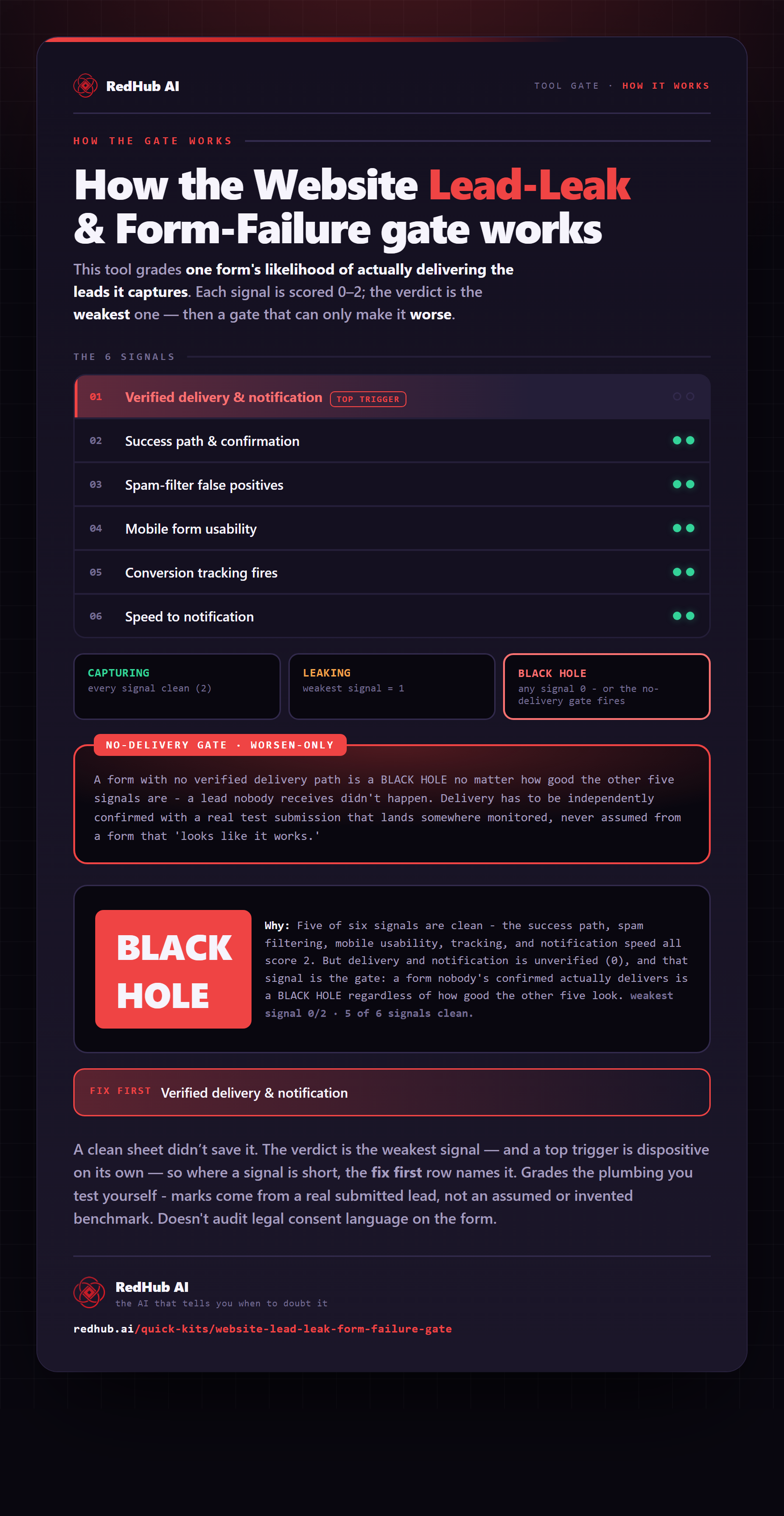
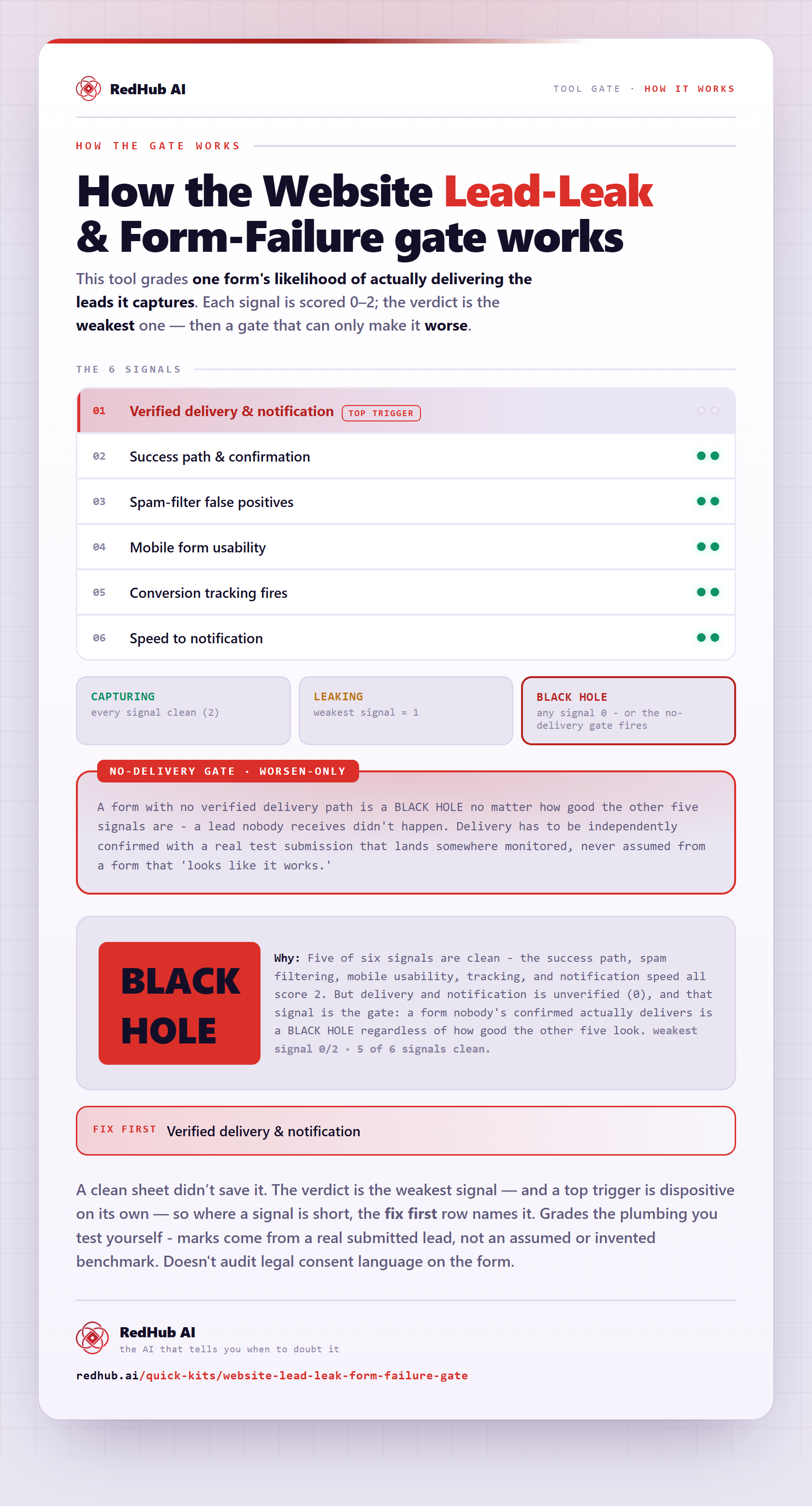
The gate this post refers to, drawn from the tool’s own logic. See the tool.