Contact Form Not Sending? How to Find Out
RedHub AI Editorialupdated October 4, 20266 min read

Jump to a section7
Submit the form yourself, from a phone on cellular data, and follow that one message until it stops. That is the fastest way to diagnose a contact form not sending, because "not sending" covers four different breaks. The form never submits. It submits, but the email step fails. The email goes out and lands in spam. Or it arrives at an address nobody checks. Each break has its own fix, so the goal is to find the exact link that failed before you change anything.
TL;DR: "Form not sending" is four failures: no submit, no delivery, spam-filtered, or the wrong inbox. Find yours by submitting as a real visitor, from a phone, logged out, and tracing each step. Check the notification's From address and sender authentication before you blame the form. The Website Lead-Leak & Form-Failure Gate ($49) turns the check into a repeatable scorecard. Part of the guide on website lead leak.
Reproduce it like a stranger
Testing while logged into your own site, on office wifi, in the browser you use for admin work, recreates conditions none of your visitors share. Reproduce theirs instead. Use your phone on cellular data, open a private window, stay logged out of everything, and fill the form the way someone who found you on a search would. Some bugs only reach strangers: a script that fails for logged-out users, spam protection that scores an unfamiliar device lower than yours, a required field that behaves differently on a small screen.
Walk the chain, one link at a time
- Does it submit? Watch for a real success state, not a spinner that hangs or a validation error you can't see. If submission fails, it is a form-script or required-field problem, and nothing downstream matters yet.
- Does it deliver? Check the actual destination: your inbox, your CRM, your form tool's dashboard. A form can post successfully and never hand the data off if the email step or an integration is misconfigured.
- Is it in spam? If it is not in the inbox, check spam and promotions before you conclude it never sent.
- Did a person get it? A delivered lead sitting in an address nobody monitors is still a lost lead. Confirm a real person was alerted.
- Is it the right person? A lead routed to a departed employee or a catch-all nobody reads is lost, even though every technical step "worked."
Match the fix to the break
A submit failure is a form-script, validation or hosting issue. A delivery failure usually sits in the email step. On WordPress, wp_mail() (opens in a new tab) sends through PHP's own mail() function unless a plugin or setting changes it, so the notification leaves from your web host with whatever authentication the host provides. Contact Form 7's guide also notes that some hosts block outgoing mail from its default wordpress@ address if that mailbox does not exist.
The common fix is to send notifications through an authenticated mail service, over SMTP or a transactional email provider, from a domain with SPF and DKIM records. Part of that is no longer optional for Gmail: since February 1, 2024, Google's sender guidelines (opens in a new tab) have said all senders to Gmail accounts must set up SPF or DKIM. If those records are new to you, read SPF and DKIM explained. A "nobody saw it" problem is about notifications and routing instead, covered in lead notification setup.
The rescue that hides the problem
When you find the test alert in spam, the natural move is to click "Not spam" and move on. That can teach your own inbox to trust the sender. Your next test lands in the inbox and passes. A colleague's inbox, or the inbox of whoever takes over the form next year, can still file the same alert in spam, because the sender is still unauthenticated. You fixed one mailbox.
A sturdier check sends the next test alert to an address that has never seen the sender, and reads the message's authentication results header for SPF and DKIM. Even that only proves today. Mailbox providers weigh signals no outside test can fully see, which is why email deliverability is never a one-time setting.
Write down what you found
Record the result where you will see it again: which form, which link broke, what you changed, and the date you checked. The next person to ask "is the form working?" then has an answer that says "checked on the 14th" instead of "I think so." The Website Lead-Leak & Form-Failure Gate ($49) is built for that record: a Form Scorecard where you mark six plumbing signals per form, including verified delivery & notification and spam-filter false positives, and a verdict per form of CAPTURING, LEAKING or BLACK HOLE. The full method is in how to test your lead forms end to end.
Turn one diagnosis into a scorecard
Mark each form on six plumbing signals from your own testing. A no-delivery gate forces BLACK HOLE when delivery is unverified, and where a signal is short you get the one signal to fix first. One .xlsx: Start Here, Form Scorecard, Dashboard.
Get the Website Lead-Leak & Form-Failure Gate — $49Pairs well with
When the break is in the email step, the Email Deliverability & DMARC Enforcement Readiness Gate ($79) grades each sending domain on six controls, including SPF, DKIM, DMARC policy and From-alignment. When the break is who gets the lead, the Speed-to-Lead Routing Kit ($69) audits assignment, escalation and after-hours coverage. Once the form delivers, the Lead-Capture Page Kit ($79) grades whether the page around it persuades.
More in this guide
Why is my contact form not sending emails?
Usually one of four things: the form does not submit, it submits but the email step is misconfigured, the email sends but lands in spam, or it arrives at an unmonitored inbox. Trace each link to find which one, because the fixes are all different.
How do I test if my form works?
Submit it yourself as a stranger would: phone on cellular, private window, logged out. Then confirm a person on your team receives it, and where. Testing while logged in on office wifi hides the bugs that only reach real visitors.
My form says "success" but I get nothing. Why?
The success message only confirms the form submitted. Delivery happens afterward. If the email or CRM handoff is misconfigured, or the notification is spam-filtered, you get the success screen and no lead. Check the actual destination and your spam folder.
Why do form notifications go to spam?
Often because the alert is sent from an address the receiving server cannot verify: your domain with no SPF or DKIM behind it, or the visitor's own address in the From field. Send from your site's domain through an authenticated mail service, and put the visitor's address in Reply-To.
I clicked "Not spam." Is it fixed?
Probably only for your inbox. Marking a message as not spam can teach your mailbox to trust that sender, while other inboxes still filter it. Fix the sender authentication, then test again with an address that has never received the alert.
What does the Gate check that I can't eyeball?
It structures six plumbing signals per form: verified delivery and notification, success path and confirmation, spam-filter false positives, mobile form usability, conversion tracking, and speed to notification. A no-delivery gate and a fix-first call mean you check every link each time, not only the one you thought of.
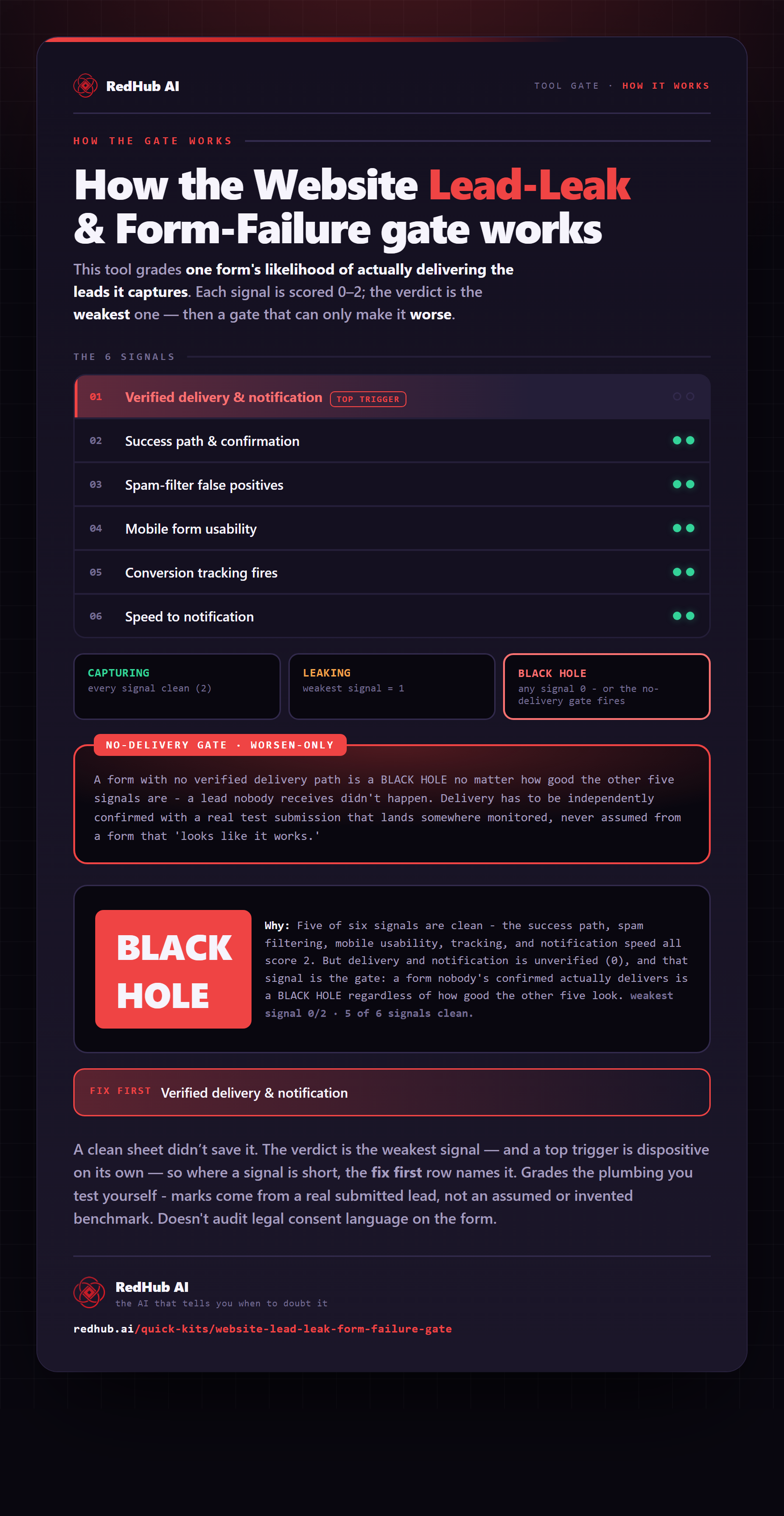
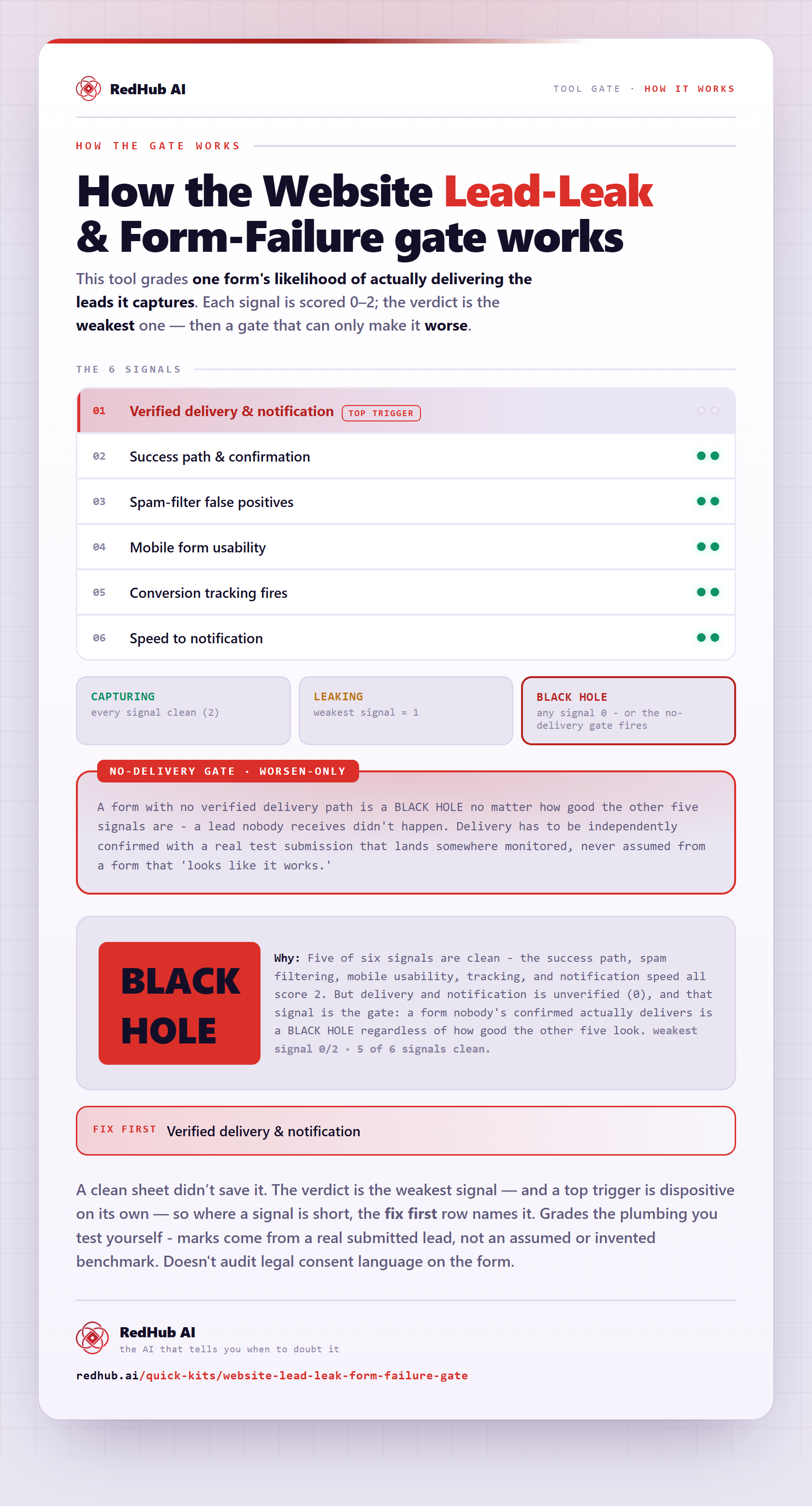
The gate this post refers to, drawn from the tool’s own logic. See the tool.