Account Reconciliation: A Practical Process That Actually Ties Out
RedHub AI Editorialupdated November 5, 20266 min read

Jump to a section9
- Step 1: Set the sources, key, fields and tolerance first
- Step 2: Build one table, one row per record per source
- Step 3: Run the comparison and sort every key
- Step 4: Work the worst key first
- Step 5: Re-run until every key agrees
- Running steps 3 and 4 with the engine
- How often to run it
- Pairs well with
- More in this guide
A reconciliation process that ties out has five steps, done in the same order every time. Set the sources, the key and the tolerance before you look at any data. Build one table with every source's version of each record. Run the comparison. Work the exceptions worst first, correcting each wrong value in the system it came from. Then run it again, and keep doing that until nothing is left. This post is about reconciling records across three or more systems. For tying one account balance to its supporting detail, see account reconciliation. Neither is accounting advice.
TL;DR: Decide the key and tolerance before the first run. Treat a value that disagrees and a record that is missing as different problems, and fix the disagreement first. Correct the source, not the report. A reconciliation is finished when every key agrees in every source, not when most do. The Multi-Source Data Reconciliation Engine ($89) runs steps three and four on exports you supply; the rest stays with you.
Step 1: Set the sources, key, fields and tolerance first
Write these down before anyone opens a spreadsheet:
- Sources. "Bank, processor, ledger," not "our systems."
- Match key. The one field that holds the same value for the same record everywhere, such as a transaction ID or invoice number.
- Compare fields. The values that must agree. Amount and status are common. Leave out any field that means different things in different systems.
- Tolerance. How far apart two amounts can be and still count as equal. One cent absorbs rounding. Set it now, while no result is pushing you to widen it.
Skipping this step means improvising the key halfway through review. Whatever you land on then is undocumented, and the next person runs a different reconciliation under the same name.
Step 2: Build one table, one row per record per source
Export each source and stack the exports into a single table: source, key, then the compare fields. Clean as you go. Make IDs consistent (ORD-0042 in one system and ORD-42 in another will not match), strip currency symbols from amounts, and check that each key appears once per source. A key that shows up twice inside one export is a problem in that source. Settle it there before you reconcile, not during.
Step 3: Run the comparison and sort every key
Every key lands in one of three places:
- Agrees. Present in every source, every compare field within tolerance.
- Disagrees. Present in two or more sources, with at least one value out of line.
- Missing somewhere. Present in some sources, absent from at least one, with no conflict among the ones that have it.
If a key both disagrees and is missing from a source, count it as a disagreement. A wrong number is the bigger problem.
Step 4: Work the worst key first
Start with disagreements. Open the conflicting sources side by side and look at the spread. Decide which system is authoritative for that value, correct the wrong one in its own system, and export again. A status that differs, say settled in one source and pending in another, usually means one export is stale.
Then the gaps. A record missing from one source has either not posted yet, in which case you wait and re-run, or was filtered out of the export, in which case you widen the export. Write down what each exception was, what caused it, and what you did. That record is what lets you answer the question six months from now when someone asks why a number moved.
Step 5: Re-run until every key agrees
After each round of corrections, run the whole comparison again. The process is finished when every key agrees in every source. "Ninety-eight percent agreed" is a progress report. One key still in conflict means at least one system holds a wrong value.
Before you sign off, spot-check a handful of the keys that agreed. An exact-key comparison will not merge two different customers because their names look alike. It can still mislead you in quieter ways. A key reused for two different things across systems, such as invoice numbers that restart each year, will line up records that are not the same. And a blank cell can let a key agree when one source never supplied the value. Ten minutes of spot-checks catches both.
Running steps 3 and 4 with the engine
The Multi-Source Data Reconciliation Engine ($89) takes the table from step 2 as a CSV and does the sorting in step 3. It reads each key AGREED, DISPUTED or INCOMPLETE, with DISPUTED outranking INCOMPLETE. It reads the set RECONCILED, FIX or NOT RECONCILED, and a single DISPUTED key forces NOT RECONCILED. Its "Fix first" line names the worst key to start step 4 on. Its Exception Triage Runbook walks the same order this post does, and says to keep each dated run as evidence for your close file.
Three things it leaves to you. It does not connect to your systems or build the table. It does not keep a log of your decisions. The output is printed text or JSON, and filing it is your step. And the script counts blank cells as "not supplied," so a key can read AGREED while one source left the amount empty. Scan for blanks before you trust an AGREED. If a key appears twice in one source, it refuses the whole file and names both rows.
How often to run it
As often as the systems drift and as often as a mismatch would cost you. Monthly, in line with the close, is common for money. Anything a customer sees, such as an account's status, earns a shorter cycle. The steps stay the same at any cadence. What changes with repetition is that step 1 is already written down. For splitting this work between a script and a person, see automating reconciliation. For the overview, see the main guide to data reconciliation.
Know which key to fix first
The Multi-Source Data Reconciliation Engine sorts every key AGREED, DISPUTED or INCOMPLETE across three or more sources and, when any key falls short, names the worst one to work next. Python script, workbook, a setup playbook and a triage runbook. Not accounting advice.
Get the Multi-Source Data Reconciliation Engine — $89Pairs well with
For a balance-level close, the Finance & Reporting Automation Kit ($129) checks tie-outs such as AR and AP against the general ledger and cash against the bank, labeling each Ties out, Review or Does not reconcile. If you only ever have two lists, the Two-List Reconciliation Kit ($49) is the simpler buy. If a source fails step 2 because it holds repeats, the Duplicate & Near-Duplicate Finder ($49) flags exact and near duplicates in one list without deleting anything.
More in this guide
What does it mean for a reconciliation to tie out?
Every key agrees in every source, after each disagreement and gap has been traced and corrected at its source. A high agreed share with one conflict left does not tie out.
What are the steps of a reconciliation process?
Set the sources, key, compare fields and tolerance. Build one table with a row per record per source. Run the comparison. Fix disagreements first, then gaps, at the source. Re-run until every key agrees.
Which exceptions should I fix first?
Values that disagree, before records that are missing. A disagreement means some system holds a wrong number. A missing record is often a timing gap or a filtered export that resolves once the row is found.
How do I set the amount tolerance?
Before the first run, at the smallest value that absorbs rounding between your systems, often one cent. Setting it after you see results invites widening it until a real difference disappears.
Why spot-check records that already agree?
Because agreement depends on the key and the data. A key reused for two different things lines up records that are not the same, and a blank value can let a key agree when one source never supplied it.
Is this process accounting advice?
No. It is an operating procedure for comparing records across systems. How reconciliation fits your close, and how to treat what it finds, is a question for your accountant or controller.
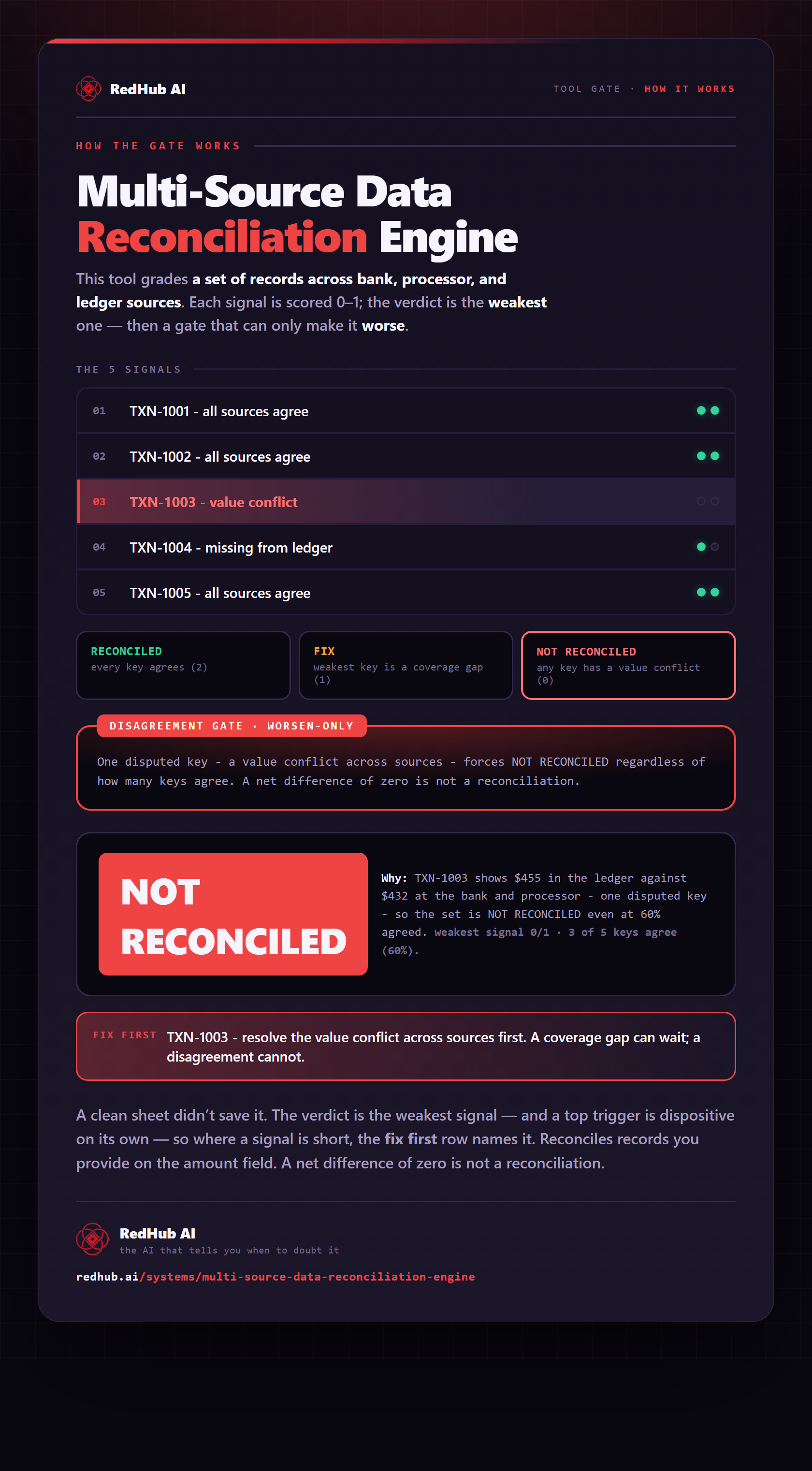
The gate this post refers to, drawn from the tool’s own logic. See the tool.