How to Avoid Google Business Profile Suspension
RedHub AI Editorialupdated September 7, 20265 min read

Jump to a section8
TL;DR
- What it is: a three-habit routine to avoid Google Business Profile suspension — audit before you edit, change one thing at a time, keep NAP consistent everywhere.
- Who it's for: operators and agencies who want to stop reacting to suspensions and start preventing them — score your profile with the Suspension-Risk Gate before you make your next edit.
- How it works: a five-minute check before every edit catches the two dispositive triggers before they cause a problem.
- Bottom line: the businesses that get suspended repeatedly are usually skipping the audit step, not committing a new violation each time.
RedHub AI is not affiliated with, endorsed by, or acting on behalf of Google. This describes Google’s published Business Profile guidelines and the enforcement patterns local operators report, current as of August 2026; Google changes both its guidelines and its support tooling without notice, so verify the current rules before you act on anything here. Nothing here is legal advice.
How do you avoid a Google Business Profile suspension?
To avoid a Google Business Profile suspension, build three habits into how you manage your listing: audit the profile against the recurring triggers before you make any edit, change one field at a time instead of editing several at once, and keep your name, address, and phone (NAP) identical everywhere your business appears online. Most avoidable suspensions happen when one of these three habits is skipped, not because a new rule was broken.
Best for: building prevention into your routine instead of only reacting after a suspension — score your profile with the Google Business Profile Suspension-Risk Gate before your next edit.
Most businesses only think about Google Business Profile suspension after it's happened. That's backwards, and it's expensive — every day a listing is down is a day of Map Pack leads you don't get back. Avoiding a suspension is mostly three habits, done consistently, before you ever touch your profile again.
Habit 1: audit before you edit
Before you change anything — your name, address, hours, or category — check the profile against the recurring triggers first. This takes a few minutes and catches problems before you make them worse. If you're about to do a rebrand, a location move, or a bulk update across multiple listings, this step matters even more, because those are exactly the moments Google's filters watch closest.
Habit 2: change one thing at a time
A sudden, large edit — renaming the business, moving the address, and changing the category all in one sitting — can read as a profile takeover to an automated review, even when it's the legitimate owner making a legitimate change. Space out major edits. Let one change settle before making the next one, especially in the weeks right after an ownership transfer or rebrand.
Habit 3: keep NAP consistent everywhere
Name, address, and phone number should be identical, character for character, across your Google profile, your website footer, your directory listings, and your business registration. Set a reminder to re-check this any time you update one of those places — a website redesign that quietly changes a suite number is a common, avoidable way NAP consistency breaks.
- Before any profile edit: re-check your business name and NAP consistency — the two dispositive triggers — even if the edit you're making is unrelated to either.
- After a rebrand or ownership change: wait, then change fields one at a time rather than all at once, and re-verify NAP across every place your business appears.
- On a regular cadence: re-run a full check against all seven signals, not just the two dispositive ones — category drift and stale hours build up quietly.
- For multi-location businesses: check every location's profile before a brand-wide update, since a template mistake — a name format or a NAP field — lands on every location at once when it's rolled out chain-wide.
Key insight: a suspension is rarely the first time a business broke a rule. It's usually the first time nobody caught it before hitting publish. The routine above moves the check earlier, from "after the notice" to "before the edit."
Multi-location brands: check the whole portfolio, not just one listing
If you manage several locations, a rebrand or bulk edit can put every listing at risk from the same mistake at once — a keyword-stuffed name template applied to all of them, or a NAP field that didn't carry over correctly during a systems migration. Check the whole portfolio before rolling anything out chain-wide, not just the first location you happen to look at.
Scope and honesty: RedHub is not affiliated with or endorsed by Google. This routine is based on Google's published Business Profile guidelines, which change over time — re-check the current guidelines periodically. Following this routine reduces your risk of suspension; it does not guarantee one won't happen. This is platform-policy guidance, not legal advice.
Score your risk before Google does
The Google Business Profile Suspension-Risk Gate is built for exactly this habit — run it before every edit, every rebrand, and every bulk update. It scores your profile (or your whole portfolio) on all seven signals and, where a signal is short, names the one trigger to fix first. Deterministic, offline, not affiliated with Google.
Get the Suspension-Risk Gate — $79 →Prevention doesn't stop at Google Maps. Once your profile is safe, the GEO / AI Visibility Playbook ($149) covers the broader work of getting recommended by AI search, and the AI Search & Brand Presence Diagnostic ($49) is a fast gut-check on whether you're visible where buyers actually look today.
Decision Guide
Build this routine now if: you manage a profile that's ever been edited more than once, or you manage more than one location.
Already suspended? Fix the cause first — see how to reinstate a suspended Google Business Profile.
Best first step: run a full check right now, before your next scheduled edit, and set a recurring reminder to repeat it.
FAQ
What's the single best habit to avoid a Google Business Profile suspension?
Audit before you edit. A quick check against the recurring triggers before any change — especially to your name, address, or category — catches most avoidable problems before they cause a suspension.
Why does changing multiple fields at once increase suspension risk?
A large, sudden edit to core fields looks like a profile takeover to Google's automated review, even when the legitimate owner is making a legitimate change. Spacing out edits and changing one field at a time avoids that pattern.
How often should I check my profile for suspension risk?
At minimum, before every edit and after any rebrand, ownership change, or bulk update. Beyond that, a regular cadence — monthly or quarterly, depending on how often your profile changes — catches slower drift like category mismatch or stale hours.
Do I need to check every location if I run a multi-location business?
Yes. A single template mistake — a keyword-stuffed name format or a broken NAP field — can put every location at risk at once if it's applied chain-wide. Check the whole portfolio before rolling out any brand-wide change.
Can prevention alone guarantee I'll never be suspended?
No. Prevention habits significantly reduce your risk, but Google's guidelines and enforcement change over time, and no routine can guarantee an outcome Google alone controls. Treat this as risk reduction, not a guarantee.
Is auditing my own profile the same as what Google does internally?
No. This is an outside risk-assessment routine based on Google's published guidelines — it doesn't connect to your Google account or see what Google's internal systems see. It's designed to catch the same recurring triggers practitioners report, using your own description of the profile.
Where do I start if I've never audited my profile before?
Start with your business name and NAP consistency — the two triggers that override every other signal. Then work through the rest of the list. The full reasons list walks through all seven.
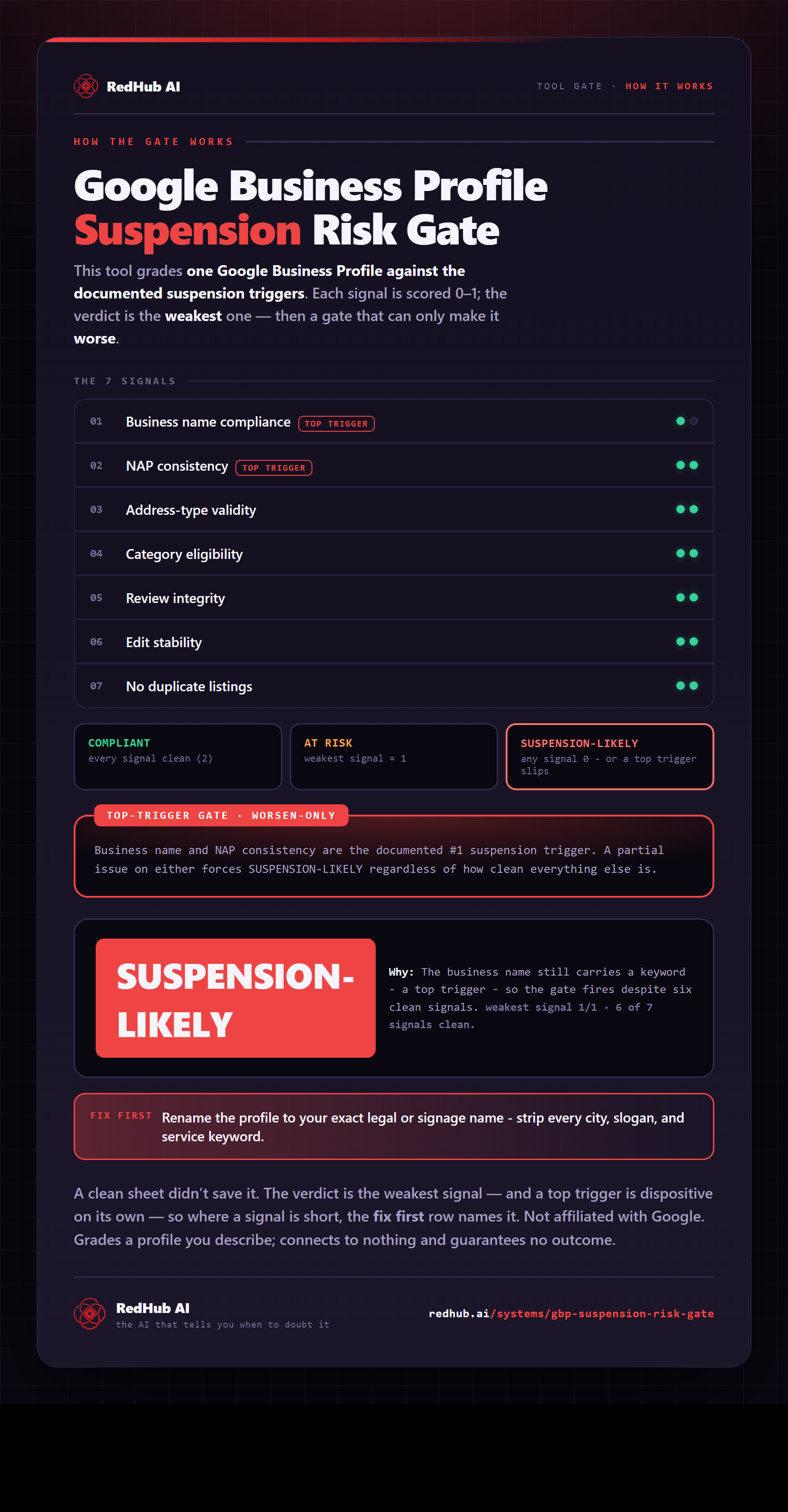
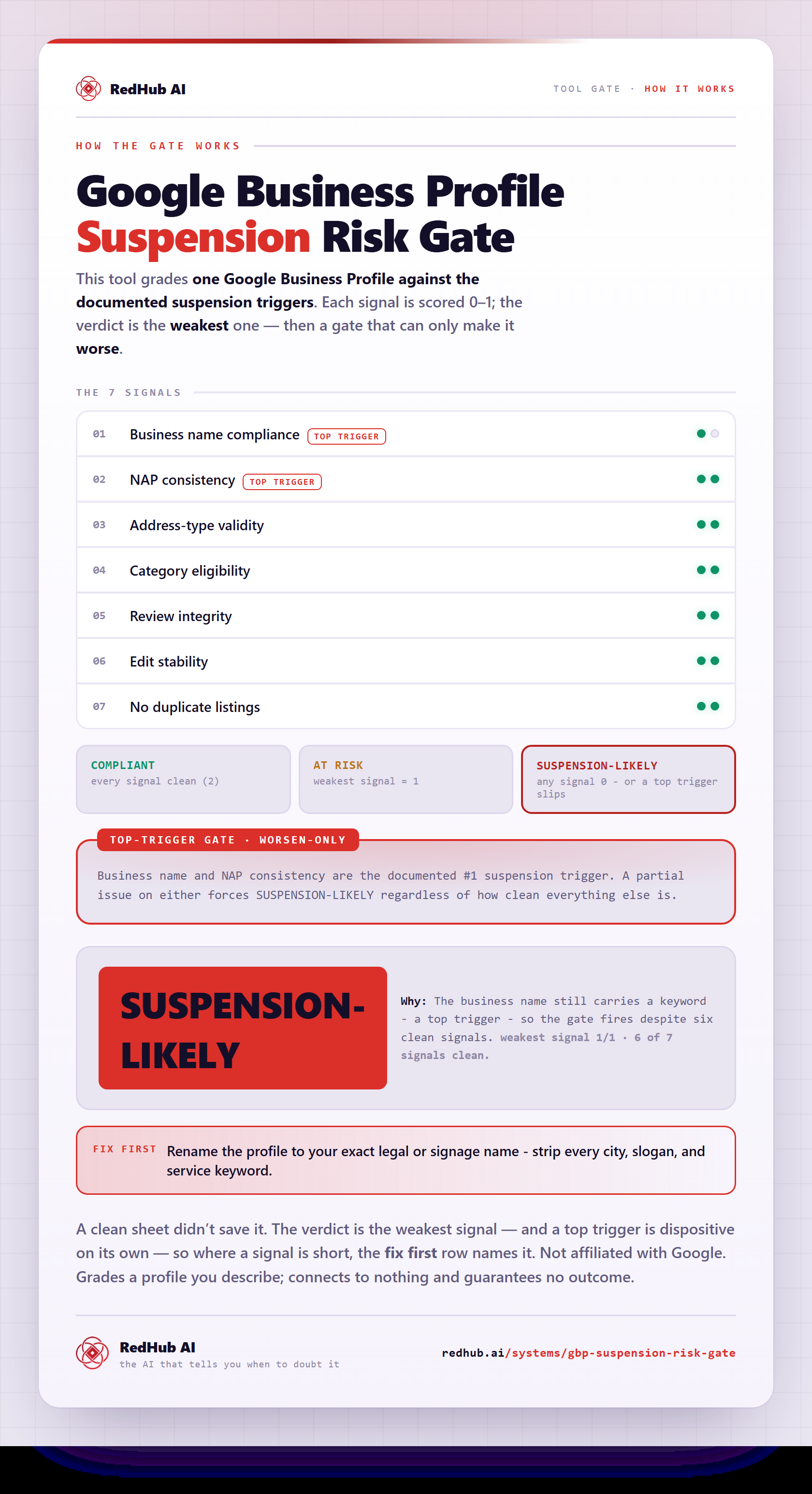
The gate this post refers to, drawn from the tool’s own logic. See the tool.