Google Business Profile Guidelines, in Plain English
RedHub AI Editorialupdated September 7, 20265 min read

Jump to a section9
- TL;DR
- What are the Google Business Profile guidelines?
- Name guidelines: use your real name, nothing added
- Address guidelines: match your actual location type
- Category guidelines: pick what you actually are
- Hours guidelines: keep them current
- Review guidelines: earn them, don't engineer them
- Decision Guide
- FAQ
TL;DR
- What it is: Google's Business Profile guidelines are the published rules covering your business name, address, category, hours, and reviews that keep a listing eligible to stay live.
- Who it's for: anyone setting up or editing a profile who wants to stay inside the rules the first time — check yours against the Suspension-Risk Gate.
- How it works: five guideline areas, each with a clear right and wrong version — matching real-world facts, not clever positioning.
- Bottom line: staying inside the guidelines is mostly about accuracy. The businesses that get suspended are usually the ones that tried to game a field, not the ones that told the plain truth.
RedHub AI is not affiliated with, endorsed by, or acting on behalf of Google. This describes Google’s published Business Profile guidelines and the enforcement patterns local operators report, current as of August 2026; Google changes both its guidelines and its support tooling without notice, so verify the current rules before you act on anything here. Nothing here is legal advice.
What are the Google Business Profile guidelines?
The Google Business Profile guidelines are Google's published rules (opens in a new tab) for what belongs in your listing and how it must be maintained. They cover five areas that matter most day to day: your business name, your address and service area, your category, your hours, and your reviews. Every one of them is checkable against a simple standard — does this field match reality? — which is the same standard the guidelines themselves apply.
Best for: setting up a new profile correctly, or auditing an existing one before an edit — the full seven-signal version runs in the Google Business Profile Suspension-Risk Gate.
Most Google Business Profile guidelines boil down to one question: does this field describe the real thing, or does it describe the thing you wish would rank better? Every guideline violation traced in the reasons list comes from someone answering that question wrong. Here's what the guidelines actually say, in plain English, for the five areas that matter most.
Name guidelines: use your real name, nothing added
Your business name on the profile must match your real-world name — what's on your sign, your invoices, your legal paperwork. It shouldn't include your city, a service keyword, a slogan, or a phone number unless those words are genuinely part of your real-world name. Denver Plumbing Co. is fine if that's what's on the sign and the paperwork. Smith Plumbing Denver 24/7 Emergency isn't. "Smith Plumbing" is compliant. "Smith Plumbing Denver 24/7 Emergency" is not, even for a business that truly does emergency plumbing in Denver around the clock.
Address guidelines: match your actual location type
If customers visit you at a real, staffed location, list that address — and it needs to be a genuine physical location, not a virtual office, PO box, or unstaffed mailbox. If you're a service-area business that drives to the customer (plumbers, movers, cleaners, electricians), the guideline runs the other way: hide your address entirely and set an accurate service area instead of displaying any address at all.
Category guidelines: pick what you actually are
Your primary category should be the single best match for your core business, and any secondary categories should be genuinely relevant services you also provide — not a list of every term you'd like to rank for. A general contractor listing itself under a dozen unrelated categories to capture more searches is a category-eligibility problem, not a growth hack.
Hours guidelines: keep them current
Listed hours should reflect when you're actually open, including holiday and seasonal adjustments. Stale hours aren't usually a suspension trigger on their own, but they erode customer trust and contribute to the broader accuracy problem Google's guidelines are built around — a profile that doesn't match reality.
Review guidelines: earn them, don't engineer them
Reviews must come from real customers, given freely. Offering anything — a discount, a gift, a free service — in exchange for a review breaks the guidelines. So does asking only your happiest customers or blocking unhappy ones from leaving feedback. The safe pattern is simple: ask every customer, the same way, and never attach a reward to the request.
| Guideline area | Common mistake | The compliant version |
|---|---|---|
| Name | Adding city, service, or slogan keywords | Your exact legal/signage name, nothing added |
| Address | Virtual office or fake storefront for a service-area business | Real staffed address, or hidden address with a set service area |
| Category | Stacking unrelated categories to rank for more terms | One accurate primary category, genuinely relevant secondaries |
| Hours | Stale hours that don't match reality | Current hours, updated for holidays and seasons |
| Reviews | Incentivizing or gating who gets asked | Ask every customer the same way, no reward attached |
Scope and honesty: RedHub is not affiliated with or endorsed by Google. This describes Google's published Business Profile guidelines in plain language — the actual rules change over time, so verify the current guidelines directly before making a major edit. This is platform-policy guidance, not legal advice.
Score your profile against all five areas at once
The Google Business Profile Suspension-Risk Gate turns these guidelines into seven scored signals and returns a COMPLIANT, AT RISK, or SUSPENSION-LIKELY verdict — plus the one thing to fix first where a signal is short, for one profile or an entire portfolio.
Get the Suspension-Risk Gate — $79 →Following the guidelines keeps your profile alive. It doesn't make it easy to find. Once your listing is safe, the GEO / AI Visibility Playbook ($149) covers the broader work of getting your business recommended by AI search and Google itself.
Decision Guide
Read this before you: set up a new profile, or make a major edit to your name, address, or category on an existing one.
Already suspended? Start with how to reinstate a suspended Google Business Profile instead.
Best first step: check your business name against your real signage, and your address against your actual location type (storefront vs. service area) — those two guidelines cause the most suspensions.
FAQ
What are the Google Business Profile guidelines?
They're Google's published rules for what belongs in a Business Profile — covering your name, address and service area, category, hours, and reviews. Each one is checkable against a simple standard: does the field match the real business, or was it edited to try to rank better?
Can I add my city or service to my business name?
No. The name guideline requires your exact real-world name — what's on your signage and legal paperwork. Adding a city, service keyword, or slogan violates the guideline even if every word is technically true about your business.
Do I need a physical address if I only do service calls?
No — and listing a fake or unstaffed address is itself a violation. Service-area businesses should hide their address and set an accurate service area instead of displaying any address at all.
How many categories can I add to my profile?
Google allows a primary category plus several secondary ones, but the guideline is relevance, not quantity. Every category should genuinely describe a service you provide — stacking unrelated categories to capture more searches is a category-mismatch problem.
Is offering a discount for a review against the guidelines?
Yes. Any incentive — a discount, gift, or free service — in exchange for a review breaks the review guideline, regardless of whether the review itself is genuine. The safe pattern is asking every customer the same way, with nothing offered in return.
Do the guidelines change over time?
Yes. Google updates its Business Profile guidelines periodically, and enforcement can shift with them. Always check the current published guidelines before a major profile change, and re-check periodically even if nothing prompted you to.
How is this different from the reasons list or the reinstatement process?
This post explains the guidelines themselves in plain English. The reasons list covers what happens when you break them. The reinstatement post covers what to do once you already have.
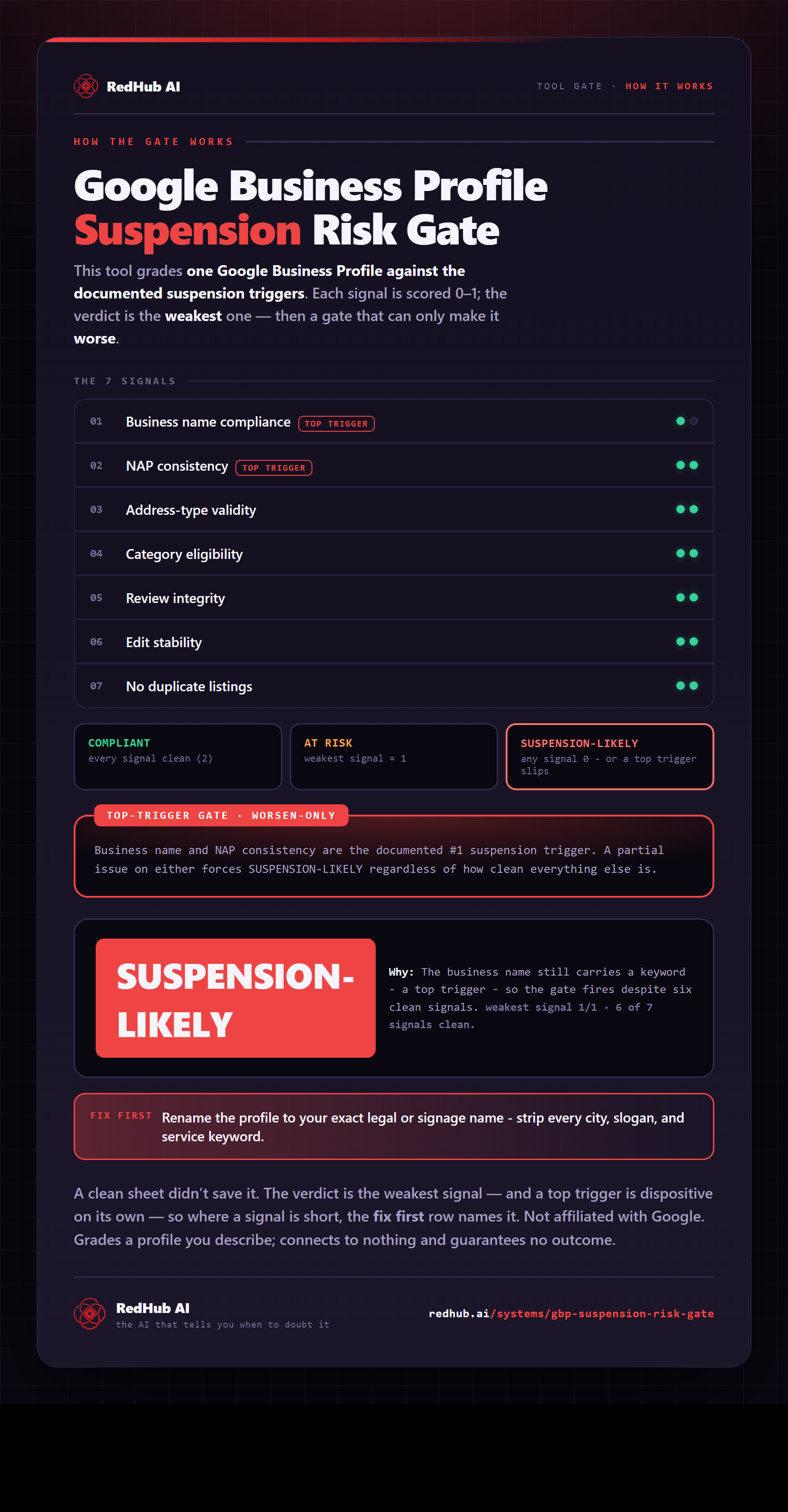
The gate this post refers to, drawn from the tool’s own logic. See the tool.