How to Reinstate Your Google Business Profile
RedHub AI Editorialupdated September 7, 20266 min read

Jump to a section9
TL;DR
- What it is: to reinstate a Google Business Profile, you fix the underlying violation, gather proof, and file an appeal Google can actually approve — not just click "appeal" and wait.
- Who it's for: suspended owners and agencies who need the listing back before losing more Map Pack leads — the Suspension-Risk Gate ships a Reinstatement-Prep Runbook alongside the risk scoring.
- How it works: fix cause, gather evidence, file once, wait — never appeal a profile that still breaks the rules.
- Bottom line: the fastest way to lose an appeal is to file it before you've actually fixed anything.
RedHub AI is not affiliated with, endorsed by, or acting on behalf of Google. This describes Google’s published Business Profile guidelines and the enforcement patterns local operators report, current as of August 2026; Google changes both its guidelines and its support tooling without notice, so verify the current rules before you act on anything here. Nothing here is legal advice, and no tool or process can guarantee that a profile will avoid suspension or be reinstated — those are Google’s decisions alone.
How do you reinstate a suspended Google Business Profile?
You reinstate a suspended Google Business Profile by first identifying and fixing the guideline violation that caused the suspension, then gathering proof of the fix (real business documents, matching signage photos, consistent NAP screenshots), and only then filing a reinstatement appeal through Google's official channels. Appealing while the violation is still in place is the failure practitioners see most often — Google reviews an appeal against the same guideline that triggered the suspension.
Best for: anyone with an active suspension who wants a working process, not guesswork — the Suspension-Risk Gate's Reinstatement-Prep Runbook walks through this exact sequence.
A suspension notice creates panic, and panic makes people file an appeal within the hour — before they've actually fixed anything. That's backwards. Google reviews reinstatement requests against the same guidelines that caused the suspension in the first place. Appeal before you fix the cause, and you're asking Google to approve the exact thing it just rejected.
Step 1: find and fix the actual violation first
Before anything else, identify which trigger caused the suspension. If you got a reason in the notice, start there. If you didn't — which is common — check your profile against the full list of reasons Google suspends business profiles, starting with the two that override everything else: a keyword-stuffed business name and inconsistent NAP information.
Make the fix completely, not partially. If your name had extra keywords, remove all of them — not just the most obvious one. If your NAP was inconsistent, correct it everywhere it appears: your website, your directory listings, your registration paperwork, not just the Google profile itself.
Step 2: gather your proof
Google's appeal process asks you to demonstrate that you're a real business operating within the guidelines. Have this ready before you file:
- Proof you're a real, registered business. A business license, articles of incorporation, or a recent utility bill in the business name.
- Proof your address is legitimate. A lease, utility bill, or photo of signage at the physical location — showing a name that matches your profile exactly.
- Proof your NAP is now consistent. Screenshots of your website footer, your directory listings, and your profile side by side, showing identical name, address, and phone.
- Proof of the specific fix. A screenshot of the corrected field, plus a short, factual note explaining what was wrong and what you changed.
Step 3: file the appeal once, through the official channel
File through Google's official Business Profile appeals tool, the one linked from Google's Fix suspended or disabled profiles help page — the correct channel changes over time as Google updates its support tools, so check the current published process before you file. Keep the explanation short and factual: what the issue was, what you fixed, and the proof attached. Avoid arguing that the rule shouldn't apply to you; the reviewer is checking for compliance, not adjudicating fairness.
Key insight: filing more than one appeal, or creating a second listing while you wait, usually makes things worse. A duplicate listing is itself one of the recurring suspension triggers — so "solving" a suspension by starting a new profile can suspend that one too.
Step 4: what to expect after filing
Review timelines vary and Google doesn't publish a guaranteed turnaround. While you wait, don't make further edits to the profile — a second bulk edit mid-review reads as unstable editing, another recurring trigger. If the appeal is denied, re-read the denial reason carefully; it usually points to something in your fix that wasn't complete, not a new problem.
After reinstatement: harden the profile
A reinstated profile isn't automatically safe going forward — it tripped a filter once, and the same filter is still watching. Once you're back, run a full check against every recurring trigger, not just the one that caused the original suspension, so you don't trip a different one next month. The prevention routine covers the ongoing habits worth keeping.
Scope and honesty: RedHub is not affiliated with or endorsed by Google. This describes Google's published reinstatement process, which changes over time — verify the current steps before filing. Following this process improves your odds of approval; it does not guarantee reinstatement, which only Google decides. This is platform-policy guidance, not legal advice.
Fix the cause first, with the runbook already written
The Google Business Profile Suspension-Risk Gate ships a Reinstatement-Prep Runbook alongside the seven-signal risk scoring — find the trigger, fix it, and assemble your appeal in the right order, without connecting to any Google account.
Get the Suspension-Risk Gate — $79 →Your Google listing isn't the only front door that can silently go dark. If your emails to customers ever land in spam or bounce outright, the Email Deliverability & DMARC Enforcement Readiness Gate ($79) checks that channel the same way — before it costs you a customer.
Decision Guide
Use this process if: your profile is currently suspended and you're ready to fix the cause before appealing.
Read this first if: you haven't identified the cause yet — check the full reasons list before you file anything.
Best first step: confirm your business name and NAP consistency are both fixed completely before you gather any other proof — those two override everything else.
FAQ
How long does Google Business Profile reinstatement take?
Google doesn't publish a guaranteed timeline, and it varies by case. What you can control is not slowing it down — filing a complete, accurate appeal the first time and avoiding further profile edits while it's under review.
Should I create a new listing instead of appealing?
No. Creating a second listing for the same business or location is itself a recurring suspension trigger — duplicate listings. It can get the new profile suspended too, and it doesn't fix whatever caused the original suspension.
What proof do I need to reinstate my profile?
Proof you're a real, registered business (license or registration documents), proof your address is legitimate (lease, utility bill, or signage photo matching your profile name), proof your NAP is now consistent everywhere, and proof of the specific fix you made.
Should I appeal right away, or fix the issue first?
Fix the issue first, always. Google reviews an appeal against the same guideline that caused the suspension. Appealing while the violation is still in place is the failure practitioners see most often — you're asking for approval of the thing that was just rejected.
Can an agency file the reinstatement appeal for a client?
Yes, as long as the agency has manager or owner access to the profile. The same rule applies regardless of who files: fix the cause completely before submitting the appeal, and gather proof specific to that client's business.
Will reinstatement guarantee I won't be suspended again?
No. A reinstated profile is not automatically hardened against future triggers. Check every recurring cause, not just the one that caused the original suspension, and build a habit of auditing before you make any large edit going forward.
Is any of this legal advice?
No. This is platform-policy guidance describing Google's published reinstatement process, which changes over time. It is not affiliated with or endorsed by Google and is not a substitute for legal counsel on a disputed suspension.
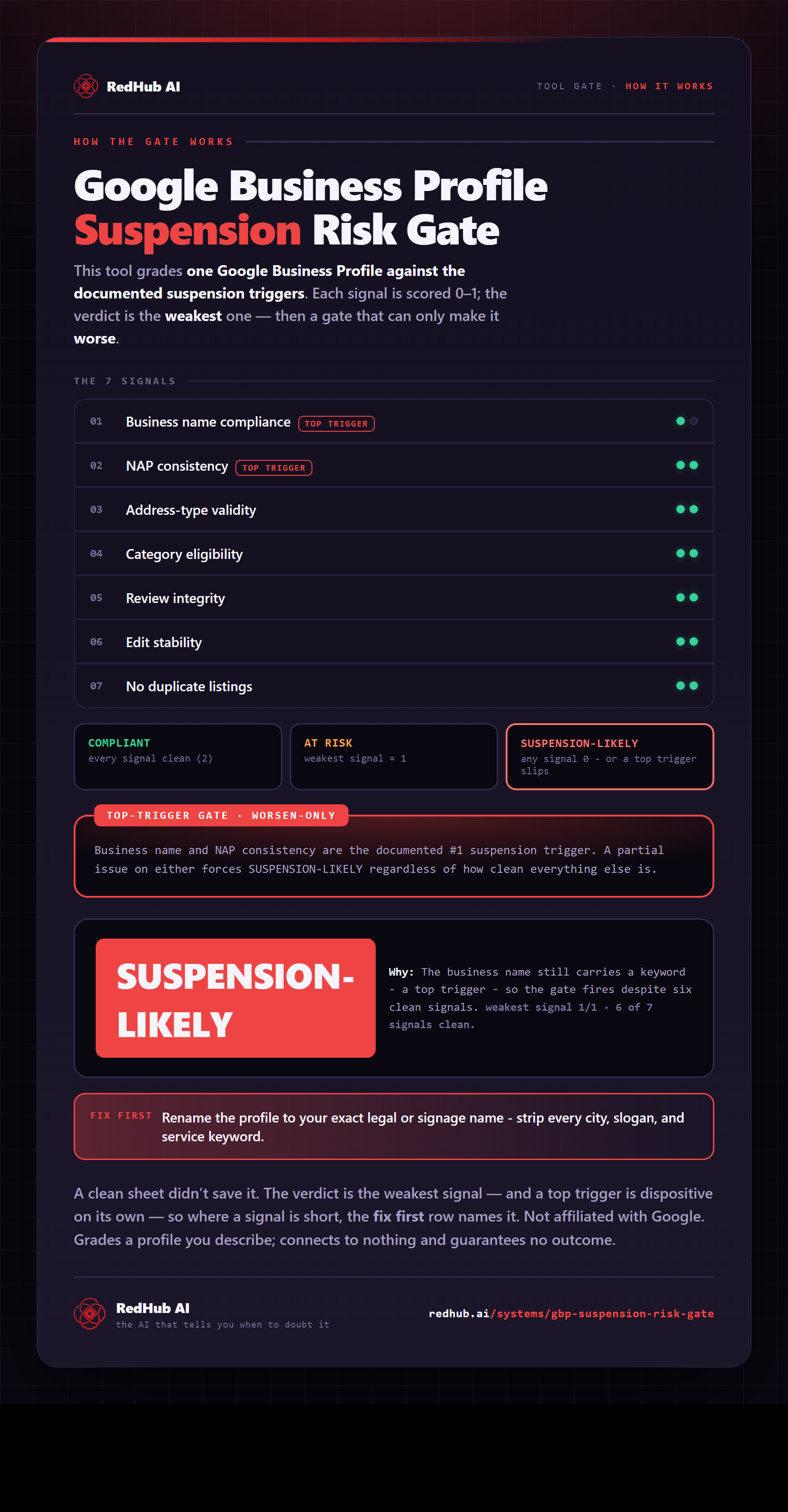
The gate this post refers to, drawn from the tool’s own logic. See the tool.