Google Business Profile Suspended: The Reasons
RedHub AI Editorialupdated September 7, 20266 min read

Jump to a section7
TL;DR
- What it is: Seven recurring issues account for most suspensions local operators report — a keyword-stuffed name and inconsistent NAP information are the two that force the highest risk read on their own.
- Who it's for: operators and agencies who want the full google business profile suspended reasons list in one place — score your own profile against it with the Suspension-Risk Gate.
- How it works: check each reason below against your live profile; the worst one you find sets your risk, not the average.
- Bottom line: most of these are self-inflicted, and every one of them is self-fixable.
RedHub AI is not affiliated with, endorsed by, or acting on behalf of Google. This describes Google’s published Business Profile guidelines and the enforcement patterns local operators report, current as of August 2026; Google changes both its guidelines and its support tooling without notice, so verify the current rules before you act on anything here. Nothing here is legal advice.
What are the most common Google Business Profile suspended reasons?
The most common google business profile suspended reasons are a keyword-stuffed business name, inconsistent name/address/phone (NAP) information, an ineligible address type, a mismatched category, manipulated reviews, unstable bulk edits, and duplicate listings. Two of these — the business name and NAP — are dispositive on their own: either one being wrong is enough to put an otherwise clean profile in the gate's highest risk band.
Best for: checking a live or recently-edited profile against the full list before you touch anything else — run the seven-signal version in the Google Business Profile Suspension-Risk Gate.
"Why was my Google Business Profile suspended?" has a short answer more often than people expect. Almost every suspension traces back to one of seven recurring causes — and once you know the list, checking your own profile against it takes a few minutes, not a guessing game.
The reason list, at a glance
| Reason | Why it trips the filter | Quick fix |
|---|---|---|
| Keyword-stuffed name | Reads as spam even from a real business | Rename to your exact legal/signage name |
| NAP inconsistency | Google can't confirm you're a real, single business | Match name, address, phone everywhere, character for character |
| Ineligible address type | Virtual offices and PO boxes are common spam patterns | Use a real staffed address, or hide it and set a service area |
| Category mismatch | Wrong category misrepresents what you do | Pick the category that matches your primary service |
| Review manipulation | Incentivized or gated reviews break the review policy | Ask every customer, never trade anything for a review |
| Unstable edits | Sudden, large edits to core fields look like a takeover | Change one field at a time, especially after a rebrand |
| Duplicate listings | More than one profile per location confuses ownership | Claim and merge, or remove the extra listing |
The two reasons that override everything else
1. A keyword-stuffed business name
Google's published name guideline is unambiguous, and practitioners consistently report this as the most common cause of a suspension. A name like "Best HVAC Denver 24/7" packs in a service, a city, and a slogan — and Google's filter reads that as spam, regardless of how legitimate the business actually is. The fix is blunt: rename the profile to your exact legal or signage name. Strip every city, slogan, and service keyword that isn't part of your real business name.
2. NAP inconsistency
NAP stands for Name, Address, Phone. If any of the three differ — even slightly — across your Google profile, your website, your directory listings, and your business registration, Google's filter treats that as a signal it can't confirm you're a single, real business. The fix is to make all three identical, character for character, everywhere your business appears online.
Key insight: either of these two reasons alone can suspend a profile that's otherwise perfect. A business can score cleanly on every other signal and still trip this gate over one wrong word in its name or one mismatched suite number.
The other five reasons, briefly
- Ineligible address type. Storefront categories need a real, staffed address customers could walk into. Service-area businesses (plumbers, movers, electricians who drive to the job) should hide their address and set an accurate service area instead of listing a fake storefront.
- Category mismatch. Your primary category should describe your main business, and secondary categories should be genuinely relevant — not a list of every service you'd like to rank for.
- Review manipulation. Offering a discount, gift, or anything else in exchange for a review — or asking only happy customers and blocking unhappy ones — breaks Google's review policy and puts the whole profile at risk.
- Unstable edits. A sudden, large edit to your name, address, or category — especially right after a rebrand or an ownership transfer — can look like a profile takeover. Change one field at a time and give it time to settle before the next edit.
- Duplicate listings. If two profiles exist for the same location or business, Google can't tell which one is authoritative. Claim and merge duplicates, or request removal of the extra one, before it triggers a suspension on both.
Scope and honesty: RedHub is not affiliated with or endorsed by Google. This list describes Google's published Business Profile guidelines, which change over time — always check the current rules before acting. Fixing these reasons lowers your risk; it doesn't guarantee a suspension won't happen. This is platform-policy guidance, not legal advice.
Check all seven reasons against your own profile
The Google Business Profile Suspension-Risk Gate scores your profile on all seven signals, applies the two dispositive top-trigger rules, and, where a signal is short, tells you the one thing to fix first — plus a portfolio rollup if you manage more than one location.
Get the Suspension-Risk Gate — $79 →If reviews are one of your risky signals, pair the fix with a look at whether you're visible where buyers search at all — the AI Search & Brand Presence Diagnostic ($49) checks that separately. And once your profile is clean, how to avoid a Google Business Profile suspension covers the ongoing habits that keep it that way.
Decision Guide
Read this first if: you got a suspension notice, or you're about to make a bulk edit and want to know what to avoid.
Move to reinstatement if: you're already suspended — see how to reinstate a suspended Google Business Profile.
Best first step: check your business name and your NAP consistency first — those two reasons override every other signal.
FAQ
What are the most common reasons a Google Business Profile gets suspended?
A keyword-stuffed business name and inconsistent name/address/phone (NAP) information are the two most commonly reported reasons, and either one alone is enough to put a profile in the highest risk band. Ineligible address types, category mismatches, review manipulation, unstable bulk edits, and duplicate listings make up the rest of the list.
Why does a keyword-stuffed name cause a suspension?
Because Google's automated filter can't tell the difference between a legitimate business that added a city or service word to its name and an actual spam listing doing the same thing. Both trip the same rule. The safest name is your exact real-world, signage-matching name — nothing added.
What counts as NAP inconsistency?
Any mismatch in your business Name, Address, or Phone number across your Google profile, your website, directory listings (Yelp, Facebook, industry directories), and your registration paperwork. Even a suite number that's missing in one place and present in another counts.
Can editing my profile too much get it suspended?
Large, sudden edits to core fields — especially your name, address, or category — can look like a profile takeover to Google's filter, particularly right after a rebrand or ownership change. Changing one field at a time, with some time between edits, is the safer pattern.
Is a virtual office address always a problem?
For a storefront category, yes — Google expects a real, staffed address customers could visit. If you're a service-area business that drives to customers rather than hosting them, the fix is different: hide your address entirely and set an accurate service area instead of listing any address.
Will fixing all seven reasons guarantee I won't be suspended?
No. Fixing every recurring cause lowers your risk substantially, but Google's guidelines and enforcement change over time, and no checklist can guarantee an outcome Google alone controls. Re-check the list periodically, especially after any profile edit.
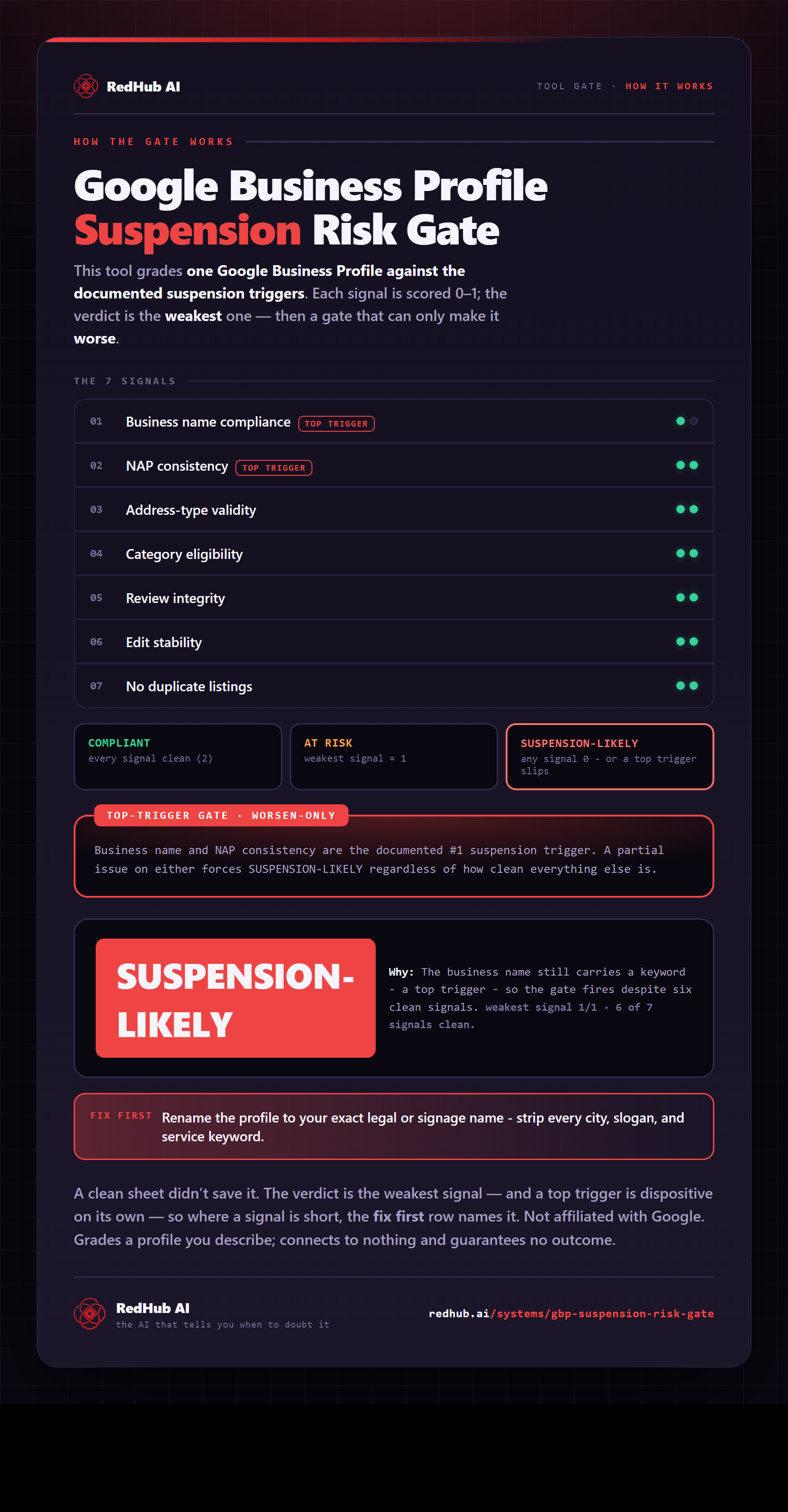
The gate this post refers to, drawn from the tool’s own logic. See the tool.