Google Business Profile Suspension: Why It Happens
RedHub AI Editorialupdated September 7, 20268 min read

Jump to a section10
- TL;DR
- What causes a Google Business Profile suspension?
- Why Google suspends profiles: it's a filter, not a judgment
- The two triggers that override every other signal
- The seven signals worth checking
- Quick self-check: how exposed is your profile?
- What to do if you're already suspended
- Read next: the GBP suspension cluster
- Decision Guide
- FAQ
TL;DR
- What it is: A Google Business Profile suspension is Google pulling your listing from Maps and Search for tripping a documented guideline — not a random punishment.
- Who it's for: local-service operators, multi-location brands, and agencies whose leads depend on staying in the Map Pack — check your risk with the Google Business Profile Suspension-Risk Gate.
- How it works: score your profile against the trigger categories; the single weakest one decides your risk, not the average.
- Bottom line: most suspensions trace back to a short, avoidable list of triggers — find the risky one before Google does, not after.
RedHub AI is not affiliated with, endorsed by, or acting on behalf of Google. This describes Google’s published Business Profile guidelines and the enforcement patterns local operators report, current as of August 2026; Google changes both its guidelines and its support tooling without notice, so verify the current rules before you act on anything here. Nothing here is legal advice, and no tool or process can guarantee that a profile will avoid suspension or be reinstated — those are Google’s decisions alone.
What causes a Google Business Profile suspension?
Google suspends a Business Profile when it trips one of a documented set of guideline violations — most often a keyword-stuffed business name, inconsistent name, address, or phone (NAP) information across the web, an ineligible address type, or the wrong category. It's an automated filter reacting to a signal, not a person judging your business. Most suspensions trace back to a short, identifiable list of triggers, and most of them are things you can find and fix yourself.
Best for: anyone whose leads run through Google Maps and can't afford a listing going dark — check your own profile with the Google Business Profile Suspension-Risk Gate.
A Google Business Profile suspension happens when your listing trips one of Google's documented guideline rules — and it usually happens without warning. One day your business shows up in the Map Pack. The next day it's gone, and so are the calls that came with it. The good news: suspension triggers are knowable and repeatable, not random. If you know what they are, you can find and fix the risky one before Google acts.
Why Google suspends profiles: it's a filter, not a judgment
Google manages tens of millions of business listings. It can't manually review every edit, every review, or every new profile — so it leans on automated filters that watch for a handful of well-known problems. When a profile trips one of those filters, it gets suspended, pending a fix or an appeal.
That matters because it means a suspension isn't an accusation of dishonesty. It's an automated system being cautious. A real, legitimate business can trip the exact same filter as a spammer — over something as small as a few extra words in a business name, or an address that doesn't match what's on file elsewhere. Local-service trades — HVAC, plumbing, roofing, locksmiths, movers — are where listing spam clusters, and operators in those trades report suspensions more often than most. Google has required extra verification in some of these categories in the past; it has never published a category-by-category enforcement threshold.
The two triggers that override every other signal
Not all seven trigger categories carry equal weight. Two of them — a keyword-stuffed business name and inconsistent NAP (name, address, phone) information — are the most commonly reported triggers, and either one on its own is enough to push a profile into the highest risk band, even if every other signal is clean.
A keyword-stuffed name looks like "Best HVAC Denver 24/7" instead of the business's real, signage-matching name. It reads as spam to the filter even when the business behind it is completely legitimate. NAP inconsistency means your name, address, or phone number doesn't match, character for character, across your profile, your website, your directory listings, and your registration paperwork. Both are avoidable. Neither requires a lawyer or an agency to fix — they require noticing.
Key insight: a profile can score well on six of seven signals and still read as high risk over the seventh. The weakest signal decides the read, not the average — because that's how Google's enforcement actually behaves. It doesn't average your compliance; it reacts to the worst thing it sees.
The seven signals worth checking
Beyond the two dispositive triggers, five more signals shape a profile's overall exposure. None of these require you to guess — each has a clear right and wrong state.
| Signal | What it checks |
|---|---|
| Business name compliance | Matches your real-world signage name — no city, service keyword, or slogan added |
| NAP consistency | Name, address, and phone match exactly across your profile, site, and directories |
| Address-type validity | A real staffed address for storefronts, or a hidden address with a correct service area for service-area businesses |
| Category eligibility | Your primary and secondary categories genuinely match what you do |
| Review integrity | No incentivized, gated, or fabricated reviews |
| Edit stability | No large, sudden edits to core fields — name, address, category — especially after a rebrand or ownership change |
| Duplicate listings | Only one profile exists per business location |
Five of these map directly to Google's published Business Profile guidelines. Edit stability and duplicate-listing enforcement are patterns practitioners report, not rules Google publishes as such — we go deeper on each in Google Business Profile guidelines, explained in plain English, and cover the full list of common causes in 7 reasons Google suspends business profiles.
Quick self-check: how exposed is your profile?
Tick anything that's true of your profile today. This is a simplified stand-in, not the scoring engine. It ticks the same seven signals but reads each as yes/no, where the gate scores each 0—2 against a profile you describe and applies the two top-trigger rules on top against a worked profile and returns a verdict.
Illustrative risk self-check
If anything came back at "SUSPENSION-LIKELY," treat it as a to-do list, not a diagnosis — start with the ticked box under the two dispositive triggers first. The Suspension-Risk Gate runs the real seven-signal version offline, with a portfolio rollup if you manage more than one location.
What to do if you're already suspended
Don't file an appeal yet. Find and fix the trigger first — appealing a profile that still breaks the rules is the fastest way to get the appeal denied and lose more time. Fix the cause, gather your proof, then file. We cover the full process in how to reinstate a suspended Google Business Profile.
Scope and honesty: RedHub is not affiliated with or endorsed by Google. This post describes Google's published Business Profile guidelines, which change over time — re-check the current rules before you act. A risk score reduces your exposure; it does not guarantee you won't be suspended, and it doesn't guarantee reinstatement if you already are. This is platform-policy guidance, not legal advice.
Find your riskiest trigger before Google does
The Google Business Profile Suspension-Risk Gate scores your profile — or your whole portfolio — against the seven signals and returns COMPLIANT, AT RISK, or SUSPENSION-LIKELY, plus the one trigger to fix first where a signal is short. Deterministic, offline, not affiliated with Google.
Get the Suspension-Risk Gate — $79 →Read next: the GBP suspension cluster
- 7 reasons Google suspends business profiles — the full trigger list, one at a time.
- How to reinstate a suspended Google Business Profile — the process, step by step.
- Google Business Profile guidelines, explained in plain English — the rules that matter most, in plain language.
- How to avoid a Google Business Profile suspension — the prevention routine.
Once your profile is safe, the next problem is getting found. The GEO / AI Visibility Playbook covers the broader "get found by AI and search" play, and the AI Search & Brand Presence Diagnostic checks whether you're visible where buyers now look. Neither replaces this gate — a profile can be perfectly visible and still one keyword-stuffed name away from disappearing.
Decision Guide
Check your risk now if: your leads depend on the Map Pack and you haven't reviewed your profile against the recurring triggers in the last few months.
Skip it (for now) if: you already have a recent, clean audit and haven't made any bulk edits since.
Best first step: tick the self-check above, then run the full seven-signal gate on any profile that comes back AT RISK or worse — before you touch anything else in the listing.
FAQ
What is a Google Business Profile suspension?
It's Google removing your listing from Maps and Search for tripping a documented guideline violation. Your business stops appearing in local results and the Map Pack until the issue is fixed and, if needed, an appeal is approved. It is enforcement against a rule, not a comment on your business's legitimacy.
Why did my Google Business Profile get suspended with no warning?
Enforcement at this scale leans heavily on automated filters, and the notice rarely explains what tripped one. That's why checking your profile against the recurring triggers ahead of time — rather than waiting for the notice — is the only real way to get ahead of it.
What are the most common Google Business Profile suspension triggers?
A keyword-stuffed business name and inconsistent name, address, or phone information (NAP) across the web are the two triggers practitioners report most often. Ineligible address types, category mismatches, review manipulation, unstable bulk edits, and duplicate listings round out the rest. See 7 reasons Google suspends business profiles for the full breakdown.
Can a profile look fine and still be at high risk?
Yes. A profile can be clean on six of seven signals and still read as high risk over the seventh, because the weakest signal decides the read — not the average. A keyword-stuffed name or NAP inconsistency alone is enough to override an otherwise clean profile.
Will fixing these issues guarantee I never get suspended?
No. Fixing the recurring triggers reduces your risk, but Google's guidelines and enforcement change over time, and no outside tool — including RedHub's — can guarantee an outcome that only Google controls. Treat a clean read as lower risk, not zero risk.
Is this legal advice?
No. This is platform-policy guidance based on Google's published Business Profile guidelines, which change over time. It is not affiliated with or endorsed by Google, and it is not a substitute for legal counsel on any dispute over your listing.
How is the Suspension-Risk Gate different from reading Google's guidelines myself?
Google's guidelines are long and scattered across several help pages. The gate turns them into seven scored signals, applies the two dispositive top-trigger rules, and returns one verdict plus the single trigger to fix first — for one profile or a whole portfolio at once, offline.
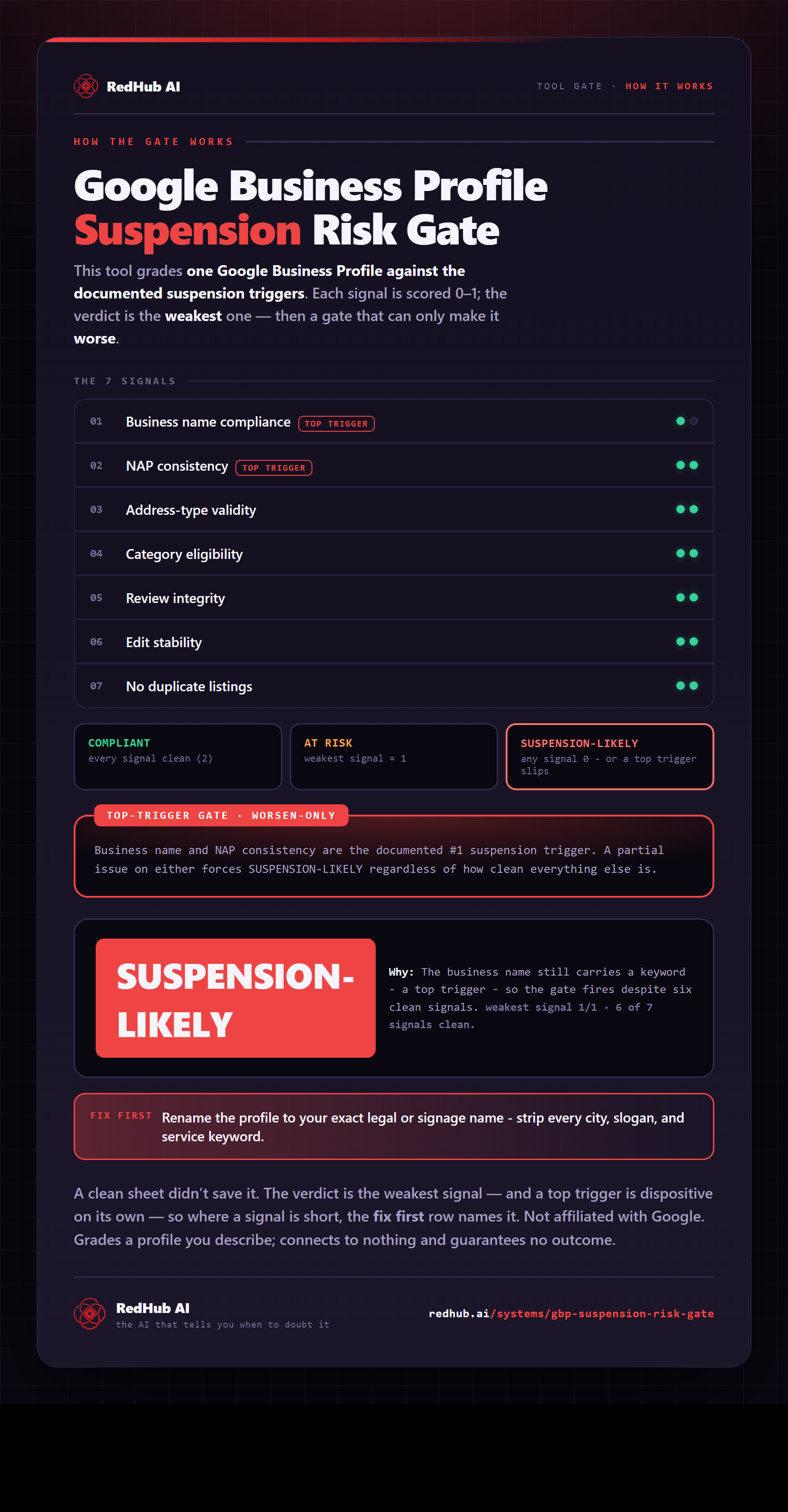
The gate this post refers to, drawn from the tool’s own logic. See the tool.