Capacity Planning for Agencies: Sell, Hire, or Say No
RedHub AI Editorialupdated August 17, 20267 min read

Jump to a section12
- TL;DR
- What is capacity planning?
- The three numbers capacity planning runs on
- The verdict: what the gap tells you to do
- The hire question — where feel costs the most
- Billable versus busy
- Matching people to the pipeline
- The check before you say yes
- What sits around the capacity number
- Where to go deeper
- Decision Guide
- FAQ
TL;DR
- What it is: Capacity planning is knowing how many billable hours your team can deliver, how many are already booked, and what to do about the gap.
- Who it's for: Agencies, studios, and consultancies that bill for people's time — browse RedHub Quick Kits.
- How it works: Three numbers — capacity, booked hours, and a target utilization — turn "everyone feels busy" into a clear verdict: sell, hire, or turn work away.
- Bottom line: Most teams don't have a capacity problem. They have a visibility problem. Measure first; decide second.
What is capacity planning?
Capacity planning is the practice of comparing the hours your team can bill against the hours already committed, so you can decide — on purpose — whether to sell more work, hire more people, or turn work away. For a billable team it runs on three numbers: each person's capacity hours, their booked hours, and a target utilization (usually around 75 percent, not 100). The gap between where you are and where you want to be is the decision.
Best for: services firms weighing a hire, a big new client, or a rate change — see the Capacity & Utilization Planner ($49).
Capacity planning sounds like something only big consultancies do. It isn't. Every billable team does it — most just do it by feel. Someone says "we're slammed," someone else says "we need to hire," and a $70,000-plus decision gets made on vibes.
Here's the problem with feel: "everyone's busy" and "we're at capacity" are not the same sentence. One is a feeling. The other is a number. Teams that never check the number make two expensive mistakes on repeat. They hire into a half-empty bench, which lowers utilization and profit. Or they keep saying yes until people are underwater, work slips, and good people quit.
This guide walks through the whole capacity planning loop for services teams: the three numbers it runs on, the verdict those numbers point to, and the check to run before you say yes to your next client.
The three numbers capacity planning runs on
Strip away the software-vendor language and capacity planning needs exactly three inputs per person:
- Capacity hours. How many hours per week each person could bill if the calendar were clear. Not 40 — nobody bills 40. Most firms plan on 32 to 36 realistic hours after admin, meetings, and internal work.
- Booked hours. How many of those hours are already committed to client work this week. A rough, honest estimate beats a perfect number you never collect.
- Target utilization. The share of capacity you want billed — commonly around 75 percent. The target is deliberately below 100, because a team booked wall-to-wall has no room for sales, training, or a single sick day.
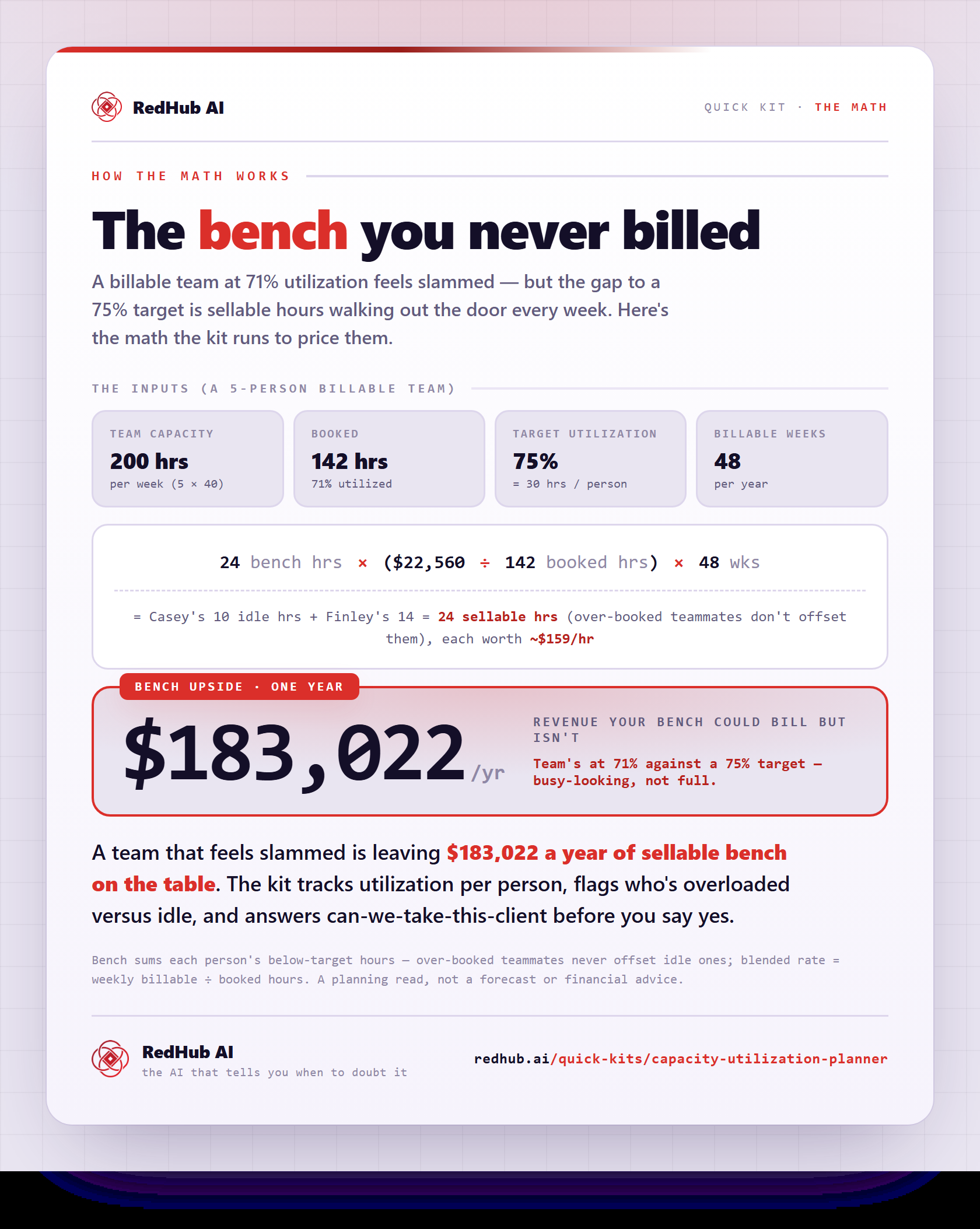
Booked divided by capacity is your utilization rate — the single most useful number a billable team can track. If you've never calculated yours, start with how to calculate your utilization rate. For context: a 2025 NetSuite benchmark put average billable utilization at 66.4 percent — below the roughly 75 percent target many firms set. Most teams have more room than they think.
The verdict: what the gap tells you to do
Once you know utilization versus target, the next move stops being a debate. The gap sorts every team into one of three bands:
| Where you are | What it means | The move |
|---|---|---|
| Below target | You have a bench — paid-for hours nobody is selling | Sell. Fill the bench before you even think about hiring. |
| At target | Healthy. Room for select new work | Take good-fit work, and start planning the next hire before you need it. |
| At or over capacity (90%+) | The team is running hot; quality and people are at risk | Hire, subcontract, raise rates, or turn work away. |
Key insight: 100 percent utilization is not the goal — it's the failure mode. A fully booked team can't absorb a rush job, an absence, or a great new client. Treat full capacity as a ceiling you plan under, not a target you chase.
The hire question — where feel costs the most
The most expensive capacity decision is the hire. A new seat adds tens of thousands of dollars in loaded cost, and if the bench wasn't actually full, the hire makes utilization worse, not better. Before posting the job, check the number. To make the stakes concrete — this is arithmetic, not a measured claim — one person with an $80,000 loaded cost billing 60 percent of capacity instead of a planned 80 percent leaves about $16,000 of paid-for capacity unsold in a year. We walk the full decision in should I hire? Run the capacity math first.
Billable versus busy
Utilization is only as honest as the hours behind it. A week can be completely full and only half billable — meetings, internal projects, rework, and scope creep all eat capacity without producing revenue. Counting what actually counts is its own discipline; we cover the honest categories, and where hours quietly leak, in billable hours: what counts, what leaks.
Matching people to the pipeline
The team-level number can also lie by averaging. A team at "72 percent" might be one designer at 110 percent and one developer at 40. Capacity planning has to look per person, and forward: what's booked next month versus who has room. That's resource allocation — matching real people to real demand — and it's where the sell/hire verdict becomes a staffing plan. The full method is in resource allocation for billable teams.
The check before you say yes
The moment capacity planning pays for itself is the day a new client shows up. A 30-hour-per-week engagement lands in your inbox — can you take it? Without the numbers, you guess, and the guess usually defaults to yes. With them, it's a three-outcome check:
- Take it — the team absorbs it inside your target utilization.
- Take it, but you'll run hot — it fits only above target. Fine for a sprint, dangerous as a lifestyle.
- You can't absorb it — say no, subcontract, or hire, and now you know exactly how much extra capacity the yes would require.
Those aren't performance claims — they're the built-in example that ships inside the Planner, so you can see the whole loop working before you enter a single number of your own.
Want the whole loop in one spreadsheet?
The Capacity & Utilization Planner ($49, one-time) is a 4-tab .xlsx: per-person capacity and utilization, a team dashboard with the sell/hire/turn-away verdict, a New Work Check for the next client, and a playbook with copy-paste scripts. Opens in Excel, Google Sheets, or Numbers.
Get the Planner — $49 →What sits around the capacity number
Capacity planning tells you whether to sell, hire, or say no. It pairs naturally with the money side of the same question. The Profit Leak Finder ($49) flags the clients eating more capacity than they're worth. The Cost of Vacancy Calculator ($39) prices the opposite problem — a seat that's genuinely empty. And if you run an agency, the Agency Operators Skills Pack ($89) is the execution layer: installable Claude skills for the status reports, scope-creep pushback, and renewal comms that turn a capacity verdict into action.
Where to go deeper
This pillar is the map. Each part of the capacity lane has its own guide:
- Utilization rate — the formula, a fair target, and a calculator for what idle capacity costs.
- Should I hire? — the decision, band by band, before you post the job.
- Billable hours — what counts, what leaks, and how to measure honestly.
- Resource allocation — matching people to the pipeline, per person and forward-looking.
Decision Guide
Use capacity planning if: you bill for people's time and you're facing a hire, a big new client, or a nagging sense that some people are drowning while others are idle.
Skip it if: your revenue isn't tied to time or capacity at all — a pure product business needs demand planning, not utilization math.
Best first step: list your team, estimate capacity and booked hours per person for this week, and compute one utilization number. That single number usually settles the "should we hire?" argument on the spot.
FAQ
What is capacity planning for a services business?
Comparing the billable hours your team can deliver against the hours already committed, then deciding deliberately whether to sell more, hire, or turn work away. It runs on three inputs: capacity hours, booked hours, and a target utilization.
What's a good target utilization?
Many firms target around 75 percent of realistic capacity. The target sits below 100 on purpose — a fully booked team has no slack for sales, absences, or a great new opportunity.
How is capacity planning different from resource allocation?
Capacity planning answers "do we have enough hours overall?" Resource allocation answers "which person's hours go to which work?" You need the first to do the second well — see our resource allocation guide.
Do I need timesheet software to plan capacity?
No. A rough, honest estimate of booked hours per person is enough to start. The Capacity & Utilization Planner asks for exactly that — weekly capacity, booked hours, and rate per person — with no integrations or admin access.
When should I hire instead of selling more?
When utilization is genuinely at or over capacity — sustained, not a one-week spike — and the pipeline supports the added cost. Below target, filling the bench comes first, because a new seat added to slack lowers utilization and profit.
Can a spreadsheet really make this call?
It makes the math, not the call. The Planner computes utilization, the sellable bench, and a verdict from your own numbers, and it will tell you not to hire when the bench is half-empty. The decision — and the judgment about your pipeline and people — stays yours.
Which RedHub tool should I start with?
The Capacity & Utilization Planner ($49) for the capacity decision itself. If the deeper issue is clients that consume more hours than they're worth, run the Profit Leak Finder ($49) alongside it.
Know your capacity this afternoon.
A 4-tab spreadsheet: per-person utilization, the sellable bench, a sell/hire/turn-away verdict, and a New Work Check before you say yes — pre-loaded with a 6-person example team so it makes sense the moment you open it. One-time $49, yours to keep. 30-day guarantee. It does the math; the call stays yours.
Get the Capacity & Utilization Planner — $49 →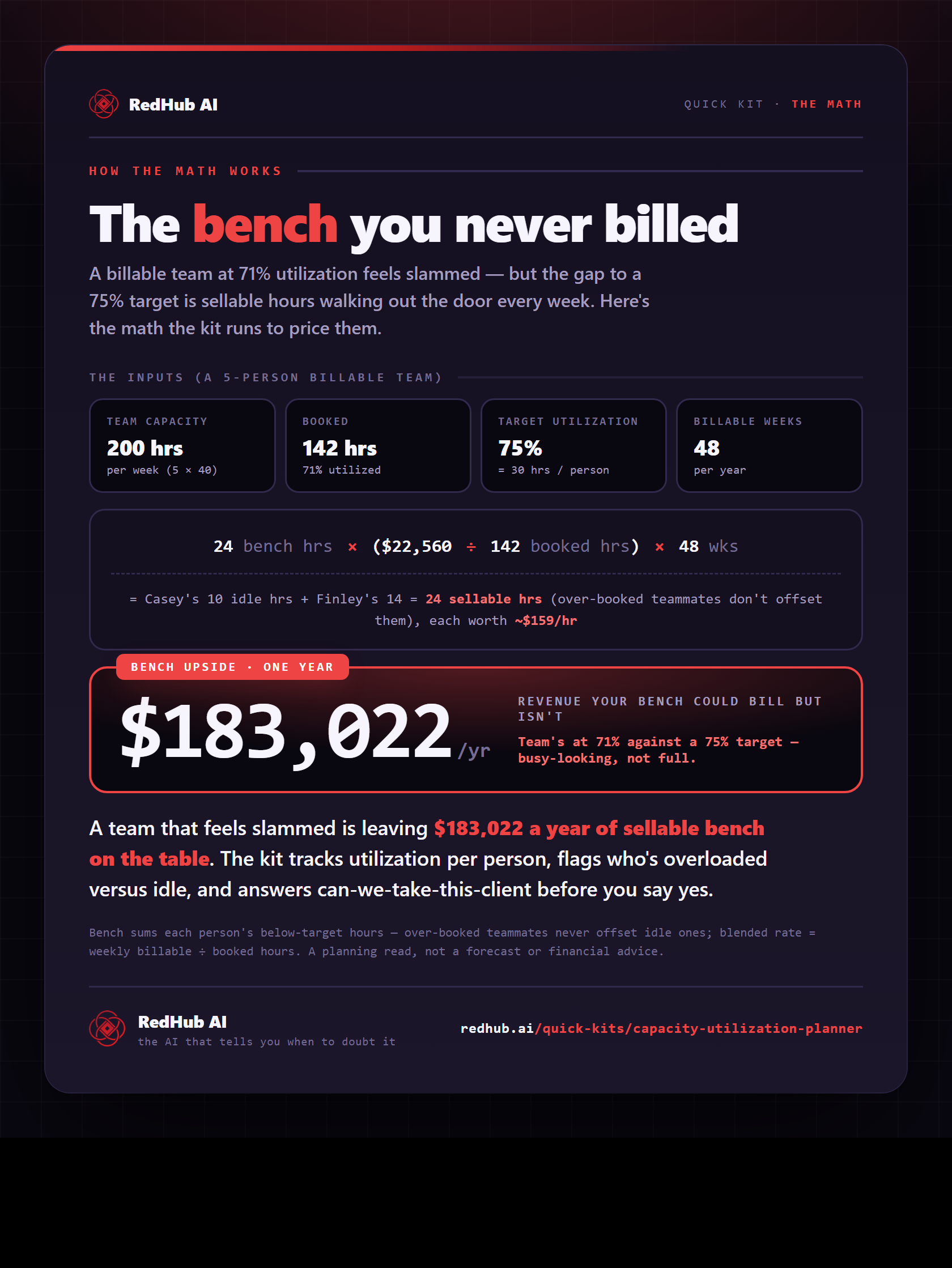
The gate this post refers to, drawn from the tool’s own logic. See the tool.