AI Document Extraction: A Practical Guide for Ops Teams
RedHub AI Editorialupdated August 17, 20267 min read

Jump to a section12
- TL;DR
- What is AI document extraction?
- Why manual document entry breaks first
- How AI document extraction actually works
- The failure mode: confidently wrong
- The standard: rate, validate, flag
- Where the human fits
- Start with the document type that hurts most
- Extraction is one stage of a longer pipeline
- Where to go deeper
- Decision Guide
- FAQ
TL;DR
- What it is: AI document extraction reads invoices, receipts, forms, and PDFs and returns the fields you care about as structured data.
- Who it's for: Ops, finance, and admin teams still retyping documents by hand — browse RedHub Systems.
- How it works: Define a schema, run the model, then validate every field and flag what's shaky for a human.
- Bottom line: The extraction is the easy part. The hard part is knowing which fields to trust — so pick a workflow that flags instead of guessing.
What is AI document extraction?
AI document extraction is the use of a language model to pull specific fields — invoice numbers, dates, vendor names, totals — out of unstructured documents and return them as clean, structured data. A good extraction workflow does three things: it rates its own confidence on every field, it validates each value against your rules, and it flags anything low-confidence or invalid for human review instead of silently accepting it.
Best for: teams processing repetitive documents — see the AI Document Extraction Kit ($99).
AI document extraction has quietly become one of the most useful things a language model can do for a business. Feed it an invoice, get back the invoice number, the date, the vendor, and the total — as data, not a picture of data. No retyping. No copy-paste. For an ops or AP team processing hundreds of documents a month, that is real hours back every week.
But there's a catch, and most vendors won't lead with it: the model returns a confident answer for every field — including the ones it got wrong. A misread total looks exactly like a correct one. It flows into your accounting the same way. And nobody notices until a reconciliation won't close or a payment goes out at the wrong amount.
This guide covers how extraction actually works, where it fails, and how to build a workflow that gets you the speed of automation without trusting a tool that quietly guesses.
Why manual document entry breaks first
Before the fix, the problem. Manual document entry is slow, boring, and error-prone in its own right — humans mistype totals too. But the deeper cost is what it does to the team: your most detail-oriented people spend hours a day retyping fields a machine can read in seconds. The work doesn't scale, it doesn't improve, and it makes document volume the ceiling on the whole operation.
So automating extraction is the right instinct. The mistake is automating it blindly.
How AI document extraction actually works
Strip away the vendor language and the mechanics are simple:
- You define a schema. A short list of the fields you want — name, type, and whether each is required. For an invoice: invoice number (text, required), date (date, required), vendor (text, required), total (number, required), currency and line items (optional).
- The model reads the document. The document text goes to a language model with the schema, and the model returns its best value for each field.
- Something checks the result. This is the step that separates a workflow you can trust from one you can't. Dates should parse. Totals should be numeric. Required fields should be present. And the model's own uncertainty should be visible, not hidden.
Steps one and two are commoditized. Every extraction tool does them. Step three is where the quality lives — and it's the step most tools skip. We walk the full pipeline design in unstructured to structured data: a working pipeline.
The failure mode: confidently wrong
Language models don't fail loudly on documents. They fail politely. A blurry scan, a cramped table, a handwritten amount — the model still returns a value, formatted beautifully, with no signal that it was a coin flip. And the fields where models are weakest are exactly the fields where mistakes cost the most: totals, dates, and handwriting.
Key insight: an extractor that never says "I'm not sure" isn't more accurate than one that does. It's just hiding its misses. The uncertainty exists either way — the only question is whether you get to see it before the data enters your books.
How accurate is AI extraction, really? The honest answer is that there is no fixed number — accuracy depends heavily on document quality and layout, which is why any vendor quoting one universal accuracy figure deserves a skeptical read. We break down what to expect, and the two metrics that actually matter, in document extraction accuracy: what to expect and verify.
The standard: rate, validate, flag
The fix isn't more confidence. It's honesty about uncertainty, enforced by three checks that stand between a model's guess and your systems:
| Check | What it does | What it catches |
|---|---|---|
| Rate | Every field comes back with a confidence level — high, medium, or low | The shaky reads that look identical to solid ones |
| Validate | Dates must parse, numbers must be numeric, required fields must be present | Type failures and missing fields before they reach your systems |
| Flag | Anything low-confidence, missing, or invalid is marked REVIEW for a human | Everything the first two checks caught — routed to a person, never silently accepted |
The result: automation handles the easy fields at full speed, and a human checks only what's risky — not every document. That's the whole trade. You keep the hours saved and lose the silent errors.
Those aren't marketing numbers — they're how the workflow is wired. When the extractor exits non-zero, whatever runs it knows not to auto-accept. That one convention turns "AI read a document" into a gate a real pipeline can be built on.
Where the human fits
"Human in the loop" gets said a lot and designed rarely. Review everything and you've rebuilt manual entry with extra steps. Review nothing and you're back to blind trust. The working answer is confidence-routed review: auto-accept documents where every field validated and came back confident, queue the flagged ones for a person, and sample-audit a share of the auto-accepted ones so trust stays earned. The full design is in human-in-the-loop document processing, done right.
Want the whole workflow in a box?
The AI Document Extraction Kit ($99, one-time) ships a runnable extractor that rates, validates, and flags — zero dependencies, demo mode runs with no API key — plus editable field schemas, an Extraction Playbook, and a QA tracker for flag rate and sampled accuracy.
Get the Extraction Kit — $99 →Start with the document type that hurts most
For most businesses that's invoices — the highest volume, the clearest schema, and the most expensive field to get wrong (the total). Invoices are also where extraction pays back fastest, because the same six fields repeat on every document. We cover the AP-specific workflow, including how to handle flagged invoices, in invoice data extraction: automate AP without bad data.
Extraction is one stage of a longer pipeline
Documents rarely arrive one at a time, pre-sorted, and complete. In a real operation, extraction sits in the middle of a chain: documents get classified and routed to the right handling first (the lane of the Document Classify & Route Kit), checked for completeness on intake, extracted, validated field-by-field (the Document Field Validator goes deeper on that stage), and only then loaded. If you're not sure which stage of your document pipeline is leaking, the Document Processing Pipeline Diagnostic scores the whole chain and, where a stage is short, names the weakest link.
Where to go deeper
This pillar is the map. Each part of the extraction lane has its own guide:
- Invoice data extraction — the AP workflow, field by field.
- Document extraction accuracy — what to expect, and the two metrics to track.
- Unstructured to structured data — the five-step pipeline, end to end.
- Human-in-the-loop document processing — who reviews what, and why.
Decision Guide
Use AI document extraction if: your team processes repetitive documents — invoices, receipts, forms — and hours of retyping are the bottleneck.
Skip it if: your documents are rare, one-off, and high-stakes (a single contract negotiation doesn't need a pipeline — it needs a careful read).
Best first step: pick one document type, define its five or six fields, and run a validate-and-flag extraction on last month's batch. Count what gets flagged before you trust anything.
FAQ
What is AI document extraction?
Using a language model to pull specific fields — numbers, dates, names, totals — out of unstructured documents like invoices, receipts, and forms, and return them as structured data your systems can use.
Is AI document extraction accurate?
There's no honest fixed number. Accuracy depends on document quality and layout, and models are weakest on totals, dates, and handwriting — the high-stakes fields. That's why a trustworthy workflow validates every field and flags the shaky ones instead of quoting one accuracy figure.
What does "flag, don't guess" mean?
Every extracted field carries a confidence rating, and anything low-confidence, missing, or invalid is marked REVIEW for a human. The alternative — an extractor that silently accepts its own guesses — can put a wrong total straight into your books.
Do I need a developer to use AI extraction?
Light comfort with running a script helps, but not much more. The RedHub kit's extractor has zero third-party dependencies and a demo mode that runs with no API key, and the schemas, tracker, and playbook are usable without writing code.
Should a human still review extracted data?
Yes — but only the risky part. Auto-accept documents where every field validated and came back confident; route flagged documents to a person; and sample-audit a share of the auto-accepted ones so accuracy stays measured, not assumed.
What documents should I automate first?
Invoices, usually. They're high-volume, the fields repeat, and the payoff is immediate. Start there, then extend the same schema-validate-flag pattern to receipts and forms.
Which RedHub tool should I start with?
The AI Document Extraction Kit ($99) — extractor, schemas, playbook, and QA tracker. If your wider document pipeline is the problem, run the Document Processing Pipeline Diagnostic ($79) first.
Extract documents. Flag, don't guess.
A runnable extractor that rates every field, validates the result, and flags what needs a human — plus editable invoice/receipt/generic schemas, an Extraction Playbook, and a QA tracker. One-time $99, yours to keep. 30-day guarantee. No accuracy guarantee — that's the point.
Get the AI Document Extraction Kit — $99 →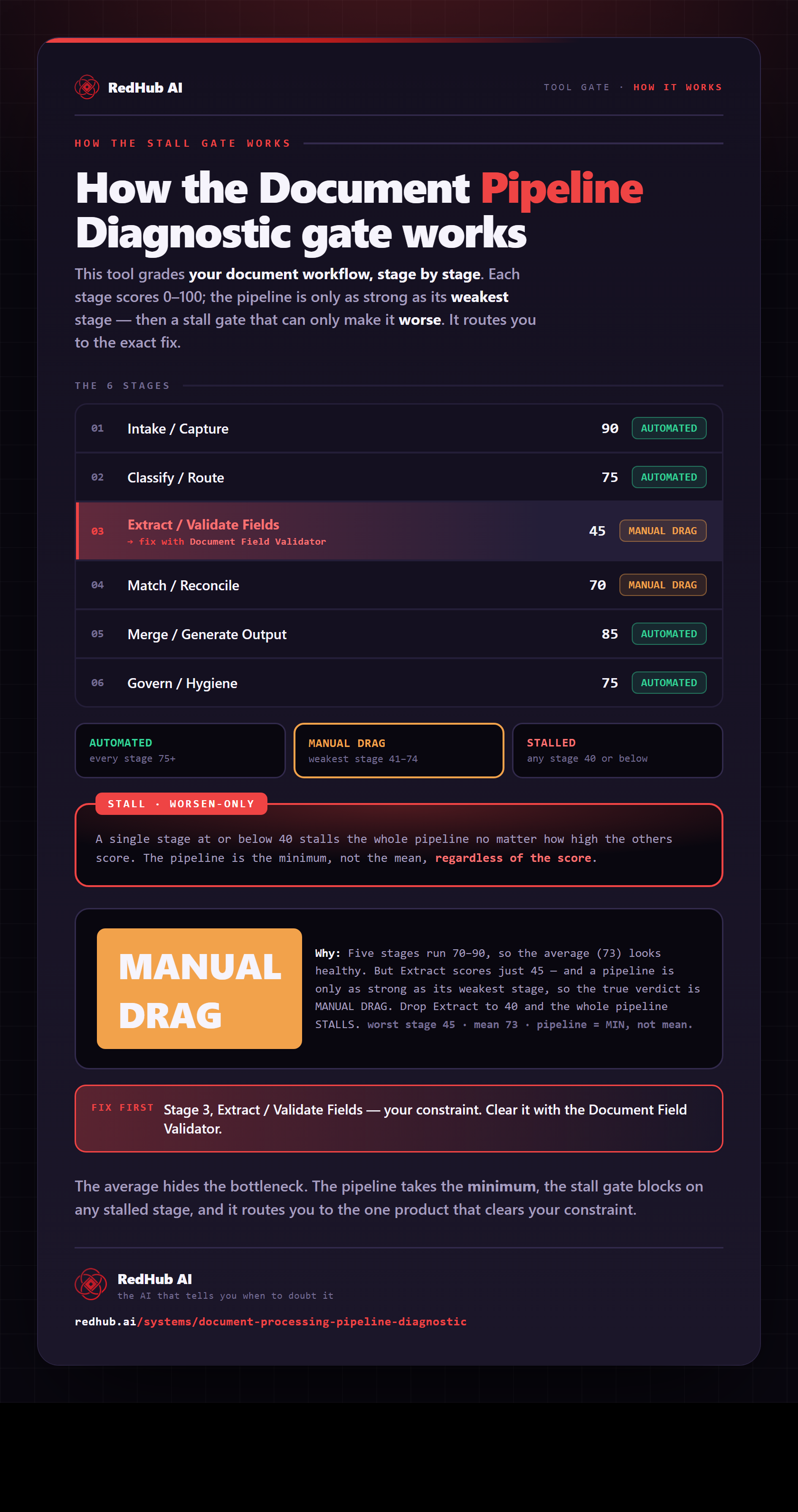
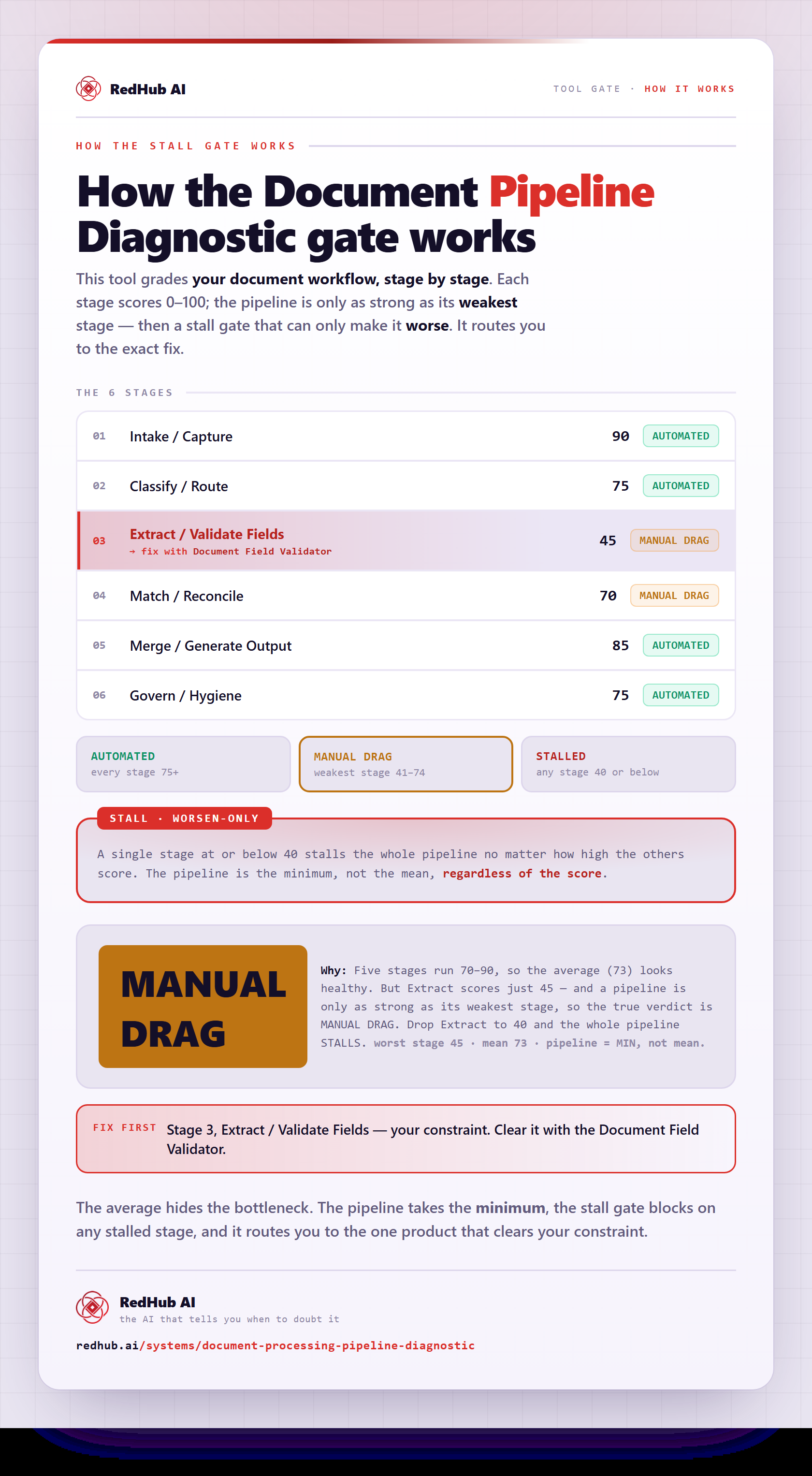
The gate this post refers to, drawn from the tool’s own logic. See the tool.