Meeting Follow-Up: The Step That Decides Whether the Meeting Mattered
RedHub AI Editorialupdated October 4, 20266 min read

Jump to a section7
At 10:58, with two minutes left and half the room glancing at the next call, a meeting's decisions either get written down with names and dates or start to fade. That closing read-back, plus the recap sent in the hour after, is meeting follow up. Teams pour effort into the meeting itself, with a tight agenda, a good facilitator and real debate. Then the clock runs out, people have another call, and the close gets rushed or skipped. A productive hour can end with nothing anyone can point to a week later.
TL;DR: Decisions from a meeting either get a named owner and a date before people leave, or they fade. Read the list back before the call ends, send a recap within the hour, and put dates in a shared tracker or calendar instead of only in an email. In a short standup with many items, read back only what is new or changed. The Meeting-to-Action Handoff Gate ($49) turns the close into the same checklist every time. Start with the pillar: How to Actually Get Meeting Action Items Done.
The window closes when the call ends
Right after a decision, everyone still agrees on what was decided, who is doing it and by when. That agreement doesn't last. The call ends, people move to their next thing, and the details start to drift. By Thursday, Jordan remembers the client email going out Wednesday. His manager heard Monday. The client heard "this week." All three were in the same meeting, and none of them is lying.
Follow-up is what freezes the agreement while it still exists. Treating it as admin bolted onto the end gets the order backward, because the meeting's value is still unrecorded until this step happens.
The last two minutes carry the other fifty-eight
A sixty-minute meeting can spend fifty-eight minutes on sharp, focused discussion and still produce nothing if the last two are rushed. The discussion creates the decisions. The close decides whether they survive the week. That is how a meeting that "felt great" shows zero finished items seven days later: the room agreed on everything and wrote down nothing binding.
The fix costs no extra time. Protect the last two minutes, and start the close on schedule even when the discussion is still going. If you want to know whether a meeting was worth having at all, our post on meeting ROI suggests naming the output you expect before the meeting starts. Follow-up is where you check whether you got it.
What a useful recap contains
A recap is neither a transcript nor a "great meeting, talk soon" note. It is a short list: what was decided, who owns each item, and the date it is due. Where it goes matters as much as what it says. A recap that sits in the host's notes app protects nobody. One in a shared thread or doc is a record that outlasts anyone's memory of the call.
- Read the list back. Thirty seconds of "so to confirm: Jordan, the client email, Wednesday" catches a mismatch while everyone is still there to fix it.
- Send the recap within the hour. The longer the gap, the softer the details get, and the easier it is to quietly renegotiate a commitment that felt firm at 2 p.m.
- Put dates somewhere durable. A calendar entry, a shared tracker or a pinned message survives the next fifty emails. A one-time recap usually doesn't.
When the read-back doesn't fit the meeting
The read-back gets expensive in short meetings. Take a 15-minute daily standup that carries 12 open items. At about 25 seconds an item, reading every line back takes 5 minutes, a third of the meeting. Those numbers are illustrative, but the shape is real: in a standup, a full read-back competes with the standup's own job.
One answer is to read back only what is new or changed since yesterday. That keeps the close short, and it has a cost. An item that hasn't changed in three weeks is never read aloud, which is exactly how a stuck item hides. A weekly pass over everything due soon covers some of that gap, and our post on action item tracking walks through it. Whether that is enough for your team depends on how many items go stale at once, and we can't tell you that number from here.
Follow-up starts where capture stops
Capturing the discussion, the context and the reasoning behind each decision is a separate job. The Meeting Intelligence System ($49) does that from a transcript or rough notes, including a follow-up email draft, and it flags any item with no clear owner or date as UNCONFIRMED. Follow-up takes that list, however it was made, and confirms the owner and date on every line before the meeting ends.
The Meeting-to-Action Handoff Gate is that confirmation in spreadsheet form. You mark five checks per item, and the result is TRACKED, CHASE or DROPPED for each one. The same close runs every time, so it doesn't depend on who happens to be hosting that week.
Make the close the same every meeting
Built for the last step of the meeting: mark named owner, due date, acceptance, system of record and definition of done for each item in a single .xlsx. Any unowned item comes back DROPPED, and the meeting rolls up to ALL TRACKED, GAPS or HANDOFF BROKEN.
Get the Meeting-to-Action Handoff Gate — $49Pairs well with
For the recap itself, the Meeting Intelligence System ($49) drafts follow-up emails from the transcript alongside the summary and action items. After the recap goes out, replies and promised deliverables come back by email, and the Inbox-to-Done Engine ($129) keeps a waiting-on tracker that surfaces overdue follow-ups before they go cold. And if a recurring meeting rarely produces anything worth following up on, the Meeting Cost Calculator ($29) prices it per year and calls it Keep, Trim / shrink, or Kill / cut.
More in this guide
What is meeting follow up?
It is the closing step where every decision gets a named owner and a real due date, followed by a recap that lands somewhere the whole group can see. Without it, nothing decided in the meeting binds anyone.
Why does the end of a meeting matter so much?
The discussion creates decisions, but the close decides whether they survive the week. A meeting can be excellent and still produce nothing if the last two minutes are rushed or skipped.
How fast should a meeting recap go out?
Within the hour, before attention moves fully to the next task. The longer the delay, the more the details soften and the easier a firm commitment becomes to renegotiate.
Do I have to read back every item in a short standup?
Not always. In a 15-minute standup with many items, reading back only new or changed items keeps the close short. Pair it with a weekly review of everything due soon, so unchanged items don't hide.
Is a recap email the same as follow-up?
Only if it names an owner and a date for every item. A friendly "great discussion today" note with no specifics doesn't work as follow-up, even if it goes out right away.
How does the Handoff Gate make follow-up consistent?
It replaces "remember to follow up" with the same five checks per item at the end of every meeting: owner, date, acceptance, system of record and definition of done. The close no longer depends on who runs the meeting.
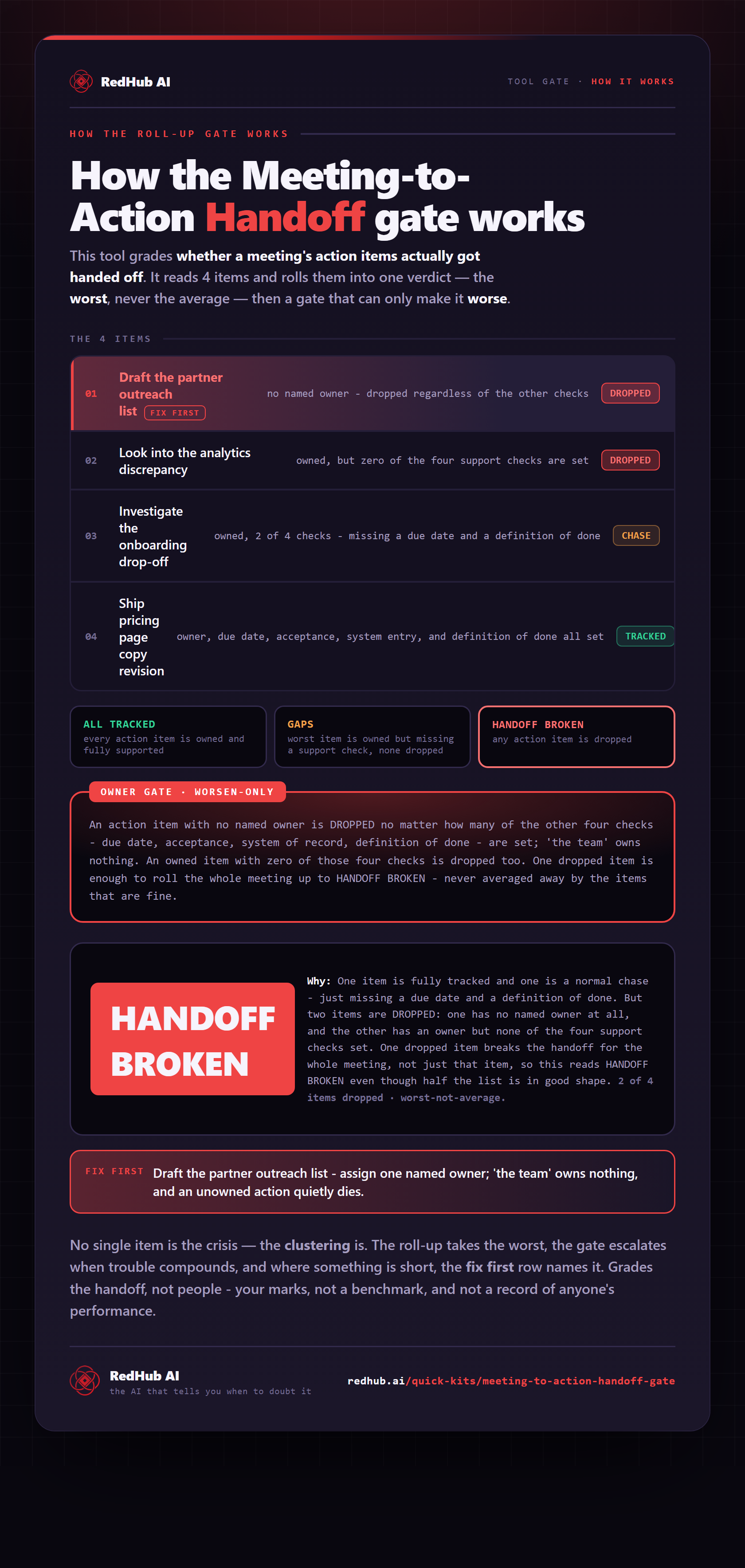
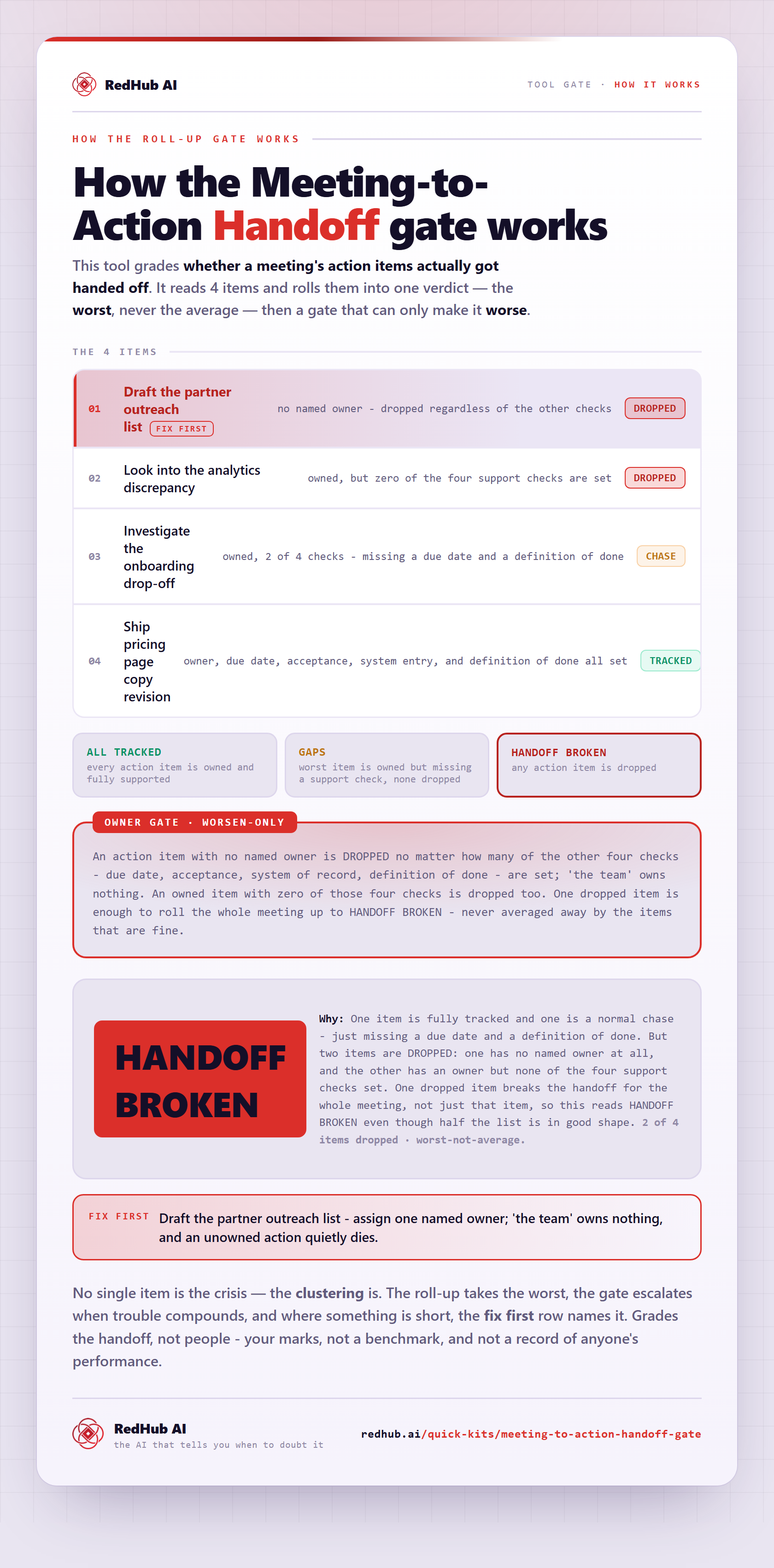
The gate this post refers to, drawn from the tool’s own logic. See the tool.