Model-Agnostic AI Architecture: Keep Your Workflow Portable
RedHub AI Editorialupdated October 2, 20267 min read

Jump to a section8
A model-agnostic AI architecture keeps the durable parts of a business process separate from the parts that change with the model market. Your rules, approvals, tools and tests live outside any one vendor's prompts. The model sits behind a thin layer that decides which model handles each job. Built that way, a workflow can survive a price change, an outage, a policy shift, a performance drop or a retirement with a test run instead of a rebuild. Built the other way, the vendor decides when you rewrite your workflow.
TL;DR: Split the workflow into six layers: business workflow, policy, tools, evaluation, routing and model. Keep business rules out of prompts, give every model the same request and output shapes, and keep one test set that any candidate model has to pass. Start thin and add abstraction only where a workflow earns it, because some vendor-specific features are worth keeping. The AI Vendor Reliability & Spend-Justification Scorecard ($79) scores each AI vendor on reliability and value, switching alternatives included, and returns RENEW, RENEGOTIATE or DO NOT RENEW. Start with the pillar: AI Model Lifecycle: Your AI Stack Has an Expiration Date.
The fast way in is the expensive way out
The quickest way to build an AI workflow is to wire your business process straight into one vendor's model: its prompt format, its tool conventions, its special features. It works on day one. A year later the approval rules live inside a system prompt, the output parser expects that one model's quirks, and the tool calls use a format only that vendor accepts. When the model is deprecated, nobody can say which parts of the workflow are the business and which are the model.
That is lock-in, and it rarely starts as a decision. It starts as a deadline that rewarded speed.
The layers to separate
Each layer has one job, and only the bottom one changes when you change models.
| Layer | What should live there |
|---|---|
| Business workflow | Objectives, rules, tasks, owners and success criteria |
| Policy layer | Approvals, risk rules, data boundaries and escalation |
| Tool layer | Connections to files, APIs, databases and business systems |
| Evaluation layer | Golden tasks, metrics, test results and release gates |
| Routing layer | Model selection, fallback and cost or performance decisions |
| Model layer | Gemini, Claude, OpenAI, local models or future providers |
What that looks like in one workflow
Take a commercial cleaning company that quotes jobs from a site walkthrough. A manager fills in a form: square footage, floor types, restroom count, visit frequency, notes. An AI reads the form, estimates labor hours, drafts the quote, and emails it to the prospect once a person approves. Each piece has a home:
- The pricing rules (hourly rate, minimum job size, the markup for weekend visits) belong in the business workflow, as code or a table. Not in the prompt.
- "Any quote over $5,000 needs the owner's approval" belongs in the policy layer, enforced by code the model cannot talk past.
- The form reader, the CRM write and the email sender belong in the tool layer, with one interface every model uses.
- Fifty past walkthroughs with the quotes the owner signed off on belong in the evaluation layer.
- Which model drafts the quote, and which takes over during an outage, belongs in the routing layer.
Now swap the model. The rates, the $5,000 rule, the tools and the fifty test quotes stay where they are. The only work is running the fifty walkthroughs through the new model and checking its hour estimates against the signed quotes. That is an afternoon, not a project.
Why separation creates options
Once the logic, policies and tools live outside the model, you can run several models against the same tasks and route each job to the best fit. One model may handle long code work. Another may answer customers faster. A smaller, cheaper model may classify incoming forms. A fallback can carry the workflow through an outage. Our post on LLM API cost control covers routing without losing quality, and the free Decision Fit Check tells you what level of AI one task needs before you assign it a model.
New models make the option worth more. In the last week of September 2026 alone, Anthropic released Claude Sonnet 5.5 and Google announced Gemini 4 Argon, which our post on Argon vs Sonnet 5.5 compares on price. Google says Argon rolls out first to trusted cyber defenders in its Fairwind Program and gives no date for developers, so only Sonnet 5.5 was open to test that week. A team with the layers in place could score Sonnet 5.5 against its own tasks within days and run the same set on Argon whenever access opens. A team without them can only read the announcements.
Do not over-abstract too early
Model-agnostic does not mean forcing every provider down to the lowest common denominator. Some features are worth using even though only one vendor has them, and an abstraction that hides them throws that value away.
A concrete case: Anthropic's migration guide for Claude Sonnet 5.5 says that to run without up-front thinking, you send a setting called between_tools, where Claude Sonnet 5 used disabled and earlier models ran without thinking by default. Nothing guarantees another provider offers the same setting, and it changed between two generations of one vendor's own models. A generic "thinking: off" switch in your abstraction either maps to it correctly for each model or quietly does the wrong thing.
The answer is to isolate those dependencies, not ban them. Keep each model-specific setting in one adapter per model, write down why it is there, and keep it out of the business layers. You will still have work to do when that model changes. It will be in one file instead of everywhere.
Start thin: common request objects, standard output schemas, shared tool interfaces, one set of evaluation tests, and simple routing logic. Add more only when a workflow earns it. A team with two workflows does not need a model gateway. A team with forty probably does, and where the line falls between them is a judgment call about how often you expect to switch.
Portability is continuity
Vendor optionality can sound like an architect's preference. It decides whether a retirement notice, like the one Anthropic sent on September 30, 2026 for Claude Sonnet 4.5, means a test run or an emergency. For the cleaning company, that notice means fifty walkthroughs and an afternoon. For a team whose $5,000 approval rule lives in a system prompt, the work starts with finding the rule. Our post on model deprecation covers what that notice looks like when it arrives.
Know which vendor you could walk away from
The AI Vendor Reliability & Spend-Justification Scorecard scores every AI vendor on two axes, reliability (uptime and SLA, incident load, support) and value (adoption, value against cost, switching alternatives), and returns RENEW, RENEGOTIATE or DO NOT RENEW. A business-critical vendor that fails any reliability dimension is DO NOT RENEW, however strong its value. Deterministic and offline.
Get the AI Vendor Reliability & Spend-Justification Scorecard — $79Pairs well with
The MCP Server & Connector Builder Kit ($99) helps you build a tool layer as Model Context Protocol servers, with tool-design and security patterns and a Pass, Fix or Block tool linter. The Token Economics Workbook ($59) brings a model-routing matrix, a forecasting calculator, caching patterns and 15 production teardowns to the routing layer. The Ransomware & AI-Outage Recovery Readiness Drill ($79) checks, among six controls, whether each load-bearing AI dependency has a fallback or degraded mode.
More in this guide
What is a model-agnostic AI architecture?
It is a way of building AI workflows so the business rules, policies, tools and tests live outside any one model, and the model sits behind a routing layer. Changing or adding a model then means running tests, not rewriting the workflow.
What layers should a model-agnostic workflow have?
Six: the business workflow, a policy layer, a tool layer, an evaluation layer, a routing layer, and the model layer. Only the model layer should change when you switch models.
Does model-agnostic mean I cannot use vendor-specific features?
No. Some vendor features are worth using. Isolate each one in a single adapter for that model, document why it is there, and keep it out of your business rules, so a model change touches one place.
Do I need a model gateway or routing platform?
Not at first. Start with common request objects, standard output schemas, shared tool interfaces, one evaluation set and simple routing logic. Add heavier infrastructure only when the number of workflows and models makes it worth the upkeep.
Why keep business rules out of the prompt?
A rule inside a prompt depends on the model following it, and a new model may follow it differently. A rule in code, such as an approval limit, works the same whichever model runs, and it can be tested on its own.
How does this help when a model is retired?
With the layers in place, a retirement means running your test set through the replacement and checking the results. Without them, it means finding every place the old model's behavior is built in, under a deadline.
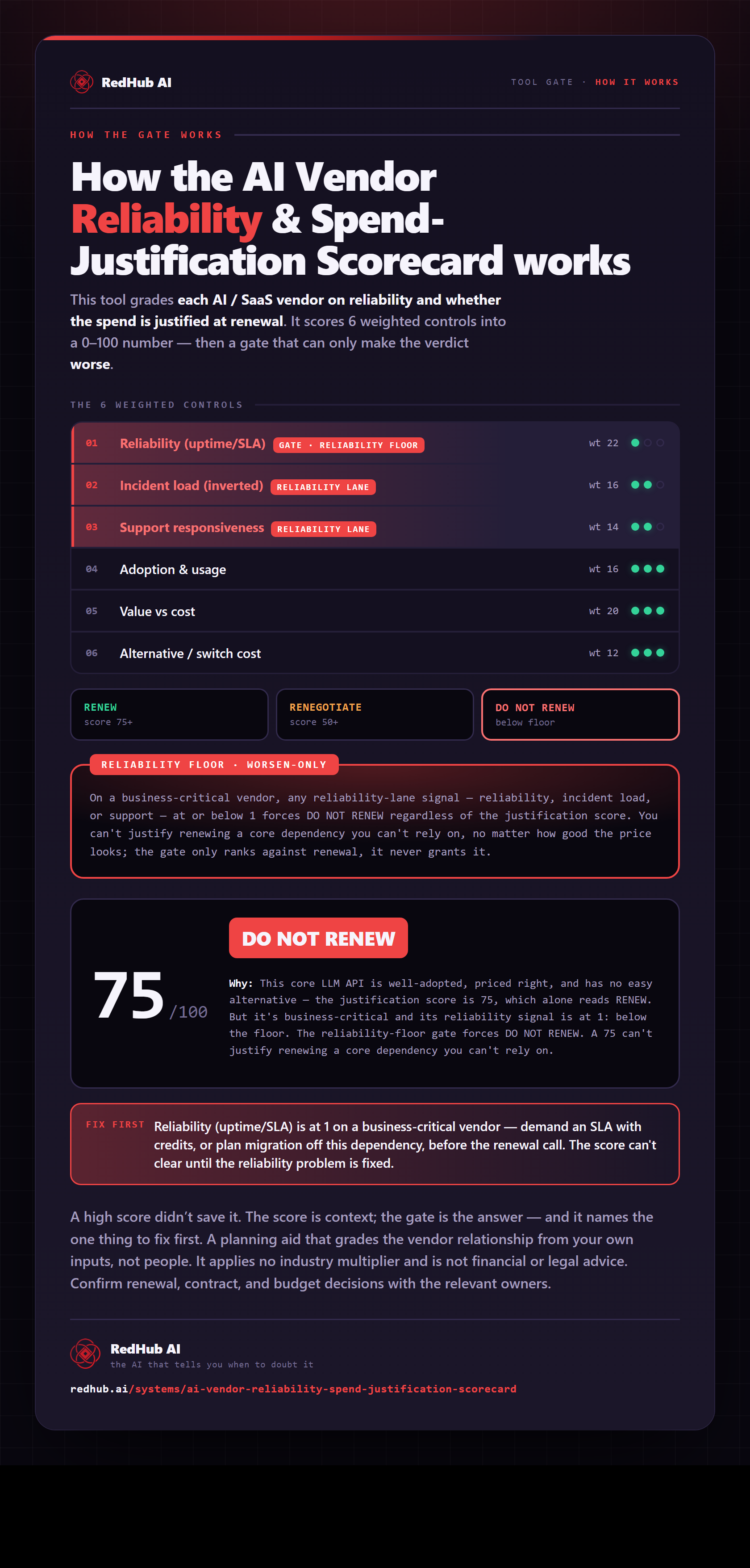
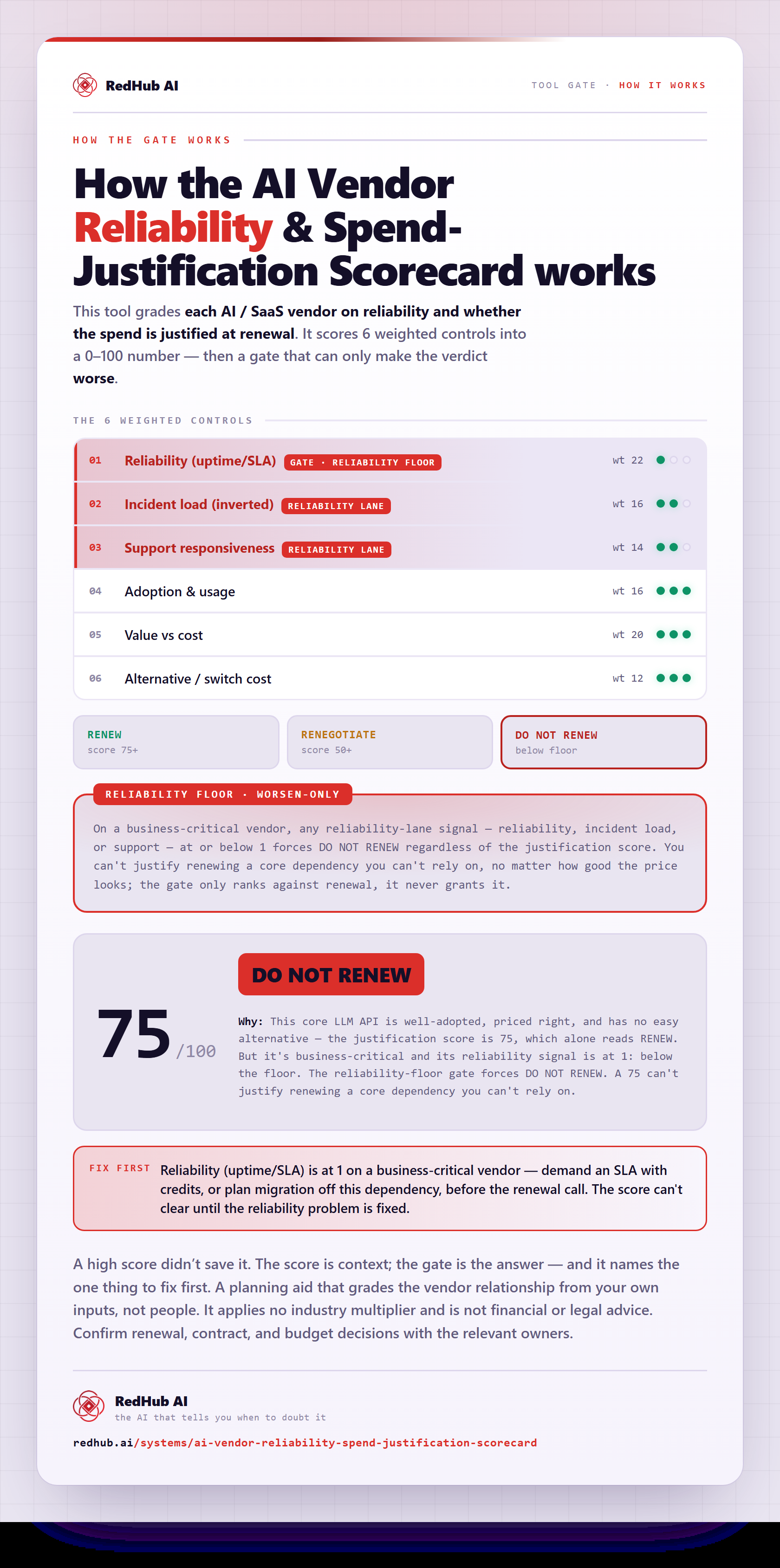
The gate this post refers to, drawn from the tool’s own logic. See the tool.