Turning One Podcast Episode Into Short Clips
RedHub AI Editorialupdated October 7, 20265 min read

Jump to a section8
Going from podcast to clips starts with a list of timestamps. Each one marks a moment that makes sense to a stranger who never heard the rest: an opinion, a story with an ending, one usable piece of advice. You cut one clip per mark. Slicing the runtime into even pieces gets you more files and fewer clips worth posting, because a conversation leans on what was said two minutes earlier.
TL;DR: Mark first, cut second. A moment earns a mark when it works without the question or the setup in front of it. The Podcast Production & Repurposing Engine ($79) plans clips as the lower of two numbers: the moments you marked, and one clip per 8 minutes of runtime. Check the audio before you cut anything. The pillar, How to Repurpose a Podcast Episode, covers the full sequence.
Ten clips from every episode is a promise about the tool
A tool that returns the same number of clips from every episode has to find them somewhere. Some episodes have ten moments that stand alone. Many have three. When the target is fixed and the episode is short on material, the extra clips come from lines that only landed because of the question before them.
Marking by ear is slower per clip. It is also the only method where the count comes from the episode. If you can flag a timestamp while you record, a tap on the recorder or a note on paper, the relisten gets shorter.
What earns a mark
The test is whether the moment survives being pulled out. Four kinds usually do.
- A firm opinion stated in one or two sentences, with no hedge trailing behind it.
- A short story with a start, a turn and a payoff.
- A complete instruction a listener could act on today.
- A number or an admission the listener did not expect.
The Engine's clip-finder skill, which works from a transcript you paste in, looks for moments that stand alone in 30 to 60 seconds. It is told to return fewer than you asked for when fewer qualify, and to flag any clip that would mislead out of context.
The great talker who gives you two clips
Picture an illustrative 50-minute interview with a guest who is funny and easy to listen to. You expect a big haul. On the relisten, almost every strong line turns out to be an answer. Without the host's question it sounds like half a conversation. Two moments stand alone.
Enter 50 minutes and two marked moments, and the Engine plans two clips. Fifty minutes would allow six. The marks allow two, and the plan takes the lower number.
There is a way to rescue some of the others: keep the question in. The clip runs longer and opens on the host, which is a weaker first second. Sometimes that trade is worth making for a great answer. The planner only counts what you marked, so that judgment stays with you.
When the runtime is the limit
The cap also works in the other direction. Mark five moments in a 24-minute solo episode and the Engine plans three clips, since 24 divided by 8 is 3. The rule is there so you do not slice filler out of a short recording. The two extra marks are not wasted. Each still gets a quote card if you have that format switched on, and both belong in the show notes.
Check the audio before you cut
A little room hum is easy to forgive across a 40-minute episode. In a 30-second clip with nothing around it, the hum is half of what the viewer hears. So score the episode before you mark it. In the Engine, a clean-audio score of 1 or 0 out of 5 puts the episode at Hold regardless of the total, and a clip cut from a held episode carries the same defect. The production workflow post covers the scoring step.
Cutting the clips you marked
- Relisten to mark. Keep a way to note a timestamp in reach, and write one down the moment something stands alone.
- Mark wide, then cut the list. Flag anything that might work. Then drop every moment that needs the minute before it.
- Start where the moment starts. A clip that runs long usually has its best line buried behind a warm-up sentence.
- Caption it. A viewer scrolling with the sound off still needs the line on screen.
What happens after the raw cut is a different craft. Our post on short-form video strategy covers hooks and a posting cadence you can keep.
Get a clip count the episode can back up
The Podcast Production & Repurposing Engine scores an episode Publish, Tighten or Hold with a hard gate on audio, then plans clips as the lower of your marked moments and one per 8 minutes. The clip-finder skill works from your transcript and returns timestamp ranges with a context flag. It does not edit audio or transcribe.
Get the Podcast Production & Repurposing Engine — $79Pairs well with
The Organic Social & Short-Form Video System ($79) scores a clip's first line Ship, Tighten or Rework before you post it, and adds content pillars and a cadence. If the show also runs on YouTube, the YouTube Packaging & Retention Engine ($99) reads each video's click-through rate and average percentage viewed against your own channel baseline. The Channel Audit & Back-Catalog Optimizer ($49) ranks the videos already on your channel Refresh, Leave or Retire.
More in this guide
How many clips can I get from one podcast episode?
As many as the moments you marked, up to a runtime limit. The Podcast Production & Repurposing Engine plans the lower of your marked moments and one clip per 8 minutes, so a 50-minute episode with two marks gets two clips and a 24-minute episode with five marks gets three.
What makes a podcast moment worth clipping?
It makes sense without the minutes around it. A firm opinion, a short story with a payoff, a complete instruction or a surprising number usually holds up. An answer that needs the host's question in front of it usually does not.
Can I clip an episode with bad audio?
You can, and the clip will carry the defect. A hum that fades into the background of a full episode is much easier to hear in a 30-second clip. Fix the audio first.
What if a great answer only works with the question?
Keep the question in and accept a longer clip with a slower start, or leave the moment for the show notes. The planner counts the moments you marked, so the decision is yours.
Does the Engine cut the clips for me?
No. It plans the count, and its clip-finder skill suggests timestamp ranges from a transcript you paste in. You make the cuts in your own editor.
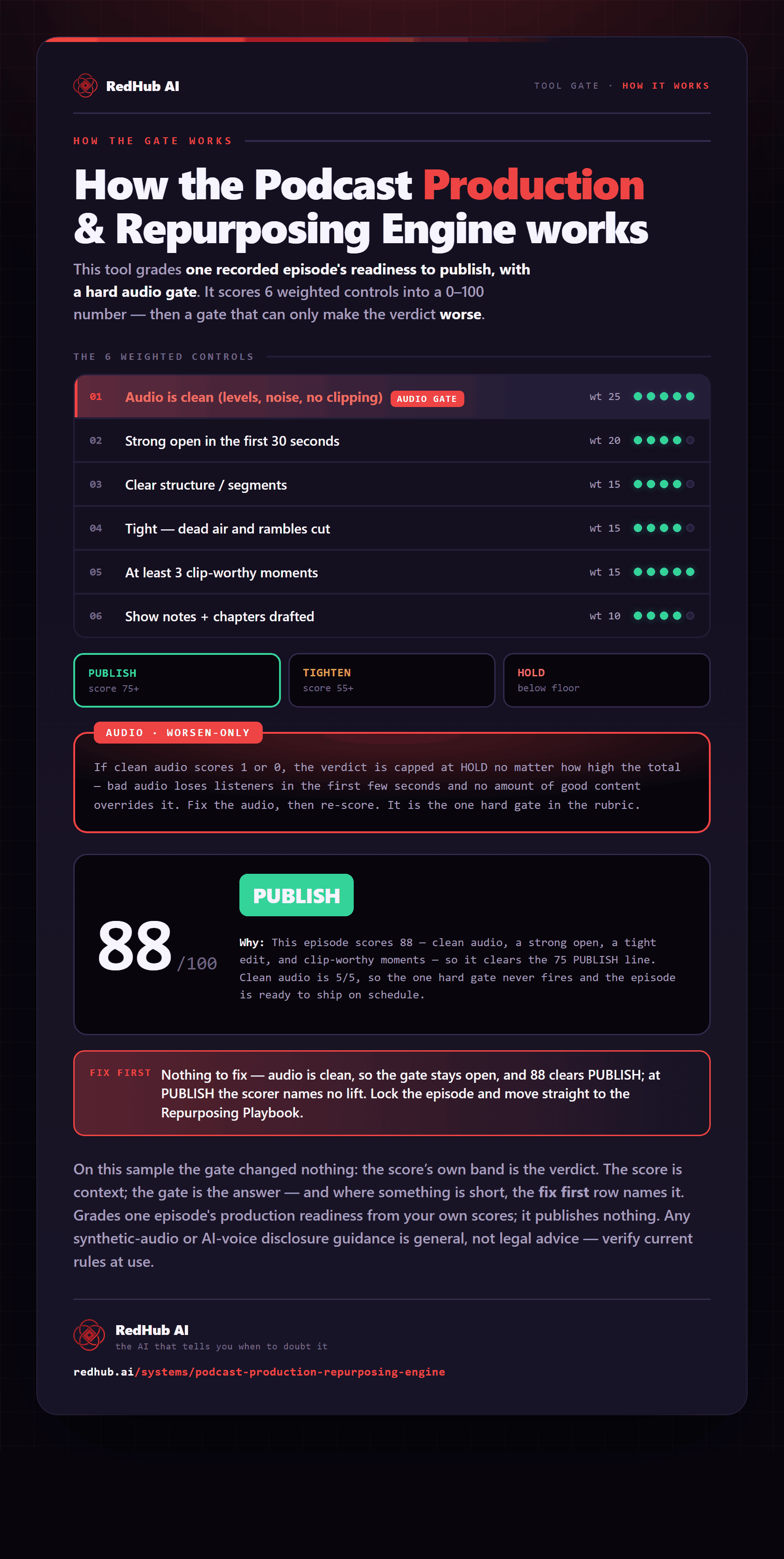
The gate this post refers to, drawn from the tool’s own logic. See the tool.