AI Sound Design: How to Add Pro Sound Effects to Your Videos
RedHub AI Editorialupdated September 20, 20265 min read
Jump to a section9
The fastest way to make a video feel amateur isn't bad footage — it's silence where a sound should be, or a stock "whoosh" slapped on every single cut. Pro-sounding video comes from a handful of quiet decisions: what sound plays under a transition, whether a button tap gets a click, how much room tone sits under dialogue so a cut doesn't feel like a hole. None of it requires a recording studio. It requires a system.
TL;DR: Sound effects come from three places — free libraries, paid libraries, and AI generation tools — and each is right for different situations. Good sound design is a short, repeatable workflow: identify the story beats that need sound, source or generate the effect, layer it under the right moment, then check you're actually allowed to use it. The AI Sound Design & SFX Kit ($59) packages the sourcing checklist, the workflow, and the rights-disclosure language into one download — it's a system for doing this consistently, not a promise that any tool makes your video "sound professional" automatically.
Why sound design matters more than people think
Viewers rarely notice good sound design — they notice bad sound design, or its absence. A cooking video with no knife-on-cutting-board sound feels flat even if the visuals are sharp. A product demo with no interface click feels unfinished. Sound is one of the cheapest ways to add production value, because it fixes something the audience feels rather than something they consciously notice. It rewards small, targeted effort far more than it rewards volume of effects.
The three sources of sound effects
Every sound effect you'll ever use comes from one of three places: a free library, a paid library, or an AI generation tool. Each has a different tradeoff between cost, quality, uniqueness, and licensing clarity. We break the full comparison down in Where to Get Sound Effects for Video (Free, Paid, and AI) — but the short version is: free libraries are fine for common sounds (footsteps, doors, notifications) where uniqueness doesn't matter; paid libraries earn their price on quality and consistency across a whole project; AI tools are strongest when you need a very specific sound that doesn't exist pre-recorded anywhere.
A basic sound-design workflow
You don't need a timeline covered in audio tracks. A simple four-pass workflow covers most creator content:
- Watch the cut silent first. Note every moment that reads as "missing something" — a transition, an action, a reveal, a punchline.
- List the beats, not the seconds. You're sourcing for story moments (a door opens, a phone buzzes, a joke lands), not filling every second of runtime.
- Source or generate each one. Pull from a library or prompt an AI tool for anything that isn't a stock sound — see AI Sound Effects: What They're Good For (and What They're Not) for where generation actually helps.
- Layer and level. Effects sit under dialogue and music in the mix, not on top of it — a sound effect that fights for attention with your voiceover is a mistake, not a flourish.
Where AI tools fit in
AI sound generation is genuinely useful for a specific problem: the sound that doesn't exist as a clean pre-recorded clip anywhere. A sci-fi hum, an abstract "notification" tone for a brand you're building, a stylized whoosh tuned to your exact edit pace. It's not a universal upgrade over libraries — for common, real-world sounds, a well-recorded library clip is usually faster and more reliable. We cover the honest split in the dedicated post linked above.
Making it feel professional in short-form
Short-form video lives or dies in the first two seconds, and sound is doing more work there than most creators realize — a hook without an audio cue underneath it just doesn't land the same way. How to Use Sound Design to Make Short-Form Video Feel Pro walks through pacing sound to cuts, using silence deliberately, and the small habits that separate "edited" from "produced." If you're also working on the visual/content side of short-form, our Organic Social & Short-Form Video System covers that half.
Rights and licensing — the part people skip
Before you publish, you need to know whether you're actually allowed to use the sound. Free doesn't always mean free-for-commercial-use, and "AI-generated" doesn't automatically mean "no one else owns it." Are AI Sound Effects Royalty-Free? What You Can Actually Use covers this in detail, and for the broader question of music and audio rights across your whole channel, the AI Music & Audio Rights Kit ($89) is the deeper resource.
What the kit actually gives you
The AI Sound Design & SFX Kit is tool-agnostic — it doesn't require a specific app or subscription. What it gives you is the system: a sourcing decision framework (free vs. paid vs. AI), a repeatable workflow for laying sound design into a cut, and a rights/disclosure checklist so you're not guessing at publish time. It won't make a boring video interesting. It will make sure the sound isn't the reason a good video feels unfinished.
Pairs well with
If you're building out the video itself alongside the sound, the Organic Social & Short-Form Video System ($79) covers hooks, cadence, and content strategy. If you use music in your videos and want the licensing side handled properly, the AI Music & Audio Rights Kit ($89) is the companion resource for that.
More in this guide
Do I need special software to do sound design for video?
No. Most video editors (CapCut, Premiere, Final Cut, DaVinci Resolve) already support multiple audio tracks and basic leveling — that's all a simple sound-design pass requires.
How many sound effects should a typical short video have?
Fewer than people assume. Cover the actual story beats — a transition, a key action, a punchline — rather than layering an effect on every cut. More effects doesn't equal better sound; it usually equals cluttered sound.
Should I use free, paid, or AI-generated sound effects?
It depends on the sound. Common, real-world sounds are often covered well by free or paid libraries; unusual or highly specific sounds are where AI generation earns its keep. See the full comparison in Where to Get Sound Effects for Video.
Will AI sound effects make my videos go viral?
No single tool or effect drives virality, and we won't claim otherwise. Good sound design removes a subtle reason viewers disengage — it supports a good video, it doesn't replace one.
Is this kit tied to a specific AI sound tool?
No. The kit is tool-agnostic — the workflow and sourcing checklist work with whatever library or AI generator you already use or prefer.
What's the difference between this and the AI Music & Audio Rights Kit?
This kit covers sound effects and sound design workflow. The AI Music & Audio Rights Kit ($89) covers the deeper rights and licensing question for music and audio across your channel. They're complementary, not overlapping.
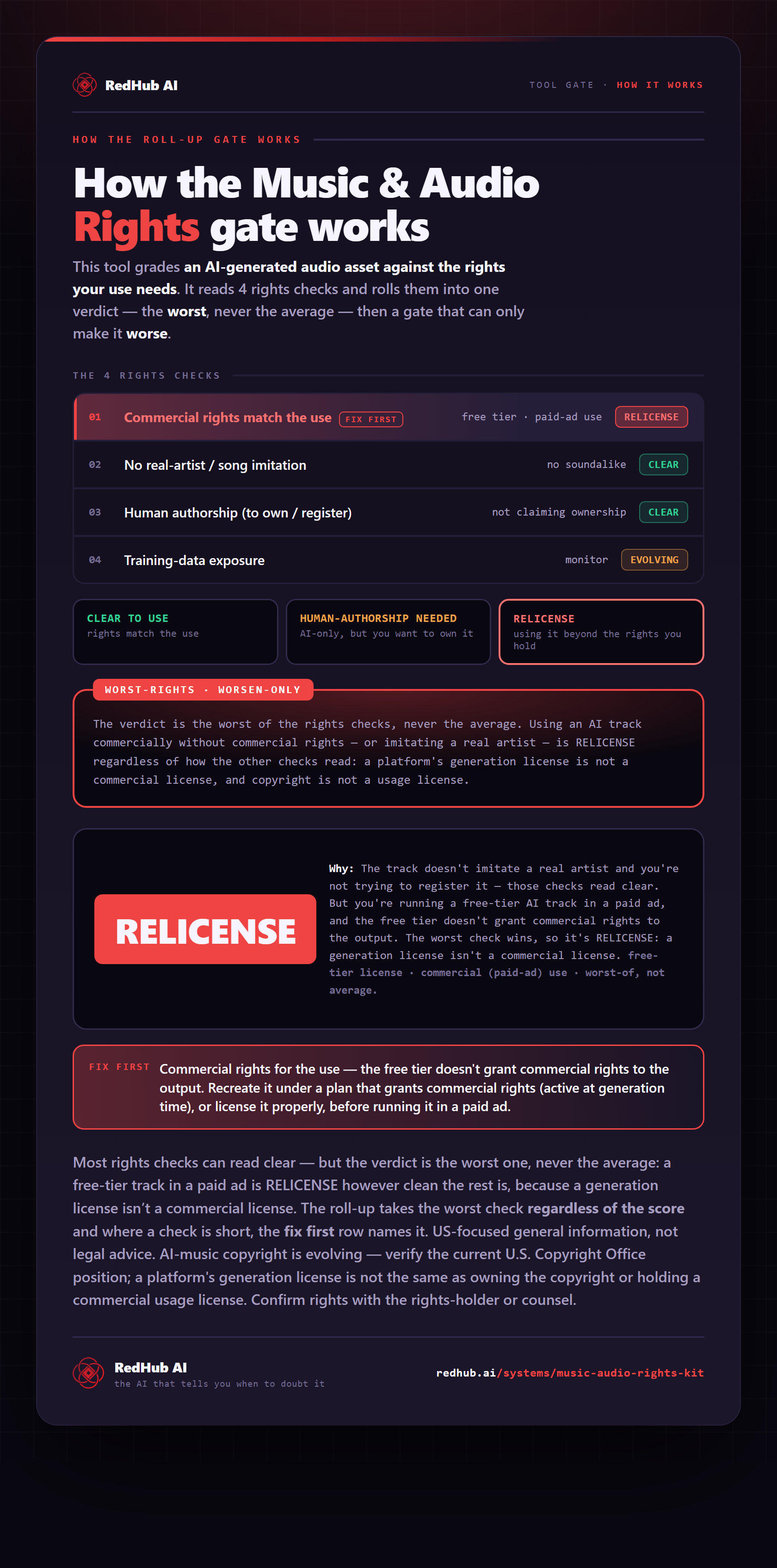
The gate this post refers to, drawn from the tool’s own logic. See the tool.