Which Old Videos to Refresh, Update, or Leave Alone
RedHub AI Editorialupdated September 20, 20266 min read
Jump to a section10
- The three-way decision, in plain terms
- Signs a video is worth refreshing
- Signs a video should be left alone
- A real example: the tutorial that still works
- A real example: the dead vlog
- Where the audit fits — and where it stops
- Once you've decided to refresh
- Score the whole catalog at once
- Pairs well with
- More in this guide
Refresh an old video when it's still getting real traffic but something specific about it is broken — outdated info, a stale thumbnail, a title that undersells it. Leave it alone when it's already doing its job. Retire it when there's no traffic and no realistic fix. The decision comes from the numbers plus your own memory of why that piece exists — not a rule that applies the same way to every video.
TL;DR: Refresh videos that are still pulling steady search traffic but have a fixable problem. Leave alone videos that are already performing well — don't fix what isn't broken. Retire videos with flat or falling traffic and no clear reason to expect a turnaround. Score your whole catalog at once with the Channel Audit & Back-Catalog Optimizer ($49) instead of guessing video by video.
The three-way decision, in plain terms
Every old video on your channel falls into one of three buckets once you look at the real numbers instead of your gut feeling about it. This is the same three-bucket split covered in the channel audit guide — this post is the deep dive on making the refresh-or-leave-alone call specifically.
- Refresh — still earning traffic, has a specific, fixable problem.
- Leave alone — already performing, no fixable problem worth the risk of touching it.
- Retire or unlist — no meaningful traffic, no plausible fix. Covered in depth in how to spot underperforming content.
Signs a video is worth refreshing
A video earns a spot on your refresh list when the traffic is real but something specific is holding it back. Look for these patterns:
- Steady search traffic on a decaying topic. A two-year-old tutorial that still gets found through search every week is proof the demand exists — but if the tool it covers changed its interface last year, viewers are landing on something that no longer matches what they see on screen. That's a refresh, not a leave-alone.
- Good watch time, weak click-through. If people who click the video actually watch it, the content works — the thumbnail and title are the problem, not the substance. That's a packaging fix, not a content rewrite.
- A near-miss on ranking. A video sitting on page two of search results with decent engagement is often one update away from page one — new info, a better title, a stronger opening 15 seconds.
- Outdated but structurally sound. The core lesson still holds, but a screenshot, a price, or a recommended tool has changed. Swap the outdated piece; don't rebuild the whole video.
Signs a video should be left alone
Not every old video needs your attention, even if it's old. Leave it alone when:
- It's still ranking well and pulling steady traffic with no obvious drop-off.
- The information in it hasn't gone stale — evergreen advice, timeless process, a story that doesn't depend on a tool or price point.
- Touching it risks resetting whatever algorithmic trust it's built up. A video with years of consistent watch-time data has momentum; re-uploading or heavily re-editing can reset that.
This is the bucket creators skip most often, because "do nothing" doesn't feel productive. But refreshing a video that's already working is a good way to spend an afternoon making something worse.
A real example: the tutorial that still works
Say you posted a "how to set up X software" tutorial two years ago. The interface has changed slightly, but the core workflow is the same. Your audit shows it's still getting 200 views a week from search, almost entirely from people searching the exact problem it solves. The watch-time is solid — people aren't bailing early.
That's a refresh candidate, not a retire candidate. The fix here isn't a new video — it's a pinned comment or an on-screen callout noting what's changed, plus an updated thumbnail and title if the old one undersells what's inside. Small, targeted, doesn't touch what's working.
A real example: the dead vlog
Now say you've got a personal vlog from three years ago — a day-in-the-life video tied to an event that's long over. It got a small spike at launch and has been flat near zero ever since. There's no search intent behind it; nobody's out there searching for that specific day. No packaging fix brings that traffic back, because the traffic was never going to be evergreen in the first place.
That's not a refresh candidate. It's either fine to leave buried in your catalog doing nothing, or a candidate to unlist if it's actively cluttering your channel page. Refreshing it would be effort spent on a video that was never built to have a long tail.
Where the audit fits — and where it stops
An audit tool can flag both of these patterns for you automatically — steady traffic plus low click-through, or flat traffic with no trend — across your entire catalog instead of you eyeballing video by video. What it can't do is know that the vlog was tied to a one-time event, or that the tutorial's topic is about to get even more relevant because a competitor just discontinued their product. That context lives in your head, not in the spreadsheet. Use the flag as a starting point, then apply what you know.
Once you've decided to refresh
The audit tells you which videos deserve the effort. What you do next depends on what's actually broken:
- If the content is right but the packaging is weak — thumbnail, title, hook — that's a job for the YouTube Packaging & Retention Engine.
- If the video is part of a written series or has a blog companion post that needs its own refresh, that's the Content Refresh & Publishing Engine.
- If the refresh reveals the video is actually one of your best-performing pieces, it might belong in a sponsorship pitch — see the Creator Sponsorship & Media-Kit System.
For the full measurement checklist to run before you decide anything, read the content audit checklist. And for the bigger-picture view of turning flagged pieces into new traffic, see back-catalog optimization.
Score the whole catalog at once
Checking video by video works if you have ten videos. It doesn't scale past that. The audit kit runs the same refresh-or-leave-alone logic across your entire back catalog in one pass, so you're deciding from a ranked list instead of a hunch.
Pairs well with
Start with the full channel audit to see where every piece stands, then use the YouTube Packaging & Retention Engine to fix packaging on flagged videos or the Content Refresh & Publishing Engine for written content that needs an update.
More in this guide
How do I know if an old video is worth refreshing?
Check if it's still getting real traffic (search especially) and whether the problem holding it back is fixable — stale info, weak thumbnail, undersold title. If the traffic is there and the fix is specific, it's worth refreshing.
Should I refresh a video that's already performing well?
No. If it's already ranking and pulling steady traffic, leave it alone. Touching a working video risks resetting the momentum it's built without a guaranteed upside.
What's the difference between refreshing and retiring a video?
Refreshing means updating a specific, fixable problem on a video that still has traffic potential. Retiring means the video has no real traffic and no plausible fix, so it's better left alone or unlisted entirely.
Does refreshing mean re-recording the whole video?
Usually not. Most refreshes are targeted — an updated thumbnail, a corrected title, a pinned comment noting what's changed, or a new intro. Full re-records are reserved for videos where the core content itself is outdated.
Can a tool tell me exactly which videos to refresh?
A tool can flag candidates based on traffic patterns and engagement data. It can't know the backstory behind a video — whether it was tied to a one-time event, or whether its topic is about to get more relevant. You still make the final call.
How often should I go through this refresh-or-leave-alone process?
Once or twice a year is typical. Doing it more often means you're spending more time auditing than creating; doing it less often lets stale content sit unnoticed for years.
Where do I go after I've decided which videos to refresh?
For packaging fixes (thumbnail, title, hook), use the YouTube Packaging & Retention Engine. For written companion content, use the Content Refresh & Publishing Engine.
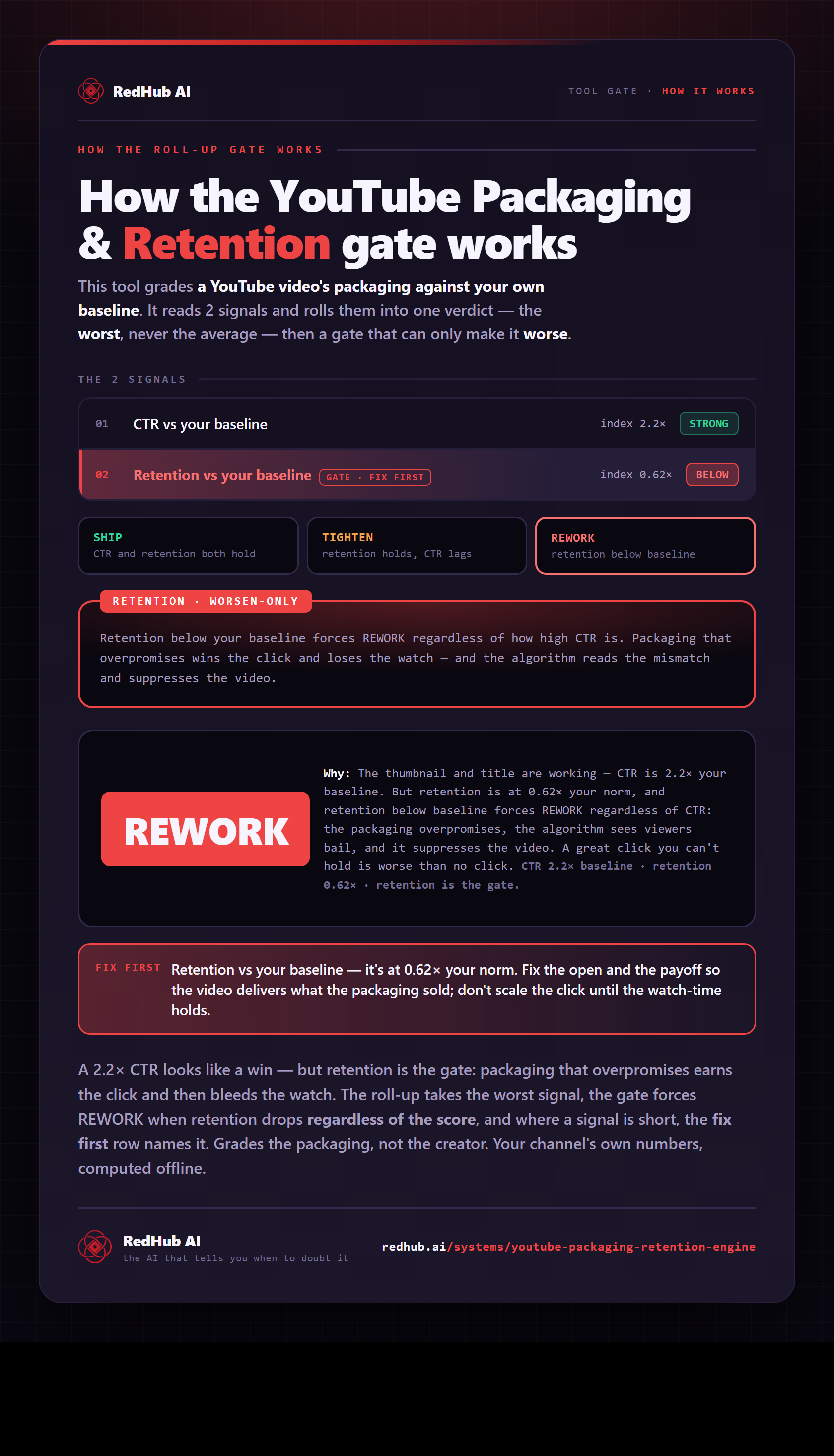
The gate this post refers to, drawn from the tool’s own logic. See the tool.