How to Find Where Leads Drop Off in Your Funnel
RedHub AI Editorialupdated October 7, 20266 min read

Jump to a section7
To find where leads drop off, count the people at each step of your funnel, divide each count by the one before it, and compare every rate with the same rate from an earlier period. The step whose rate fell is where to look. The step that loses the most people is usually the wrong answer, because the top of a funnel always loses the most. A page that turns 4 visitors in 100 into leads loses the other 96, every month, and that tells you nothing about what changed.
TL;DR: Turn counts into step-to-step rates. Compare each rate with its own history, not with the other steps and not with an outside benchmark. Check that the counts are complete before you trust them, and expect small numbers to mislead. Counts show where the loss is. They do not show why. The Lead-Gen Funnel Diagnostic ($79) works on the why: it scores six operating stages from your own ratings. Start with the pillar: The Lead-Generation Funnel: Find Your One Bottleneck.
A worked example
These figures are made up to show the arithmetic. A firm compares this quarter with the one before.
| Step | Last quarter | Rate | This quarter | Rate |
|---|---|---|---|---|
| Visitors | 1,000 | 1,000 | ||
| Leads | 42 | 4.2% | 40 | 4.0% |
| Reached by a person | 40 | 95.2% | 30 | 75.0% |
| Qualified | 16 | 40.0% | 12 | 40.0% |
| Meetings booked | 8 | 50.0% | 6 | 50.0% |
Each rate is that row's count divided by the row above it. Meetings fell from 8 to 6, and the question is where the two went.
The biggest loss by head count is at the top: 960 of 1,000 visitors never became leads. But that rate barely moved, from 4.2% to 4.0%. The lowest rate after the top is qualification at 40.0%, and it did not move at all. The step that changed is the second one. Last quarter 40 of 42 leads were reached. This quarter 30 of 40 were. Ten leads never heard from anyone, and the two missing meetings follow from that.
Compare each step with its own past
The example works because every rate has a matching rate from before. Without that, you are left comparing a 4% step with a 75% step, and those numbers describe different things. A visitor has shown almost no intent. A qualified lead has shown a lot. Rates from different steps do not rank against each other.
An outside benchmark has the same flaw from another direction. We are not going to tell you what share of visitors should become leads. That depends on where your traffic comes from and what you ask for on the form, and a figure from someone else's site cannot tell you whether yours got worse.
So keep the counts for at least two periods. If you have never recorded them, this quarter is your baseline and next quarter gives you the first comparison.
Check that the counts are complete
A step can look healthy because some of its losses never get counted. Two cases come up often.
The first is a form that accepts a submission and never delivers it. The visitor sees a thank-you page. Nothing reaches your inbox or your CRM. Those people are missing from the leads row, so the loss shows up as a slightly low capture rate and not as lost leads. How to test your lead forms end to end covers the check.
The second is a loose definition. If "lead" means anyone who downloaded anything, the qualified row will look like a cliff, and the cliff is in the definition. Write down what each row means before you compare two periods, and use the same meaning for both.
Small numbers move a lot
In the example, 12 qualified leads produced 6 meetings. One more meeting would have made the rate 58.3%, up from 50.0%. One booking moved the rate by about 8 points. At that size, a rate can change between quarters with nothing changing in the business.
There is no clean rule for how many leads is enough. A drop from 95% to 75% across 40 leads is 8 extra people unreached, and you can go and find those 8 by name. A drop from 50% to 42% across 12 leads is one person. When the numbers are that small, read the individual records before you believe the rate.
Counts show where, not why
The table says leads stopped being reached. It does not say whether a rep left, the notification email started landing in spam, or weekend leads stopped being covered. That is a question about how the stage is run, and counts cannot answer it.
The Lead-Gen Funnel Diagnostic starts from that side. It does not read your counts. You rate three items for each of six stages, from 0 to 5. Under Speed-to-lead those are how fast the first touch is, whether each lead is routed to a named owner, and whether after-hours and overflow are covered. The lowest-scoring stage becomes the funnel score. Use the two together: counts tell you which step to open up, and the ratings make you say what is wrong inside it. Then go to fixing a leaking lead funnel, and keep the table going with the lead funnel metrics worth tracking.
Say what is wrong inside the step
The Lead-Gen Funnel Diagnostic scores capture, speed-to-lead, qualification, definition and handoff, nurture, and source ROI from 0 to 100, using your own 0 to 5 ratings. It reports the lowest stage as the funnel score and returns FLOWING, LEAKING or CLOGGED. Where a stage is short, it names that stage and the kit built for it. With every stage at 70 or above it names nothing.
Get the Lead-Gen Funnel Diagnostic — $79Pairs well with
The Prospect Funnel Leak Audit ($79) is the counts-based tool for the sales side: you enter head counts from inquiry to client, it marks each step ON TARGET, LEAKING or SEVERE against a target you set, and it returns FLOWING, LEAKING or HEMORRHAGING. The Website Lead-Leak & Form-Failure Gate ($49) is for the incomplete-counts case: you test each form and mark six signals, and a form with no verified delivery reads BLACK HOLE. The Speed-to-Lead Routing Kit ($69) audits the routing behind a "reached" rate like the one in the example and returns PASS, FIX or BLOCK.
More in this guide
How do I find where leads drop off?
Count the people at each step, divide each count by the one before it, and compare each rate with the same rate from an earlier period. The step whose rate fell is where to look first.
Is the step that loses the most people the problem?
Usually not. The top of a funnel loses the most people even when nothing is wrong. In the illustrative example here, 960 of 1,000 visitors leave in both quarters, and the real change is leads reached falling from 95.2% to 75.0%.
What is a good conversion rate at each step?
There is no figure that applies to every business. It depends on your traffic, your offer and what your form asks for. Compare each step with its own earlier rate.
Why might a drop be hidden?
Because some losses never get counted. A form can show a thank-you page and deliver nothing, so those people never appear as leads. A loose definition of "lead" can also make the next step look like a cliff.
How many leads do I need before a rate means anything?
There is no clean cutoff. With 12 qualified leads, one extra meeting moves the booking rate from 50.0% to 58.3%. When the counts are that small, read the individual records before you trust the rate.
Can the Lead-Gen Funnel Diagnostic find the drop for me?
It works on a different input. It does not read counts. You rate three items for each of six stages from 0 to 5, and it reports the lowest-scoring stage. Where a stage is short, it names that stage and the kit built for it. Counts show where the loss is, and the ratings make you say why.

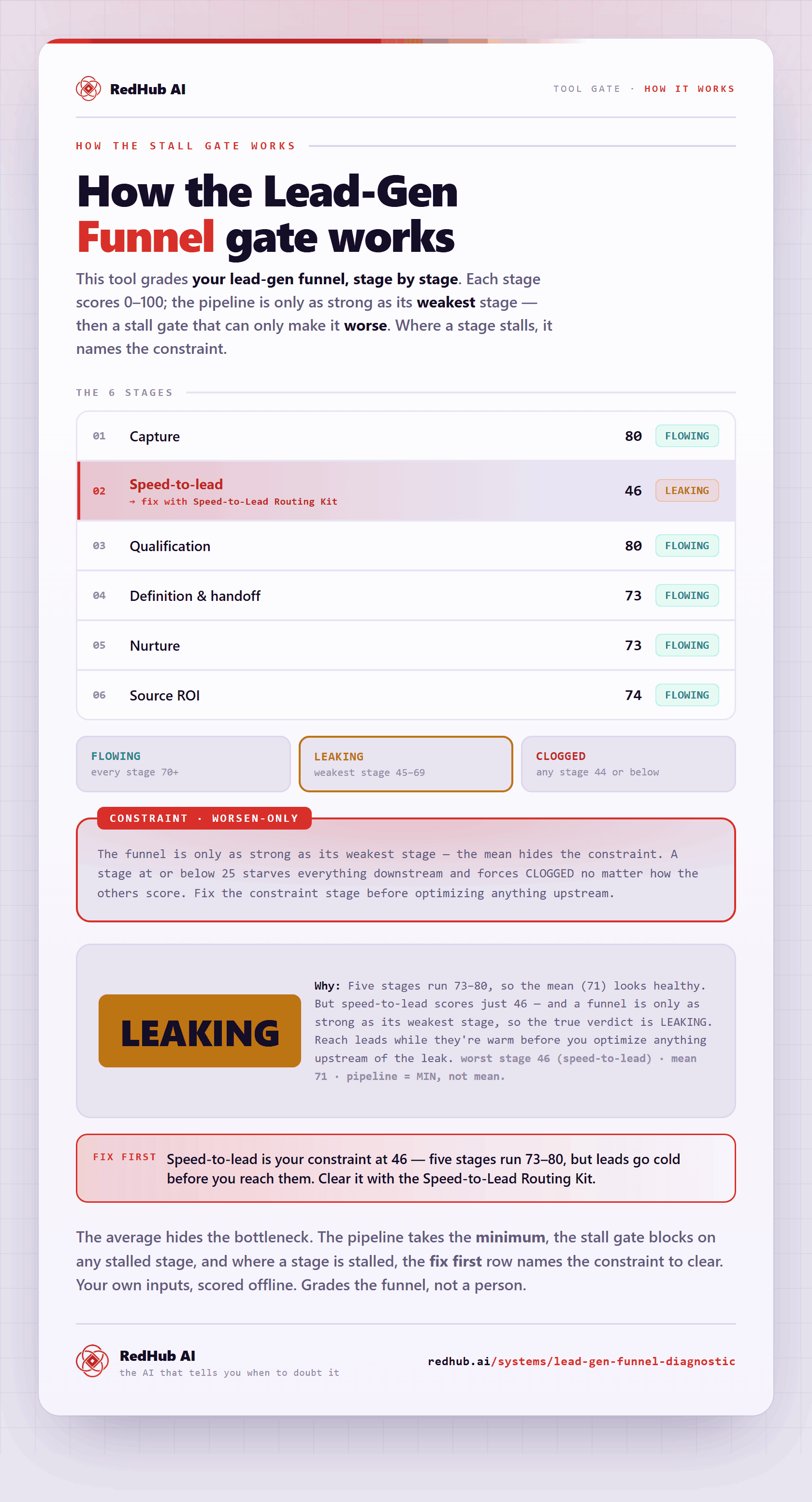
The gate this post refers to, drawn from the tool’s own logic. See the tool.