How to Keep Your AI Skills Sharp
RedHub AI Editorialupdated November 5, 20265 min read

Jump to a section7
A prompt you built on July 1 for the quarterly report has had 92 days to fade by October 1. To keep AI skills sharp, put the ones you rarely use on a review schedule, and check each one against the tool as it works today. Memory is half the problem. The tool moving is the other half.
TL;DR: The AI skills at risk are the ones the job does not make you repeat: checking output for errors, prompts for periodic tasks, and deciding when a task should not go to a model. Put those on a schedule with gaps that grow as each one holds. A schedule only covers memory, so re-check a skill when the tool under it changes. The Spaced-Repetition AI Skills Tracker ($39) keeps the schedule in one spreadsheet and makes the week ESCALATE when a skill goes COLD. This post is part of Spaced Repetition for Skills You Can't Afford to Forget.
Which AI skills fade
Skills you use every day look after themselves. You do not need a system to remember how to ask a chatbot for a summary. The ones to watch are the ones with long gaps between uses:
- Checking output for errors. When most answers look fine, the careful check is easy to skip, and a skipped check is a missed rep.
- Prompts for periodic tasks. A prompt for a quarterly report or an annual review gets used a handful of times a year.
- Deciding when to skip AI. Knowing which tasks need a person comes from experience, and the hard cases do not come up often.
We have not seen a measurement showing that AI skills fade faster than other work skills, so we will not claim it. The argument here is about exposure: these skills have long gaps built in, and a long gap is where the forgetting curve does its work.
A quarterly skill is always overdue
Take the quarterly prompt. Used on July 1 and needed again on October 1, it has gone 92 days without a rep. The longest gap in a five-box Leitner system like the Tracker's is 70 days. So even in the top box, that skill is 22 days past due on the day you need it. In box 4, with a 35-day gap, it is past twice the gap and reads COLD.
The point of the arithmetic is that the quarterly task cannot be its own review. Something has to bring you back to the skill in between. One short review on August 15 would leave 47 days to October 1, inside a box 5 gap. The dates are an example, but the gap sizes are the Tracker's own.
A sharp memory of an old tool
A review schedule protects memory. It does nothing about the tool changing. You can review a prompt pattern last week, log the date, see FRESH, and still be wrong today, because a model update shifted how that prompt behaves. Our post on AI model upgrades covers how that happens without an error message.
No spreadsheet can know the tool changed. Our working rule is blunt: when a tool you rely on updates, move every skill built on it back to box 1 and re-run each against the new version. That throws away gaps you earned, and for a minor update it is probably more work than you need. We do not have a better test for which updates matter, short of re-running the skill.
What a review looks like
A review is doing the task from memory and checking the result, as how to retain what you learn explains. For the three skills above:
- Output checking. Pull up an old AI answer where you know what was wrong. Mark what you would verify, then see whether you caught it.
- A periodic prompt. Close the saved version, write it again cold, run both, and compare the outputs.
- The skip-AI call. List three recent tasks you gave to a model and write one line on what a person had to check afterward.
Checking AI output has a real cost in time, which our post on the AI verification tax covers, and a review is practice at paying it on purpose.
Flag the one you can't afford to lose
The Tracker has a yes or no column for critical. Use it sparingly. Any COLD skill already makes the week's verdict ESCALATE. A COLD skill you flagged as critical also fires the critical-cold gate, which the Dashboard shows on its own line, and that skill is named first to review ahead of any other. If every skill is flagged, the flag sorts nothing.
The sheet is one .xlsx. No AI runs and nothing is uploaded. It does not teach a skill and does not score or rank people. It reads the boxes and dates you enter and tells you what is overdue.
A review schedule for the AI skills you rarely use
Give each skill a Leitner box, a last-reviewed date and a critical flag. The Tracker returns FRESH, FADING or COLD per skill and one verdict for the week. One .xlsx, no AI, nothing uploaded.
Get the Spaced-Repetition AI Skills Tracker — $39Pairs well with
Before you build the list, the AI Fluency Diagnostic ($79) scores six skills, verification and safety among them, from your own 0 to 5 marks, with tiers of FLUENT, CAPABLE or AWARE. For the prompt-writing reps, the Prompt Practice Lab ($69) has you score each drill on six criteria, one of which is whether you asked the model to check its own work. To put a kept skill into a working setup, the Claude Project Blueprint Library ($79) has ten blueprints, one per business function.
More in this guide
How do I keep my AI skills sharp over time?
Put the skills you rarely use on a review schedule, with gaps that grow as each one holds, and review by doing the task from memory. When the tool under a skill changes, re-check the skill against the new version.
Do AI skills fade faster than other work skills?
We have not seen that measured. What makes some AI skills exposed is how seldom they are used. A prompt for a quarterly task or a careful output check can go weeks between uses, and the tool can change in the meantime.
Which AI skills are most at risk?
The ones with long gaps between uses: checking AI output for errors, prompts built for periodic tasks, and judging when a task should not go to a model. Skills you use daily are reviewed by the work.
Can a tracker tell me a skill is out of date?
No. A tracker reads dates. It can tell you how long it has been since a review, not whether the tool changed since then. When a tool updates, re-run the skills built on it.
Is a spaced-repetition tracker the same as AI training?
No. The Spaced-Repetition AI Skills Tracker ($39) is a spreadsheet. No AI runs and nothing is uploaded. It reads the boxes and dates you enter and returns a freshness verdict. It does not teach the skill.
How many skills should I flag as critical?
Few. The flag exists so that one lapsed essential skill is named first to review. If every skill carries it, nothing stands out.
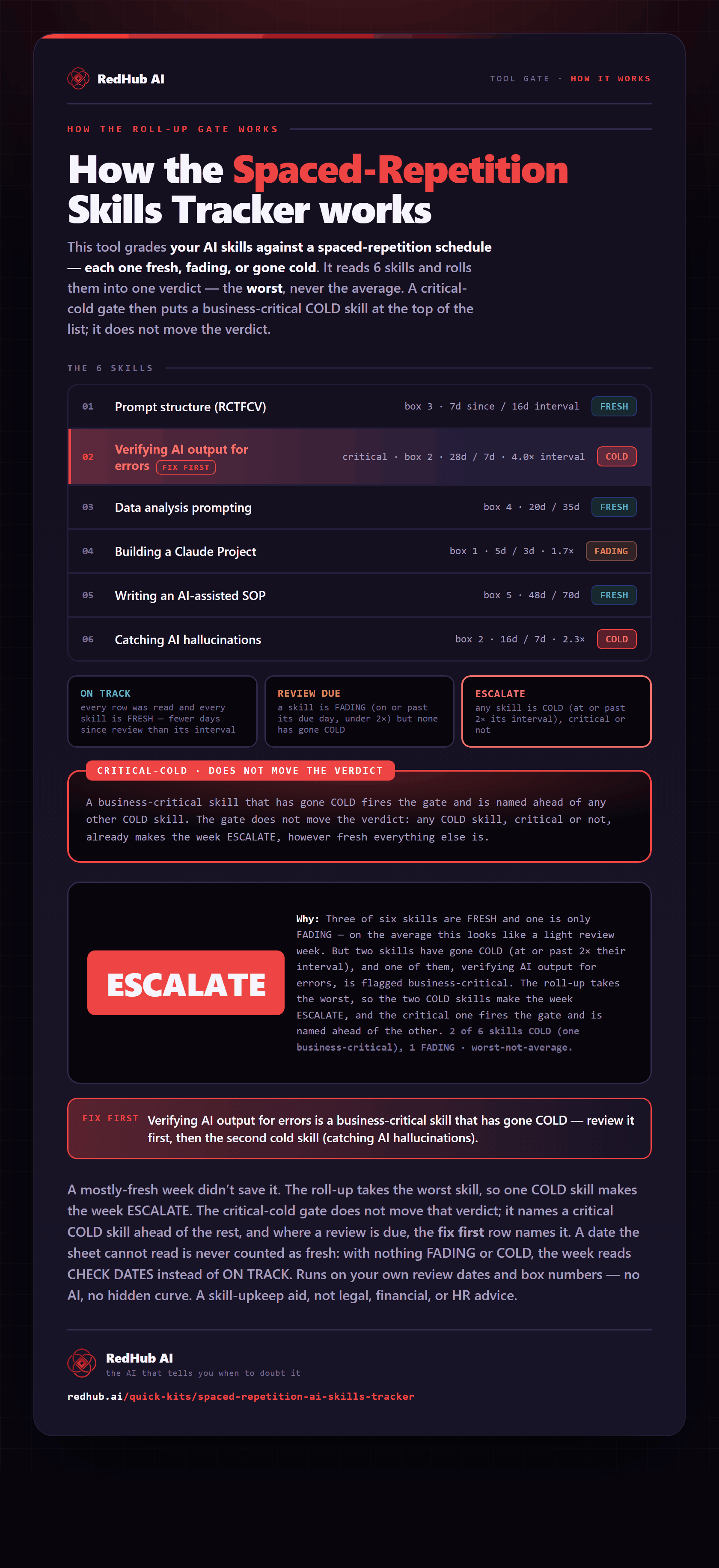
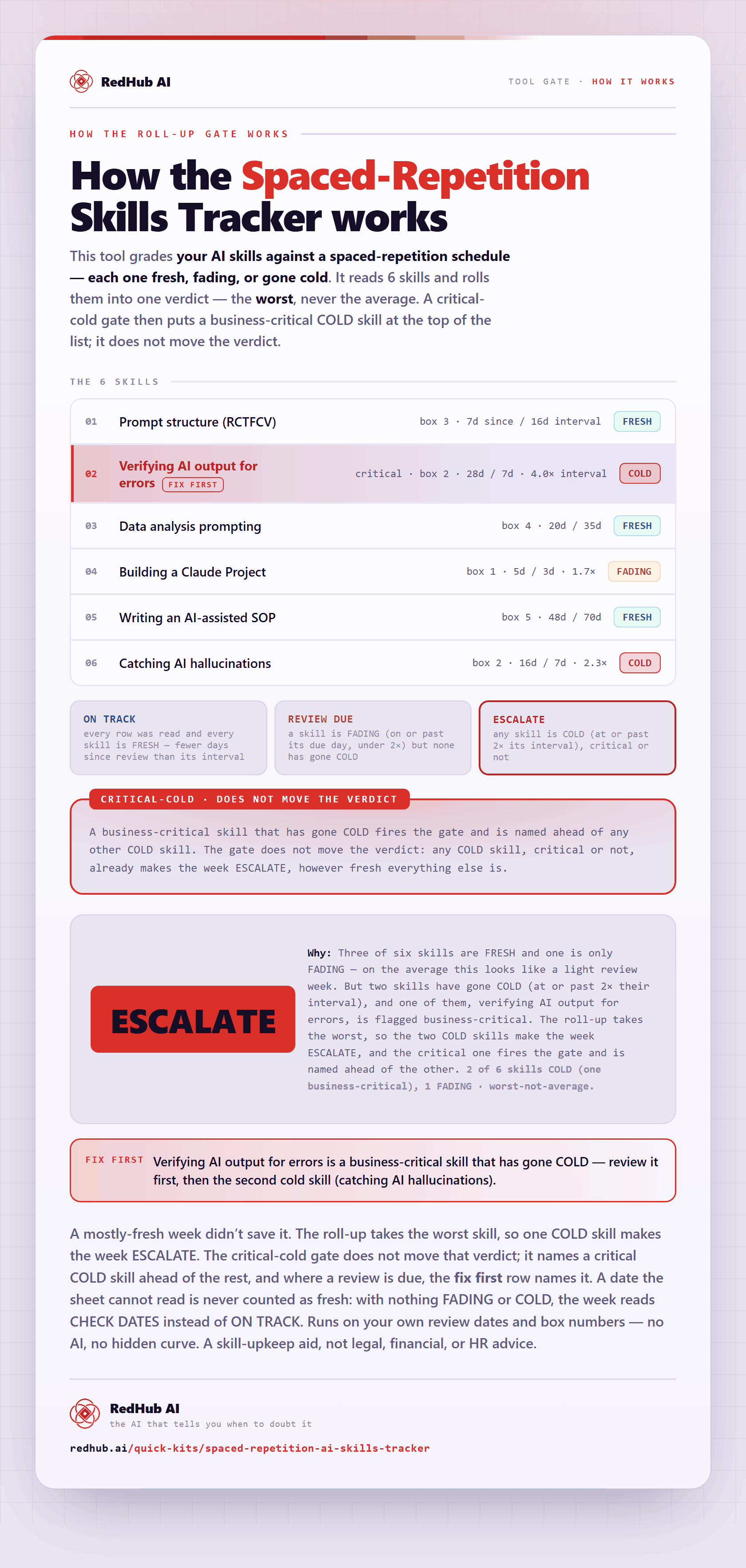
The gate this post refers to, drawn from the tool’s own logic. See the tool.