How to Stop a Runaway AI Bill Before It Happens
RedHub AI Editorialupdated August 18, 20268 min read

Jump to a section12
TL;DR
- What it is: A runaway AI bill happens when usage-based API billing has no ceiling — a leaked key, a retry loop, or a stuck agent keeps running, and keeps charging, with nothing to stop it.
- Who it's for: Anyone holding an AI API key — see the AI Spend Runaway & Billing-Safeguard Gate.
- How it works: Most "budget limits" only email you after the money is gone. A real hard cutoff, plus five other checkable safeguards, is what actually stops the bill.
- Bottom line: If nothing in your setup can actually halt spend, you don't have a safety net — you have a smoke detector.
How do you stop a runaway AI bill?
You stop a runaway AI bill by putting a real hard cutoff in place — something that disables the key or account at a dollar ceiling — instead of relying on a "budget alert" that only sends an email after the spend already happened. Around that cutoff, you add scoped and rotated keys so a leak is contained, a loop or retry circuit breaker so a stuck process can't run forever, anomaly alerts so a spike gets noticed fast, cost attribution so you can see where it's coming from, and one named owner who actually gets the alert and can pull the switch. Skip any one of these and the bill can still run; skip the hard cutoff and nothing stops it at all.
Best for: founders, engineers, and finance owners who've never actually tested whether their AI spend has a floor — the AI Spend Runaway & Billing-Safeguard Gate grades all six safeguards per account in one deterministic spreadsheet pass.
A runaway AI bill isn't a rounding error. It's what happens when usage-based billing meets one bad night: a key committed to a public repo, an agent that never learned to stop, a retry loop with no backoff. None of these are exotic. All of them are ordinary mistakes that, on most AI platforms today, run into nothing that actually stops them. The bill just keeps growing until a human notices — and by then the damage is already billed.
Why usage-based AI billing has no natural ceiling
Traditional software has a built-in brake: a seat-based SaaS tool can only cost you as much as the number of seats you bought. AI APIs don't work that way. You're billed by the token, the call, or the minute of compute — and there's no seat count capping how many calls a script, a script gone wrong, or someone else's stolen key can make in an hour. The meter runs as fast as the requests come in. If nothing throttles or halts the requests, nothing throttles or halts the bill.
This is not a hypothetical edge case. It's the direct, structural consequence of consumption pricing: cost scales with usage, and usage has no upper bound unless you build one.
Illustrative framing, not measured statistics — the point is structural: consumption pricing has no built-in stop.
The three ways a bill runs away
Almost every runaway bill traces back to one of three triggers.
- A leaked key. A key committed to a public repo, pasted into a shared doc, or exposed in a client-side bundle can be found and used by anyone, billing to your account until it's revoked.
- A retry loop with no backoff. A script that retries a failing call every second instead of backing off can turn one bad request into thousands of billed ones inside an hour.
- A runaway agent. An autonomous agent that gets stuck in a reasoning loop, or keeps calling tools without a turn limit, can run — and bill — for days if nothing stops it.
Each of these is preventable. None of them are prevented by an email that arrives after the fact.
Why "budget alerts" don't stop anything
Key insight: an email that arrives after you've hit your budget is a smoke detector that texts you once the house is already on fire. It's useful for record-keeping. It does nothing to put the fire out.
Most platform "spending limits" today are notify-only: they watch your usage and send a notification once you cross a threshold, but the key keeps working and the calls keep going through. That's a real gap, and it's worth its own deep dive — see why API spending limits don't stop runaway bills for exactly how to build a real hard cutoff instead of relying on a notification.
The six safeguards that actually stop a bill
A runaway-proof setup isn't one control — it's six, working together. Here's what each one does, in plain English.
- Hard spend cutoff. The dispositive one. Something — a proxy, a prepaid balance, a programmatic kill switch — actually disables the key or account at a dollar ceiling. Without this, nothing else on this list can save you from the worst case.
- Scoped and rotated keys. Each key is limited to only what it needs, and rotated on a schedule, so a single leak is contained instead of exposing your whole account. See how a leaked API key becomes a five-figure bill for the full playbook.
- A loop or retry circuit breaker. A cap on retries, backoff on failures, and a turn limit on any autonomous agent, so a stuck process can't run indefinitely.
- Anomaly alerts. Something watches your usage against its normal pattern and flags a spike fast — not at month-end, in near-real time.
- Cost attribution. Spend is broken out by key, project, or environment, so when a spike hits, you can see exactly where it's coming from instead of hunting through one combined invoice.
- A named owner. One specific person is on the hook to receive the alert and actually pull the switch. "The team" is not an owner. A person with a tested kill-switch is.
For the controls that cap the day-to-day cost of a healthy account — not just the catastrophic case — see the controls that actually cap LLM API spend.
Check your own setup
Tick the boxes that are true for your account right now. This is a simplified self-check for illustration — the AI Spend Runaway & Billing-Safeguard Gate grades this with more precision, per account, across your whole stack.
Would a runaway bill be stopped in your setup?
What to do this week
- Find every live key. List every API key and every account that can spend money on your behalf, including ones teammates or contractors hold.
- Test the cutoff, don't assume it. Check whether your platform's "limit" actually disables the key, or only emails you. If you're not sure, assume it only emails you.
- Scope and rotate. Split shared keys into per-project keys with the narrowest scope that still works, and rotate anything that's been sitting still for months.
- Name one owner per account. Write down who gets the alert and confirm they know how to kill the key, today, not in theory.
- Grade the rest. Run the full six-safeguard pass with the AI Spend Runaway & Billing-Safeguard Gate to see exactly which account is exposed.
Grade every account before the next incident does it for you
The AI Spend Runaway & Billing-Safeguard Gate ($49, one-time) grades six safeguards per account — hard cutoff, key hygiene, loop breaker, anomaly alerts, attribution, named owner — and returns SAFEGUARDED, EXPOSED, or RUNAWAY RISK, with a dispositive gate: no hard cutoff means RUNAWAY RISK no matter how good the rest looks. Deterministic and offline — your setup, your marks.
Get the Gate — $49 →Where this fits
This is about one specific, sudden risk: variable, usage-based API spend running away with no floor. It is not about your recurring software subscriptions — that leak is slower and steadier, and it's covered by the AI & SaaS Subscription Auditor. It's also not about modeling what each AI request costs per unit — that's the job of the Token Economics Workbook. If you want the fuller picture across both the sudden risk and the ongoing cost, the AI Cost & Reliability Bundle covers the wider set.
Decision Guide
Act now if: you or your team hold a live AI API key and have never confirmed whether your platform's "limit" actually stops spending.
Skip it if: your account already has a tested hard cutoff, scoped keys, and a named owner who's confirmed the kill-switch works.
Best first step: check whether your platform's spending limit disables the key or just emails you. If you don't know the answer, assume the worst and start there.
More in this guide
FAQ
What is a runaway AI bill?
A runaway AI bill is usage-based API spend that keeps growing with nothing to stop it — usually caused by a leaked key, a retry loop, or a stuck agent, and made worse by "budget limits" that only notify instead of halting spend.
Do AI platforms have hard spending limits?
Many advertise "spending limits," but most are notify-only — they email you after you cross a threshold while the key keeps working. Test yours before you trust it; don't assume the label means a hard stop.
How much can a runaway AI bill actually cost?
It depends entirely on how fast the trigger runs and how long it goes unnoticed — from a few hundred dollars to a genuinely large bill overnight if nothing halts it. There's no fixed number; that's exactly why a hard cutoff matters more than any dollar estimate.
What's the single most important safeguard?
The hard spend cutoff. It's the dispositive one — if nothing actually disables the key or account at a ceiling, the other five safeguards only slow the damage, they don't stop it.
Is this the same as auditing my SaaS subscriptions?
No. This is about sudden, variable API spend with no ceiling. Recurring software subscriptions are a slower, steadier leak covered by the AI & SaaS Subscription Auditor.
Does this tell me what each AI request costs?
No. Modeling cost per token or per unit is a separate job, handled by the Token Economics Workbook. This is about whether a runaway spike gets stopped, not what a normal request costs.
What does the AI Spend Runaway & Billing-Safeguard Gate actually do?
It's a $49 one-time spreadsheet that grades six safeguards per account against a deterministic gate, returning SAFEGUARDED, EXPOSED, or RUNAWAY RISK. It's offline — your own marks, no connection to your bills or accounts.
How often should I re-check my safeguards?
Any time you add a new key, ship a new agent, or onboard a contractor with access — plus a quarterly pass as a baseline, since setups drift.
Find the gap before it finds your card
Six safeguards, one dispositive gate, a verdict per account. Deterministic and offline.
Get the AI Spend Runaway & Billing-Safeguard Gate — $49 →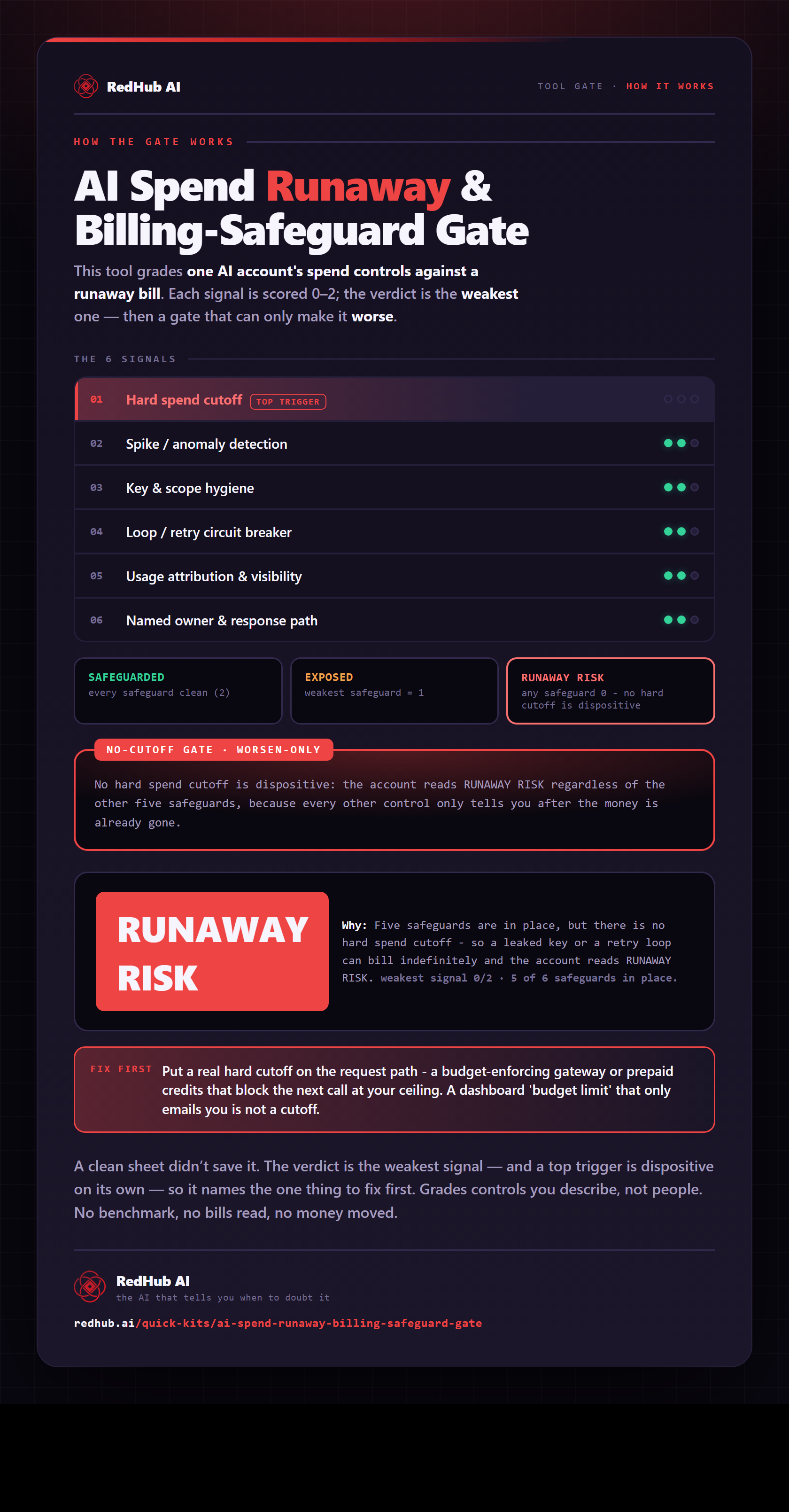
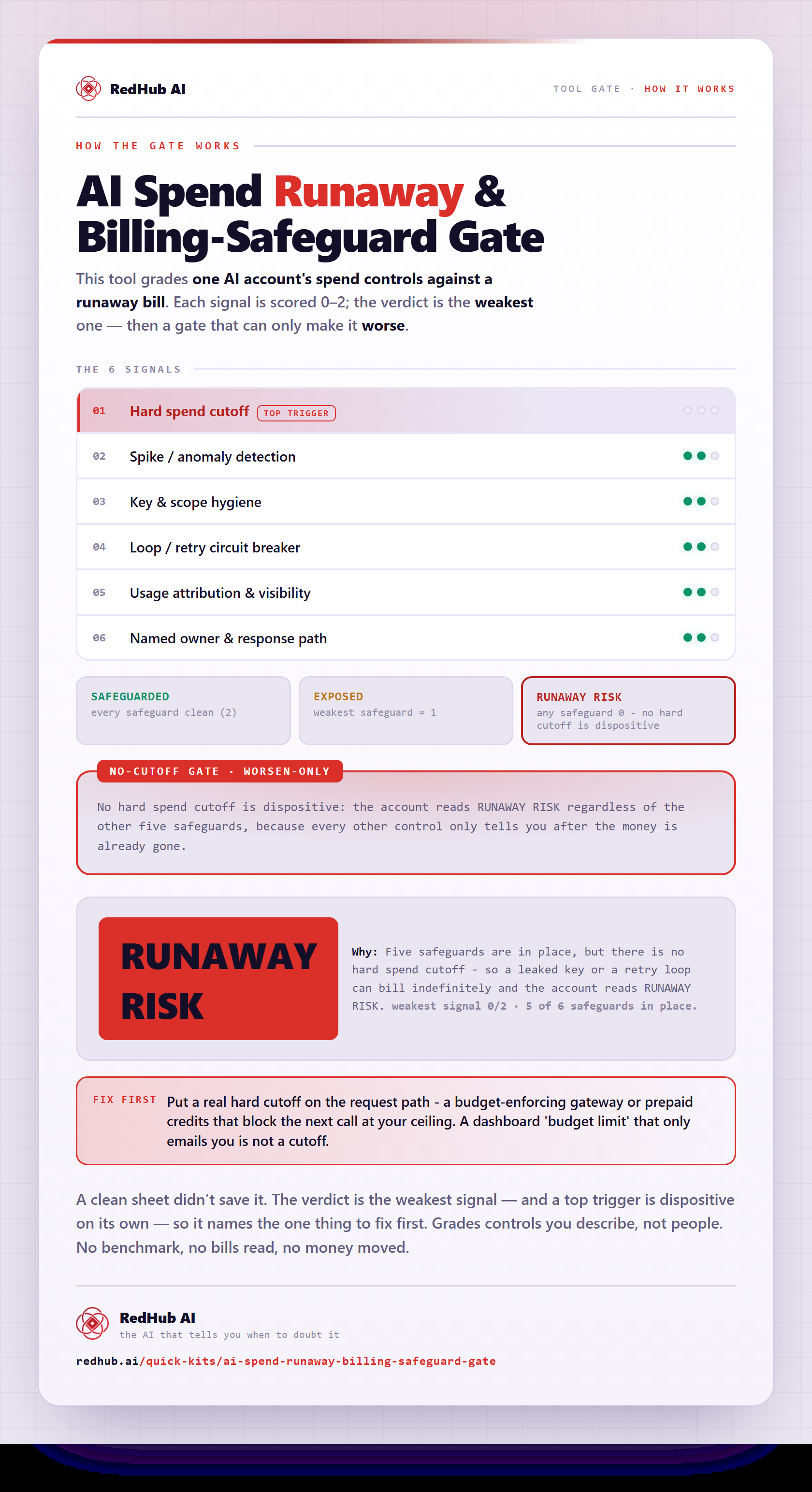
The gate this post refers to, drawn from the tool’s own logic. See the tool.