Business Listing Audit With AI: 8 Read-Only Steps
RedHub AI Editorialupdated October 30, 202611 min read

Jump to a section10
TL;DR
- What it is: a business listing audit is a read-only pass over every place your business is listed online, comparing each one to a single written record of who you are, and marking each listing correct, wrong, duplicated, or dead.
- Why an agent fits: the work is reading and comparing at volume, the output is a report, and a second person can verify every line of it. Nothing is submitted, created, or paid for.
- The eight steps: identity record, inventory, verify, classify, prioritize, prepare, verify completion, maintain. Seven quality gates sit across them.
- The key line: a submitted form is not a published listing. The audit counts only what it can open, read, and capture.
What is a business listing audit?
A business listing audit is a check of every online listing of your business (map platforms, directories, review sites, industry and association pages) against one identity record: name as used on signage, address, phone, hours, categories, and website. Each listing is opened, each field is compared, and each listing is marked correct, wrong, duplicate, or dead, with a dated capture as evidence. Local SEO calls these listings local citations. This series calls them business listings, to keep them apart from an AI engine citing you in an answer. The audit is read-only by design: it changes nothing, so an AI agent can run it without any permission to act in your name.
Best for: owners, office managers, and agency account leads who need to know what is wrong before anyone pays to fix it. The identity check the audit starts from is also the Name-and-NAP gate in the Google Business Profile Suspension-Risk Gate.
Most businesses have never seen a full list of where they are listed. There is the Google profile someone set up years ago, the map pin on the other platform that may or may not be claimed, a dozen directories a former marketing contractor submitted to, and the review site that scraped an old address when the business was two doors down. Each of those is a place a customer or a search engine can read a version of who you are. If the versions disagree, the search engine has to guess, and the customer calls the wrong number.
RedHub is not affiliated with Google or Ahrefs. This post describes their published documentation. It is not a promise about rankings.
A business listing audit fixes the guessing. It is the first workflow in our guide to AI SEO agents: what to automate and what to avoid, and the one we recommend automating first, for a reason that has nothing to do with rankings. The audit reads. It does not create accounts, submit forms, or send anything. The worst outcome of a bad run is a wrong report you throw away. That makes it the safest possible job to hand an agent, and the one whose output you can check line by line.
Google's Business Profile help page on local ranking (opens in a new tab) gives the audit its purpose in one sentence: "Businesses with complete and accurate info are more likely to show up in local search results." The same page warns that if your information is not accurate, "your Business Profile might not show up for relevant searches in your area." Accurate everywhere is the goal. The audit is how you find out how far from it you are.
The eight steps
Each step reads something and writes a report. None of them touches a third-party system. Where a step produces work for a person to do later, it says so.
- Write the identity record. One page, one owner, one date. The business name as it appears on your signage, since Google's guidelines (opens in a new tab) ask for the name "as used consistently on your storefront, website, stationery, and as known to customers". The street address, precise. The phone number, which per the same guidelines "must be under the direct control of the business." Hours. Primary category. Website. Every later step compares to this record, so get it agreed before the agent reads anything.
- Build the inventory. The agent searches for the business by name, by phone, by address, and by old names and old addresses you give it, and records every listing it finds with the URL. The inventory is a list of places, not a judgment yet. Expect it to be longer than you thought.
- Verify each listing. The agent opens each URL and reads the fields: name, address, phone, hours, category, website link. It compares every field to the identity record and captures the page with a date. An HTTP 200 is not verification. A page can answer with a 200 and show someone else's business, or a listing that was removed, or a form that was never approved. Verification means the fields were read.
- Classify. Each listing gets one of four marks. Correct: every field matches. Wrong: one or more fields differ, with the differences named. Duplicate: a second listing of the same location, which Google's guidelines rule out with "There should only be one profile per business" on its own platform and which does similar damage elsewhere. Dead: the URL no longer shows the business at all.
- Prioritize. Not every wrong listing matters the same. The ones a customer or a search engine is most likely to read come first: the map platforms, the major directories, the review sites, your industry's own association pages. A wrong phone number on a page nobody visits is still wrong, but it is not first.
- Prepare the corrections. For each wrong, duplicate, or dead listing, the agent drafts what the correction is, where it is made, and what the login or claim process requires. This is a work list for a person. The agent does not submit the corrections. Submitting is an action in your name on someone else's system, and it gets a named approval per listing, which is the governance rule the pillar sets out.
- Verify completion. After a person makes a correction, or a vendor says it has, the agent reopens the listing and repeats step three. A correction request is not a correction. The corrected page, captured with a date, is. This is also the step a vendor's report has to survive: if a listing was "submitted" and the agent cannot open a published URL that shows it, it is not delivered. The paid Listing Delivery Verification Gate is the instrument for this step: you mark each listing your vendor delivered on published URL found, identity fields match, link resolves, evidence captured, and still live at recheck. It grades each listing and rolls them up, and a listing that was submitted but never published never counts as delivered.
- Maintain. Listings drift. Platforms accept edits from the public, scrapers refresh from stale sources, and a business that moves or changes its phone number has to change it everywhere. The audit reruns on a schedule, and the measure that matters over time is how many listings are still correct at recheck, not how many were correct once.
The seven quality gates
A gate is a question that can stop a listing from counting, whatever else is true about it. These seven run across the eight steps.
| Gate | The question | What fails it |
|---|---|---|
| Identity | Does every field match the identity record exactly | A variant name, an old suite number, a tracking phone number |
| Publication | Can the listing be opened at a public URL today | A submission receipt, a pending status, a 200 on a page that does not show the business |
| Accuracy | Are hours, category, and description right, not only name, address, and phone | A category chosen as a keyword, hours copied from a different location |
| Relevance | Would a customer or a search engine plausibly read this listing | A directory with no visitors that exists to sell listings |
| Link integrity | Does the website link resolve to your site, to the page you intended | A redirect through a third party, a link to a vendor's landing page, a dead link |
| Evidence | Is there a dated capture of the listing as it was read | A spreadsheet row with no capture behind it |
| Authorization | Did a named person approve every change made in the business's name | An agent or a vendor that created or edited a listing on its own authority |
The publication gate is the one that separates an audit from a vendor dashboard. A dashboard counts submissions, because submissions are what the vendor did. The audit counts what can be opened and read, because that is what exists. The two numbers are rarely the same, and the gap between them is the subject of SEO vendor accountability: pay for evidence, not activity.
A worked example
Notice what the example counts. Not 41 submissions. Not 19 corrections requested. It counts 29 listings a person could open today and find correct, with the other 12 named so that the next pass knows where to look. That is a number a second person can check in an afternoon, and it is the only kind of number the audit produces.
Why the identity record comes first, and what it protects
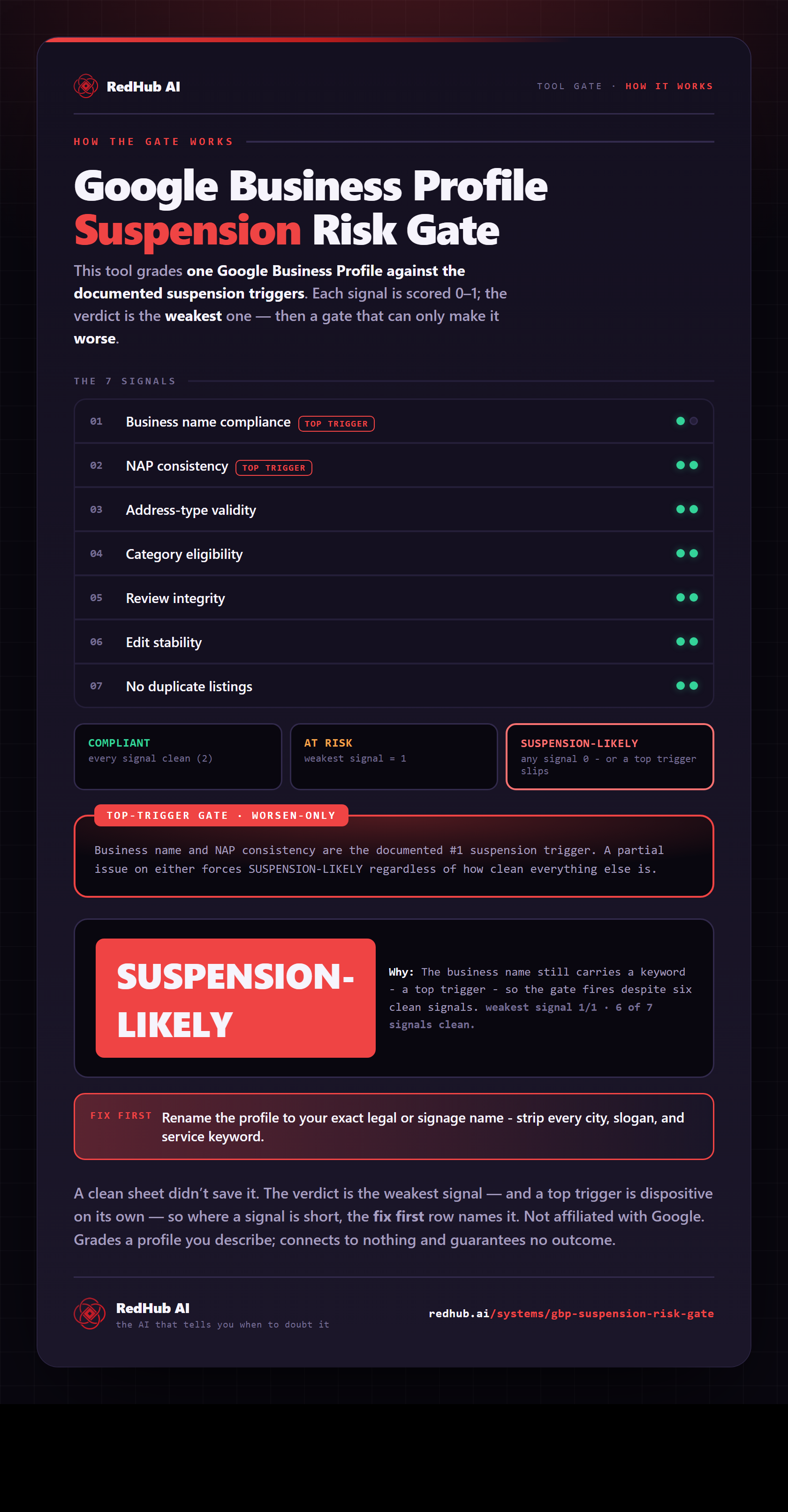
The identity record is tedious to write and it is the step most teams skip. The reason not to skip it is that the same inconsistency the audit finds in a directory is also a guideline condition on your Google Business Profile. The Google Business Profile Suspension-Risk Gate scores one profile GUIDELINE-READY, GUIDELINE GAPS, or HIGH SUSPENSION RISK against seven guideline conditions the gate checks, from your own description of the profile, and two of its signals are gate signals: business name, and NAP consistency across your profile, site, and directories. A mark of 1 or 0 on either produces HIGH SUSPENSION RISK regardless of the other marks. It is not affiliated with Google, connects to no account, and grades the profile, never a person. The audit and the gate start from the same place, which is the record of what the business is called and where it is.
For the rules behind the triggers, read Google Business Profile guidelines, in plain English. For what to do when a profile has already been pulled, read how to reinstate your Google Business Profile.
What an agent should never do in this audit
- Create or claim a listing. That is an account in your name on a platform you may not want to be on. A person decides, per platform.
- Submit a correction. The agent prepares it. A named person approves and makes it, or approves a vendor making it.
- Guess a field. If the identity record does not have a value for something a listing shows, the agent reports the gap. It does not fill it in from whatever it scraped elsewhere.
- Scrape search results to check rank. Google's spam policy (opens in a new tab) describes machine-generated traffic as including "scraping results for rank-checking purposes". The audit reads listings, not result pages.
- Hold a standing password. Reading public listings needs none. Reading your own accounts, where needed, is done by a person with the agent watching, or through an export.
The permission design behind that list, enough access to help and no more, is covered in AI agent permissions.
Start with the one profile that can be suspended
The Google Business Profile Suspension-Risk Gate scores one profile GUIDELINE-READY, GUIDELINE GAPS, or HIGH SUSPENSION RISK against seven guideline conditions the gate checks, with a Name-and-NAP gate on business name and NAP consistency and a priority control where a signal is short. Deterministic, offline, not affiliated with Google. Grades the profile, not people.
Get the Suspension-Risk Gate →Pairs well with
The Google Business Profile Suspension-Risk Gate grades one profile GUIDELINE-READY, GUIDELINE GAPS, or HIGH SUSPENSION RISK, with NAP consistency as one of its two gate signals. The free Decision Fit Check places any one task, such as submitting a correction, on a ladder from code to a person, and its irreversibility gate only ever moves a task toward human judgment. The AI Search Brand-Presence Diagnostic scores PRESENT, PARTIAL, or ABSENT per AI engine from your own observations, for the surface where listings do not reach.
Keep going: the full set starts at AI SEO agents: what to automate and what to avoid. The next post asks whether AI backlinks are worth it, and the last one turns this audit into the questions to put to a vendor in SEO vendor accountability: pay for evidence, not activity.
Decision Guide
Run the audit now if: you cannot say today how many places your business is listed, or whether all of them show the same phone number. That is most businesses, and the audit is cheap.
Wait if: you have no agreed identity record. Write it first. An audit against a record nobody has signed off produces a report nobody can act on.
Best first step: search your own phone number in quotes and count the results that show a different business name or address. That count is a preview of the audit, and it is usually enough to justify running the whole thing.
FAQ
What is a business listing audit?
A read-only check of every online listing of your business against one identity record (name, address, phone, hours, categories, website), marking each listing correct, wrong, duplicate, or dead, with a dated capture as evidence. It changes nothing. Corrections are a separate step with a named approval each.
Is a business listing the same as a local citation?
Yes. Local SEO calls a directory listing of your name, address, and phone a local citation. This series uses "business listing" to keep it apart from an AI engine citing your business in an answer, which is a different surface with a different check.
Can an AI agent run the audit safely?
Yes, because every step reads and reports. The agent needs no standing password and no permission to act in your name. The output is a list a second person can verify by opening the same URLs. The steps that change anything, claiming, correcting, or creating a listing, are done by a person with a named approval.
Why is a submitted form not a listing?
Because a submission is something you did, and a listing is something that exists. Directories reject, hold, or never process submissions. The audit's publication gate counts a listing only when it can be opened at a public URL today and the fields can be read.
Does an HTTP 200 mean the listing is live?
No. A 200 means the server answered. The page may show a different business, a removed listing, or a pending form. Verification means the name, address, and phone were read from the page and compared to the record.
Does the Suspension-Risk Gate audit my listings for me?
No. It grades one Google Business Profile from your own description against seven guideline conditions the gate checks and returns GUIDELINE-READY, GUIDELINE GAPS, or HIGH SUSPENSION RISK. It connects to no account and reads nothing live. NAP consistency across your profile, site, and directories is one of its two gate signals, which is why the listing audit and the gate start from the same identity record.
The gate this post refers to, drawn from the tool’s own logic. See the tool.